Map Route to Multiple Locations (2025 Guide)
How to Create a Map Route to Multiple Locations: The Technical Guide
Need to plan delivery routes, road trips, or multi-stop journeys? While Google Maps handles simple A-to-B routes, creating optimized routes with multiple stops requires programming. Here’s the developer method for building custom multi-location route planners.
Method 1: Custom Google Maps Routes with Optimization
This solution creates an interactive route planner with multiple stops, distance calculation, and basic optimization.
Step 1: Set Up Google Cloud with Additional APIs
- 1. Create a project at [Google Cloud Console](https://console.cloud.google.com/)
- 2. Enable billing (free credits cover moderate usage)
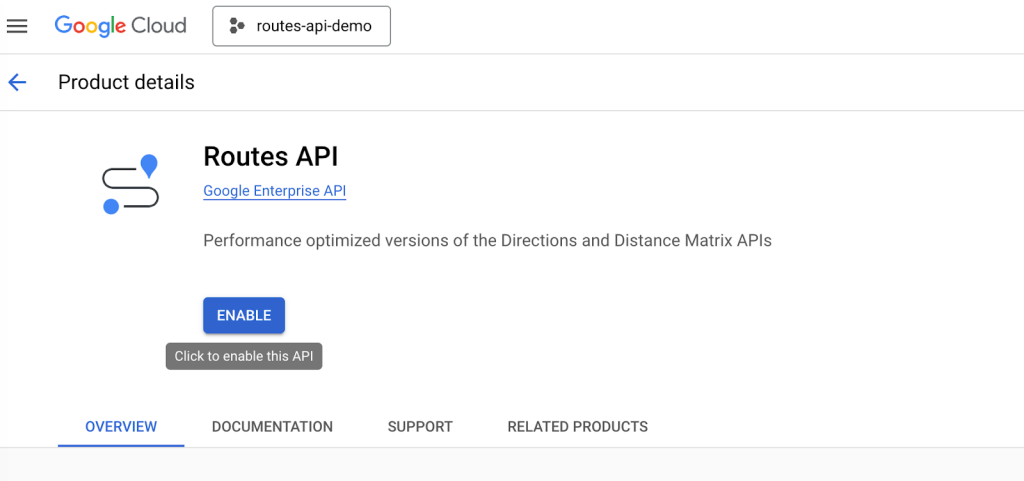
- 3. Enable these essential APIs
- – Maps JavaScript API (core maps)
- – Directions API (route calculations)
- – Distance Matrix API (multi-point distance calculations)
- – Geocoding API (address conversion)
Step 2: Generate and Secure API Keys
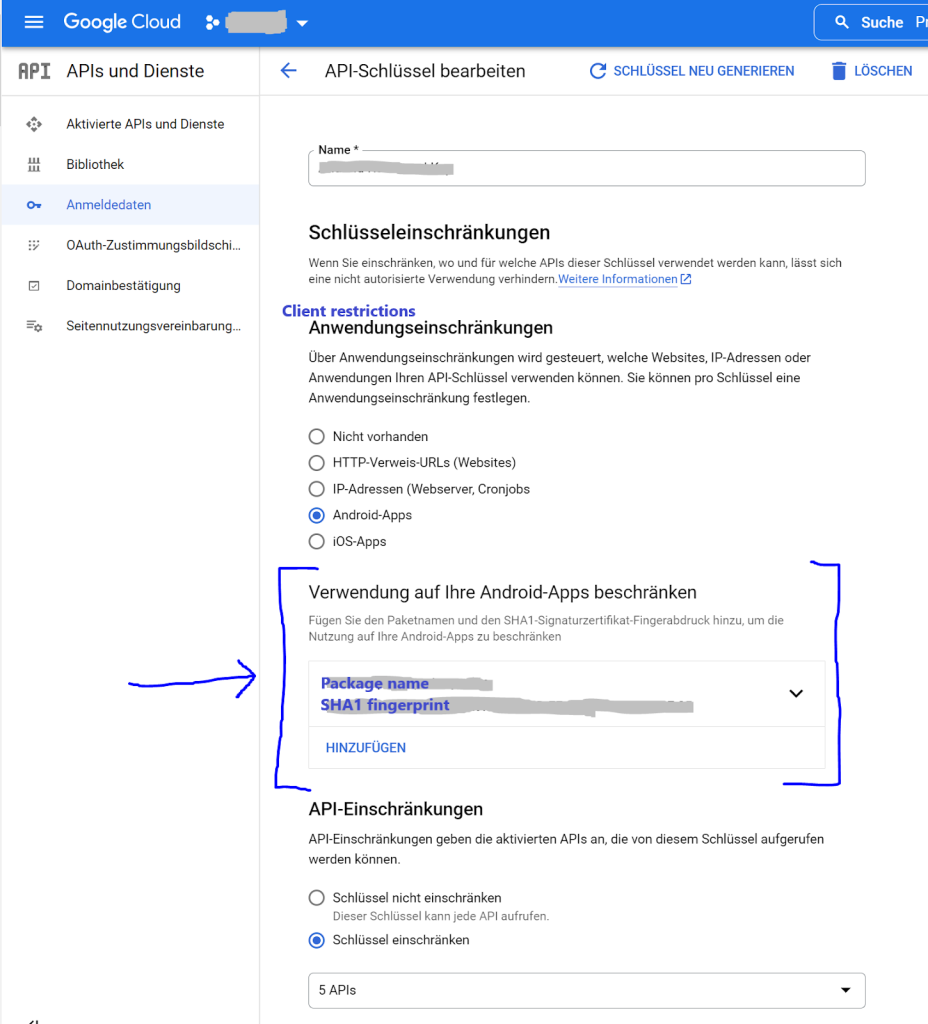
- 1. Go to Credentials → Create Credentials → API Key
- 2. Critical Security Step: Restrict your key:
- – Application: HTTP referrers
- – Domains: `*.yourwebsite.com/*`
- – APIs: Restrict to only the four APIs above
Step 3: Build the Advanced Route Planner
Create `multi-location-route.html` with this comprehensive code:
html
<!DOCTYPE html>
<html lang="en">
<head>
<meta charset="UTF-8">
<meta name="viewport" content="width=device-width, initial-scale=1.0">
<title>Advanced Multi-Location Route Planner</title>
<style>
:root {
--primary-color: #1a73e8;
--secondary-color: #0d47a1;
--success-color: #34a853;
--warning-color: #fbbc04;
--danger-color: #ea4335;
--light-bg: #f8f9fa;
--dark-text: #202124;
}
* {
margin: 0;
padding: 0;
box-sizing: border-box;
}
body {
font-family: 'Google Sans', -apple-system, BlinkMacSystemFont, sans-serif;
background: linear-gradient(135deg, #f5f7fa 0%, #c3cfe2 100%);
min-height: 100vh;
padding: 20px;
color: var(--dark-text);
}
.container {
max-width: 1600px;
margin: 0 auto;
}
.app-header {
background: white;
border-radius: 20px 20px 0 0;
padding: 30px 40px;
box-shadow: 0 10px 30px rgba(0, 0, 0, 0.08);
margin-bottom: 2px;
}
.header-content {
display: flex;
justify-content: space-between;
align-items: center;
flex-wrap: wrap;
gap: 20px;
}
.header-title h1 {
font-size: 2.8rem;
font-weight: 700;
background: linear-gradient(90deg, var(--primary-color), var(--secondary-color));
-webkit-background-clip: text;
-webkit-text-fill-color: transparent;
margin-bottom: 10px;
}
.header-title p {
color: #5f6368;
font-size: 1.1rem;
max-width: 700px;
}
.header-actions {
display: flex;
gap: 15px;
}
.app-main {
display: grid;
grid-template-columns: 400px 1fr;
gap: 2px;
background: white;
border-radius: 0 0 20px 20px;
overflow: hidden;
box-shadow: 0 20px 60px rgba(0, 0, 0, 0.15);
}
.control-panel {
background: var(--light-bg);
padding: 30px;
border-right: 1px solid #e0e0e0;
}
.panel-section {
margin-bottom: 40px;
}
.section-title {
font-size: 1.3rem;
font-weight: 600;
color: var(--dark-text);
margin-bottom: 20px;
padding-bottom: 10px;
border-bottom: 2px solid var(--primary-color);
display: flex;
align-items: center;
gap: 10px;
}
.section-title i {
color: var(--primary-color);
}
.waypoint-list {
max-height: 400px;
overflow-y: auto;
margin-bottom: 20px;
padding-right: 10px;
}
.waypoint-item {
background: white;
padding: 15px;
border-radius: 12px;
margin-bottom: 12px;
border: 2px solid #e0e0e0;
transition: all 0.3s;
cursor: move;
}
.waypoint-item:hover {
border-color: var(--primary-color);
transform: translateX(5px);
box-shadow: 0 5px 15px rgba(26, 115, 232, 0.1);
}
.waypoint-item.dragging {
opacity: 0.5;
background: #e8f0fe;
}
.waypoint-header {
display: flex;
justify-content: space-between;
align-items: center;
margin-bottom: 10px;
}
.waypoint-number {
background: var(--primary-color);
color: white;
width: 28px;
height: 28px;
border-radius: 50%;
display: flex;
align-items: center;
justify-content: center;
font-weight: 600;
font-size: 0.9rem;
}
.waypoint-actions {
display: flex;
gap: 8px;
}
.action-btn {
width: 32px;
height: 32px;
border-radius: 50%;
border: none;
background: #f1f3f4;
color: #5f6368;
cursor: pointer;
display: flex;
align-items: center;
justify-content: center;
transition: all 0.2s;
}
.action-btn:hover {
background: #e8f0fe;
color: var(--primary-color);
transform: scale(1.1);
}
.waypoint-address {
font-size: 0.95rem;
color: #5f6368;
line-height: 1.4;
}
.input-group {
margin-bottom: 20px;
}
.input-group label {
display: block;
margin-bottom: 8px;
font-weight: 500;
color: var(--dark-text);
}
.address-input {
display: flex;
gap: 10px;
}
.address-input input {
flex: 1;
padding: 14px 16px;
border: 2px solid #dadce0;
border-radius: 10px;
font-size: 1rem;
transition: border-color 0.3s;
}
.address-input input:focus {
outline: none;
border-color: var(--primary-color);
}
.btn {
padding: 14px 28px;
border: none;
border-radius: 10px;
font-weight: 600;
font-size: 1rem;
cursor: pointer;
transition: all 0.3s;
display: inline-flex;
align-items: center;
justify-content: center;
gap: 10px;
}
.btn-primary {
background: var(--primary-color);
color: white;
}
.btn-primary:hover {
background: var(--secondary-color);
transform: translateY(-2px);
box-shadow: 0 5px 15px rgba(26, 115, 232, 0.3);
}
.btn-success {
background: var(--success-color);
color: white;
}
.btn-warning {
background: var(--warning-color);
color: white;
}
.btn-danger {
background: var(--danger-color);
color: white;
}
.btn-full {
width: 100%;
margin-top: 10px;
}
.btn-group {
display: flex;
gap: 10px;
flex-wrap: wrap;
}
.optimization-controls {
background: white;
padding: 20px;
border-radius: 12px;
margin-top: 20px;
border: 2px solid #e0e0e0;
}
.optimization-option {
display: flex;
align-items: center;
gap: 10px;
margin-bottom: 15px;
padding: 10px;
border-radius: 8px;
transition: background 0.3s;
}
.optimization-option:hover {
background: #f8f9fa;
}
.optimization-option input[type="radio"] {
accent-color: var(--primary-color);
}
.optimization-option label {
flex: 1;
cursor: pointer;
}
.map-container {
position: relative;
padding: 20px;
}
#map {
height: 700px;
border-radius: 15px;
box-shadow: 0 10px 30px rgba(0, 0, 0, 0.1);
}
.route-info {
position: absolute;
top: 40px;
right: 40px;
background: white;
padding: 25px;
border-radius: 15px;
box-shadow: 0 10px 30px rgba(0, 0, 0, 0.15);
z-index: 1000;
width: 320px;
max-height: 80vh;
overflow-y: auto;
}
.route-summary {
margin-bottom: 25px;
}
.summary-item {
display: flex;
justify-content: space-between;
align-items: center;
padding: 12px 0;
border-bottom: 1px solid #f0f0f0;
}
.summary-item:last-child {
border-bottom: none;
}
.summary-label {
color: #5f6368;
font-weight: 500;
}
.summary-value {
font-weight: 600;
color: var(--dark-text);
font-size: 1.1rem;
}
.directions-list {
max-height: 300px;
overflow-y: auto;
padding-right: 10px;
}
.direction-step {
padding: 12px 0;
border-bottom: 1px solid #f0f0f0;
font-size: 0.9rem;
line-height: 1.5;
}
.direction-step:last-child {
border-bottom: none;
}
.direction-icon {
color: var(--primary-color);
margin-right: 8px;
}
.empty-state {
text-align: center;
padding: 60px 20px;
color: #9aa0a6;
}
.empty-state i {
font-size: 4rem;
margin-bottom: 20px;
opacity: 0.3;
}
.empty-state h3 {
font-size: 1.5rem;
margin-bottom: 10px;
color: #5f6368;
}
.loading-overlay {
position: absolute;
top: 0;
left: 0;
right: 0;
bottom: 0;
background: rgba(255, 255, 255, 0.9);
display: flex;
flex-direction: column;
align-items: center;
justify-content: center;
z-index: 2000;
border-radius: 15px;
display: none;
}
.spinner {
width: 50px;
height: 50px;
border: 5px solid #f3f3f3;
border-top: 5px solid var(--primary-color);
border-radius: 50%;
animation: spin 1s linear infinite;
margin-bottom: 20px;
}
@keyframes spin {
0% { transform: rotate(0deg); }
100% { transform: rotate(360deg); }
}
.optimization-badge {
background: var(--warning-color);
color: white;
padding: 4px 10px;
border-radius: 20px;
font-size: 0.8rem;
font-weight: 500;
margin-left: 10px;
}
@media (max-width: 1200px) {
.app-main {
grid-template-columns: 1fr;
}
.control-panel {
border-right: none;
border-bottom: 1px solid #e0e0e0;
}
.route-info {
position: relative;
top: auto;
right: auto;
width: 100%;
margin-top: 20px;
max-height: none;
}
}
@media (max-width: 768px) {
.header-content {
flex-direction: column;
text-align: center;
}
.header-actions {
justify-content: center;
flex-wrap: wrap;
}
.btn-group {
justify-content: center;
}
.map-container {
padding: 10px;
}
#map {
height: 500px;
}
}
</style>
<link rel="stylesheet" href="https://cdnjs.cloudflare.com/ajax/libs/font-awesome/6.4.0/css/all.min.css">
<link href="https://fonts.googleapis.com/css2?family=Google+Sans:wght@400;500;600;700&display=swap" rel="stylesheet">
</head>
<body>
<div class="container">
<div class="app-header">
<div class="header-content">
<div class="header-title">
<h1><i class="fas fa-route"></i> Advanced Multi-Location Route Planner</h1>
<p>Plan, optimize, and visualize routes with multiple stops. Perfect for deliveries, road trips, and service routes.</p>
</div>
<div class="header-actions">
<button id="exportRouteBtn" class="btn btn-primary">
<i class="fas fa-file-export"></i> Export Route
</button>
<button id="printRouteBtn" class="btn btn-secondary">
<i class="fas fa-print"></i> Print
</button>
</div>
</div>
</div>
<div class="app-main">
<div class="control-panel">
<div class="panel-section">
<h3 class="section-title"><i class="fas fa-map-pin"></i> Route Stops</h3>
<div class="waypoint-list" id="waypointList">
<!-- Waypoints will be added here -->
<div class="empty-state">
<i class="fas fa-route"></i>
<h3>No stops added yet</h3>
<p>Add your first stop below to begin planning</p>
</div>
</div>
<div class="input-group">
<label for="newStopInput"><i class="fas fa-plus-circle"></i> Add New Stop</label>
<div class="address-input">
<input type="text"
id="newStopInput"
placeholder="Enter address or search location..."
autocomplete="off">
<button id="addStopBtn" class="btn btn-primary" style="padding: 0 20px;">
<i class="fas fa-plus"></i> Add
</button>
</div>
</div>
<div class="btn-group">
<button id="calculateRouteBtn" class="btn btn-success">
<i class="fas fa-calculator"></i> Calculate Route
</button>
<button id="optimizeRouteBtn" class="btn btn-warning">
<i class="fas fa-magic"></i> Optimize Route
</button>
<button id="clearRouteBtn" class="btn btn-danger">
<i class="fas fa-trash"></i> Clear All
</button>
</div>
</div>
<div class="panel-section">
<h3 class="section-title"><i class="fas fa-cogs"></i> Route Settings</h3>
<div class="optimization-controls">
<h4 style="margin-bottom: 15px; color: var(--dark-text);">Optimization Mode</h4>
<div class="optimization-option">
<input type="radio" id="optFastest" name="optimization" value="fastest" checked>
<label for="optFastest">
<strong>Fastest Route</strong>
<div style="font-size: 0.9rem; color: #5f6368; margin-top: 5px;">
Minimizes travel time considering current traffic
</div>
</label>
</div>
<div class="optimization-option">
<input type="radio" id="optShortest" name="optimization" value="shortest">
<label for="optShortest">
<strong>Shortest Distance</strong>
<div style="font-size: 0.9rem; color: #5f6368; margin-top: 5px;">
Minimizes total distance regardless of traffic
</div>
</label>
</div>
<div class="optimization-option">
<input type="radio" id="optAvoidHighways" name="optimization" value="avoidHighways">
<label for="optAvoidHighways">
<strong>Avoid Highways</strong>
<div style="font-size: 0.9rem; color: #5f6368; margin-top: 5px;">
Prefers local roads and avoids highways
</div>
</label>
</div>
<div class="optimization-option">
<input type="radio" id="optAvoidTolls" name="optimization" value="avoidTolls">
<label for="optAvoidTolls">
<strong>Avoid Tolls</strong>
<div style="font-size: 0.9rem; color: #5f6368; margin-top: 5px;">
Routes around toll roads when possible
</div>
</label>
</div>
</div>
<div style="margin-top: 25px;">
<h4 style="margin-bottom: 15px; color: var(--dark-text);">Travel Mode</h4>
<div style="display: flex; gap: 10px; flex-wrap: wrap;">
<button id="modeDriving" class="btn btn-primary" data-mode="DRIVING">
<i class="fas fa-car"></i> Driving
</button>
<button id="modeWalking" class="btn btn-secondary" data-mode="WALKING">
<i class="fas fa-walking"></i> Walking
</button>
<button id="modeBicycling" class="btn btn-secondary" data-mode="BICYCLING">
<i class="fas fa-bicycle"></i> Bicycling
</button>
</div>
</div>
</div>
<div class="panel-section">
<h3 class="section-title"><i class="fas fa-history"></i> Recent Routes</h3>
<div id="recentRoutes" style="color: #5f6368; font-size: 0.95rem;">
<p>No recent routes saved. Routes will appear here after calculation.</p>
</div>
</div>
</div>
<div class="map-container">
<div id="map"></div>
<div class="route-info" id="routeInfo" style="display: none;">
<h3 style="margin-bottom: 20px; color: var(--dark-text);">
<i class="fas fa-info-circle"></i> Route Summary
</h3>
<div class="route-summary">
<div class="summary-item">
<span class="summary-label">Total Distance:</span>
<span class="summary-value" id="totalDistance">0 mi</span>
</div>
<div class="summary-item">
<span class="summary-label">Total Duration:</span>
<span class="summary-value" id="totalDuration">0 min</span>
</div>
<div class="summary-item">
<span class="summary-label">Number of Stops:</span>
<span class="summary-value" id="stopCount">0</span>
</div>
<div class="summary-item">
<span class="summary-label">Fuel Estimate:</span>
<span class="summary-value" id="fuelEstimate">0 gal</span>
</div>
</div>
<h4 style="margin: 25px 0 15px 0; color: var(--dark-text);">Turn-by-Turn Directions</h4>
<div class="directions-list" id="directionsList">
<!-- Directions will be added here -->
</div>
</div>
<div class="loading-overlay" id="loadingOverlay">
<div class="spinner"></div>
<h3>Calculating optimal route...</h3>
<p style="color: #5f6368; margin-top: 10px;">This may take a moment</p>
</div>
</div>
</div>
</div>
<!-- Load Google Maps API with required libraries -->
<script src="https://maps.googleapis.com/maps/api/js?key=YOUR_API_KEY_HERE&libraries=places,geometry&callback=initMap" async defer></script>
<script>
// Configuration
let map;
let directionsService;
let directionsRenderer;
let waypoints = [];
let travelMode = 'DRIVING';
let currentRoute = null;
let autocomplete;
let dragStartIndex = null;
// Initialize the application
function initMap() {
// Default center (USA)
const defaultCenter = { lat: 39.8283, lng: -98.5795 };
// Initialize map
map = new google.maps.Map(document.getElementById("map"), {
center: defaultCenter,
zoom: 4,
mapTypeControl: true,
streetViewControl: true,
fullscreenControl: true,
mapTypeControlOptions: {
style: google.maps.MapTypeControlStyle.HORIZONTAL_BAR,
position: google.maps.ControlPosition.TOP_RIGHT
},
styles: [
{
featureType: "poi.business",
stylers: [{ visibility: "off" }]
}
]
});
// Initialize Directions services
directionsService = new google.maps.DirectionsService();
directionsRenderer = new google.maps.DirectionsRenderer({
map: map,
suppressMarkers: false,
preserveViewport: false,
polylineOptions: {
strokeColor: '#1a73e8',
strokeOpacity: 0.8,
strokeWeight: 6
},
markerOptions: {
icon: {
path: google.maps.SymbolPath.CIRCLE,
fillColor: '#1a73e8',
fillOpacity: 1,
strokeWeight: 2,
strokeColor: '#ffffff',
scale: 8
}
}
});
// Initialize autocomplete for address input
autocomplete = new google.maps.places.Autocomplete(
document.getElementById('newStopInput'),
{
types: ['address'],
componentRestrictions: { country: 'us' }
}
);
// Setup event listeners
setupEventListeners();
setupDragAndDrop();
// Load sample stops for demonstration
setTimeout(loadSampleStops, 1000);
}
function setupEventListeners() {
// Add stop button
document.getElementById('addStopBtn').addEventListener('click', addStopFromInput);
// Enter key in input field
document.getElementById('newStopInput').addEventListener('keypress', (e) => {
if (e.key === 'Enter') addStopFromInput();
});
// Route calculation buttons
document.getElementById('calculateRouteBtn').addEventListener('click', calculateRoute);
document.getElementById('optimizeRouteBtn').addEventListener('click', optimizeRoute);
document.getElementById('clearRouteBtn').addEventListener('click', clearAllStops);
// Export and print
document.getElementById('exportRouteBtn').addEventListener('click', exportRoute);
document.getElementById('printRouteBtn').addEventListener('click', printRoute);
// Travel mode buttons
document.querySelectorAll('[data-mode]').forEach(btn => {
btn.addEventListener('click', function() {
travelMode = this.getAttribute('data-mode');
// Update button styles
document.querySelectorAll('[data-mode]').forEach(b => {
b.classList.remove('btn-primary');
b.classList.add('btn-secondary');
});
this.classList.remove('btn-secondary');
this.classList.add('btn-primary');
// Recalculate route if we have one
if (waypoints.length >= 2) {
calculateRoute();
}
});
});
// Set initial active mode
document.getElementById('modeDriving').classList.add('btn-primary');
}
function setupDragAndDrop() {
const waypointList = document.getElementById('waypointList');
// Drag start
waypointList.addEventListener('dragstart', (e) => {
if (e.target.classList.contains('waypoint-item')) {
dragStartIndex = Array.from(waypointList.children).indexOf(e.target);
e.target.classList.add('dragging');
e.dataTransfer.effectAllowed = 'move';
}
});
// Drag over
waypointList.addEventListener('dragover', (e) => {
e.preventDefault();
e.dataTransfer.dropEffect = 'move';
const draggingItem = document.querySelector('.dragging');
if (!draggingItem) return;
const siblings = [...waypointList.querySelectorAll('.waypoint-item:not(.dragging)')];
const nextSibling = siblings.find(sibling => {
return e.clientY <= sibling.getBoundingClientRect().top + sibling.offsetHeight / 2;
});
waypointList.insertBefore(draggingItem, nextSibling);
});
// Drag end
waypointList.addEventListener('dragend', (e) => {
const draggingItem = document.querySelector('.dragging');
if (!draggingItem) return;
draggingItem.classList.remove('dragging');
const dragEndIndex = Array.from(waypointList.children).indexOf(draggingItem);
if (dragStartIndex !== null && dragStartIndex !== dragEndIndex) {
// Reorder waypoints array
const movedWaypoint = waypoints.splice(dragStartIndex, 1)[0];
waypoints.splice(dragEndIndex, 0, movedWaypoint);
// Update waypoint numbers
updateWaypointList();
// Recalculate route if we have enough stops
if (waypoints.length >= 2) {
calculateRoute();
}
}
dragStartIndex = null;
});
}
function addStopFromInput() {
const input = document.getElementById('newStopInput');
const address = input.value.trim();
if (!address) {
alert('Please enter an address');
return;
}
// Use geocoding to get coordinates
const geocoder = new google.maps.Geocoder();
showLoading(true);
geocoder.geocode({ address: address }, (results, status) => {
showLoading(false);
if (status === 'OK') {
const location = results[0].geometry.location;
const formattedAddress = results[0].formatted_address;
addStop(location.lat(), location.lng(), formattedAddress);
input.value = '';
// If this is the second stop, automatically calculate route
if (waypoints.length === 2) {
setTimeout(calculateRoute, 500);
}
} else {
alert('Could not find location. Please try a different address.');
}
});
}
function addStop(lat, lng, address) {
const waypoint = {
id: Date.now() + Math.random(),
lat: lat,
lng: lng,
address: address,
added: new Date().toISOString()
};
waypoints.push(waypoint);
updateWaypointList();
// Center map on new stop if it's the first one
if (waypoints.length === 1) {
map.setCenter({ lat: lat, lng: lng });
map.setZoom(12);
}
}
function updateWaypointList() {
const waypointList = document.getElementById('waypointList');
if (waypoints.length === 0) {
waypointList.innerHTML = `
<div class="empty-state">
<i class="fas fa-route"></i>
<h3>No stops added yet</h3>
<p>Add your first stop below to begin planning</p>
</div>
`;
return;
}
let html = '';
waypoints.forEach((waypoint, index) => {
html += `
<div class="waypoint-item" draggable="true">
<div class="waypoint-header">
<div class="waypoint-number">${index + 1}</div>
<div class="waypoint-actions">
<button onclick="zoomToStop(${index})" class="action-btn" title="Zoom to stop">
<i class="fas fa-search-plus"></i>
</button>
<button onclick="removeStop(${index})" class="action-btn" title="Remove stop">
<i class="fas fa-times"></i>
</button>
</div>
</div>
<div class="waypoint-address">${waypoint.address}</div>
</div>
`;
});
waypointList.innerHTML = html;
}
function zoomToStop(index) {
if (waypoints[index]) {
map.setCenter({ lat: waypoints[index].lat, lng: waypoints[index].lng });
map.setZoom(14);
}
}
function removeStop(index) {
if (confirm('Remove this stop from the route?')) {
waypoints.splice(index, 1);
updateWaypointList();
// Recalculate route if we still have enough stops
if (waypoints.length >= 2) {
calculateRoute();
} else {
// Clear route display
directionsRenderer.setDirections({ routes: [] });
document.getElementById('routeInfo').style.display = 'none';
}
}
}
function calculateRoute() {
if (waypoints.length < 2) {
alert('Please add at least two stops to calculate a route.');
return;
}
showLoading(true);
// Prepare request for Directions API
const origin = waypoints[0];
const destination = waypoints[waypoints.length - 1];
const middleWaypoints = waypoints.slice(1, -1).map(wp => ({
location: new google.maps.LatLng(wp.lat, wp.lng),
stopover: true
}));
// Get optimization mode
const optimization = document.querySelector('input[name="optimization"]:checked').value;
// Build request with optimization options
const request = {
origin: new google.maps.LatLng(origin.lat, origin.lng),
destination: new google.maps.LatLng(destination.lat, destination.lng),
waypoints: middleWaypoints,
travelMode: google.maps.TravelMode[travelMode],
optimizeWaypoints: (optimization === 'fastest'),
provideRouteAlternatives: false,
avoidHighways: (optimization === 'avoidHighways'),
avoidTolls: (optimization === 'avoidTolls'),
unitSystem: google.maps.UnitSystem.IMPERIAL
};
// Make API call
directionsService.route(request, (result, status) => {
showLoading(false);
if (status === 'OK') {
directionsRenderer.setDirections(result);
currentRoute = result.routes[0];
displayRouteInfo(result.routes[0]);
saveToRecentRoutes();
} else {
alert('Could not calculate route. Error: ' + status);
}
});
}
function optimizeRoute() {
if (waypoints.length < 3) {
alert('Optimization requires at least 3 stops.');
return;
}
showLoading(true);
// For true optimization, we'd use the Distance Matrix API and TSP algorithms
// This is a simplified version that reorders stops based on proximity
// Extract middle waypoints (excluding first and last)
const middlePoints = waypoints.slice(1, -1);
const optimizedMiddle = [];
// Simple nearest neighbor algorithm
let currentPoint = waypoints[0];
let remainingPoints = [...middlePoints];
while (remainingPoints.length > 0) {
// Find closest point to current point
let closestIndex = 0;
let closestDistance = Number.MAX_VALUE;
remainingPoints.forEach((point, index) => {
const distance = calculateDistance(
currentPoint.lat, currentPoint.lng,
point.lat, point.lng
);
if (distance < closestDistance) {
closestDistance = distance;
closestIndex = index;
}
});
// Add closest point to optimized route
optimizedMiddle.push(remainingPoints[closestIndex]);
currentPoint = remainingPoints[closestIndex];
remainingPoints.splice(closestIndex, 1);
}
// Reconstruct waypoints array
const optimizedWaypoints = [
waypoints[0],
...optimizedMiddle,
waypoints[waypoints.length - 1]
];
waypoints = optimizedWaypoints;
updateWaypointList();
// Show optimization badge
const optimizeBtn = document.getElementById('optimizeRouteBtn');
optimizeBtn.innerHTML = '<i class="fas fa-check"></i> Optimized!';
optimizeBtn.classList.remove('btn-warning');
optimizeBtn.classList.add('btn-success');
setTimeout(() => {
optimizeBtn.innerHTML = '<i class="fas fa-magic"></i> Optimize Route';
optimizeBtn.classList.remove('btn-success');
optimizeBtn.classList.add('btn-warning');
}, 3000);
// Recalculate route with optimized waypoints
calculateRoute();
}
function displayRouteInfo(route) {
const legs = route.legs;
let totalDistance = 0;
let totalDuration = 0;
// Calculate totals
legs.forEach(leg => {
totalDistance += leg.distance.value; // in meters
totalDuration += leg.duration.value; // in seconds
});
// Convert distance to miles
const distanceMiles = (totalDistance / 1609.34).toFixed(1);
// Convert duration to hours/minutes
const hours = Math.floor(totalDuration / 3600);
const minutes = Math.floor((totalDuration % 3600) / 60);
// Calculate fuel estimate (assuming 25 MPG)
const fuelGallons = (distanceMiles / 25).toFixed(1);
// Update summary
document.getElementById('totalDistance').textContent = `${distanceMiles} mi`;
document.getElementById('totalDuration').textContent = hours > 0
? `${hours}h ${minutes}m`
: `${minutes} min`;
document.getElementById('stopCount').textContent = waypoints.length;
document.getElementById('fuelEstimate').textContent = `${fuelGallons} gal`;
// Build directions list
let directionsHtml = '';
let stepNumber = 1;
legs.forEach((leg, legIndex) => {
// Add start of leg
directionsHtml += `
<div class="direction-step">
<i class="fas fa-flag-checkered direction-icon"></i>
<strong>Start: ${leg.start_address}</strong>
</div>
`;
// Add steps
leg.steps.forEach(step => {
const instruction = step.instructions.replace(/<[^>]*>/g, '');
directionsHtml += `
<div class="direction-step">
<i class="fas fa-arrow-right direction-icon"></i>
<span>${stepNumber}. ${instruction}</span>
</div>
`;
stepNumber++;
});
// Add end of leg (unless it's the last leg)
if (legIndex < legs.length - 1) {
directionsHtml += `
<div class="direction-step">
<i class="fas fa-map-marker-alt direction-icon"></i>
<strong>Arrive at: ${leg.end_address}</strong>
</div>
`;
}
});
document.getElementById('directionsList').innerHTML = directionsHtml;
// Show route info panel
document.getElementById('routeInfo').style.display = 'block';
}
function clearAllStops() {
if (waypoints.length === 0) return;
if (confirm(`Clear all ${waypoints.length} stops?`)) {
waypoints = [];
updateWaypointList();
directionsRenderer.setDirections({ routes: [] });
document.getElementById('routeInfo').style.display = 'none';
}
}
function exportRoute() {
if (!currentRoute) {
alert('No route to export. Calculate a route first.');
return;
}
const exportData = {
waypoints: waypoints.map((wp, index) => ({
stopNumber: index + 1,
address: wp.address,
latitude: wp.lat,
longitude: wp.lng
})),
routeSummary: {
totalDistance: document.getElementById('totalDistance').textContent,
totalDuration: document.getElementById('totalDuration').textContent,
numberOfStops: waypoints.length,
travelMode: travelMode,
calculatedAt: new Date().toISOString()
},
directions: currentRoute.legs.flatMap(leg =>
leg.steps.map(step => ({
instruction: step.instructions.replace(/<[^>]*>/g, ''),
distance: step.distance.text,
duration: step.duration.text
}))
)
};
const dataStr = JSON.stringify(exportData, null, 2);
const dataUri = 'data:application/json;charset=utf-8,' + encodeURIComponent(dataStr);
const linkElement = document.createElement('a');
linkElement.setAttribute('href', dataUri);
linkElement.setAttribute('download', `route-${new Date().toISOString().slice(0,10)}.json`);
document.body.appendChild(linkElement);
linkElement.click();
document.body.removeChild(linkElement);
}
function printRoute() {
window.print();
}
function saveToRecentRoutes() {
const recentRoutes = document.getElementById('recentRoutes');
const routeInfo = {
date: new Date().toLocaleString(),
stops: waypoints.length,
distance: document.getElementById('totalDistance').textContent,
duration: document.getElementById('totalDuration').textContent
};
const routeHtml = `
<div style="background: white; padding: 12px; border-radius: 8px; margin-bottom: 10px; border-left: 4px solid var(--primary-color);">
<div style="font-weight: 600; margin-bottom: 5px;">Route from ${waypoints[0].address.split(',')[0]} to ${waypoints[waypoints.length-1].address.split(',')[0]}</div>
<div style="display: flex; justify-content: space-between; font-size: 0.85rem; color: #5f6368;">
<span>${routeInfo.stops} stops</span>
<span>${routeInfo.distance}</span>
<span>${routeInfo.duration}</span>
</div>
<div style="font-size: 0.8rem; color: #9aa0a6; margin-top: 5px;">${routeInfo.date}</div>
</div>
`;
// Add to beginning of list
recentRoutes.innerHTML = routeHtml + recentRoutes.innerHTML;
}
function showLoading(show) {
document.getElementById('loadingOverlay').style.display = show ? 'flex' : 'none';
}
function calculateDistance(lat1, lon1, lat2, lon2) {
const R = 6371; // Earth's radius in km
const dLat = (lat2 - lat1) * Math.PI / 180;
const dLon = (lon2 - lon1) * Math.PI / 180;
const a =
Math.sin(dLat/2) * Math.sin(dLat/2) +
Math.cos(lat1 * Math.PI / 180) * Math.cos(lat2 * Math.PI / 180) *
Math.sin(dLon/2) * Math.sin(dLon/2);
const c = 2 * Math.atan2(Math.sqrt(a), Math.sqrt(1-a));
return R * c; // Distance in km
}
function loadSampleStops() {
if (waypoints.length > 0) return;
const sampleStops = [
{ lat: 40.7128, lng: -74.0060, address: "New York, NY, USA" },
{ lat: 39.9526, lng: -75.1652, address: "Philadelphia, PA, USA" },
{ lat: 38.9072, lng: -77.0369, address: "Washington, DC, USA" },
{ lat: 39.2904, lng: -76.6122, address: "Baltimore, MD, USA" }
];
sampleStops.forEach((stop, index) => {
setTimeout(() => {
addStop(stop.lat, stop.lng, stop.address);
// Auto-calculate after adding all stops
if (index === sampleStops.length - 1) {
setTimeout(calculateRoute, 1000);
}
}, index * 300);
});
}
// Make functions available globally
window.zoomToStop = zoomToStop;
window.removeStop = removeStop;
</script>
</body>
</html>
Code language: HTML, XML (xml)Step 4: Deploy and Use Your Route Planner
- 1. Replace API Key: Change `YOUR_API_KEY_HERE` to your actual Google Maps API key
- 2. Test Locally: Open in browser and test with sample stops
- 3. Deploy to Server: Upload to your web hosting environment
- 4. Share with Team: Provide access to colleagues or embed in internal tools
The Hidden Costs and Complexities
While this custom solution is powerful, it comes with significant challenges:
- 1. Multiple API Costs: Directions API and Distance Matrix API incur separate charges per request
- 2. Complex Optimization: True route optimization requires advanced algorithms (Traveling Salesman Problem)
- 3. Rate Limiting: Google imposes strict limits on API calls (50 requests per second)
- 4. No Real Traffic Integration: Advanced traffic-aware routing requires additional APIs
- 5. No Historical Data Can’t analyze past routes or performance
- 6. No Multi-Day Planning: Can’t schedule routes across multiple days
- 7. No Driver Management: No way to assign routes to specific drivers or vehicles
- 8. Mobile Limitations: Complex interface doesn’t work well for field staff
The Professional Alternative: MapsFun.com
Why spend weeks building and maintaining a route planner when you can have an enterprise solution instantly?
MapsFun.com provides complete route planning and optimization without any coding:
- ✅ True Route Optimization – Advanced algorithms for optimal stop sequencing
- ✅ Multi-Day Planning – Schedule routes across days with driver assignments
- ✅ Real Traffic Integration – Live traffic-aware routing
- ✅ Unlimited Waypoints – Plan routes with hundreds of stops
- ✅ Driver Mobile App – Turn-by-turn navigation for field staff
- ✅ Proof of Delivery – Digital signatures and photo capture
- ✅ Analytics Dashboard- Track performance and efficiency metrics
- ✅ Team Collaboration- Multiple planners can work simultaneously
With MapsFun.com, here’s the complete workflow:
- 1. Import addresses from CSV or spreadsheet
- 2. Set constraints (time windows, driver schedules, vehicle capacities)
- 3. Click “Optimize” – AI calculates the most efficient routes
- 4. Dispatch to drivers via mobile app
- 5. Track in real-time and analyze performance
The custom Google Maps solution works for simple A-to-B-to-C routing, but for delivery companies, field service businesses, sales teams, or anyone needing true multi-location route optimization, it’s insufficient and requires months of additional development.
Stop building route planners and start using professional ones. Plan, optimize, and execute multi-location routes in minutes at MapsFun.com – the complete route optimization platform.