Map Where I Can Mark Multiple Locations (2025 Tutorial)
How to Create a Map Where You Can Mark Multiple Locations: The Complete Technical Guide
Looking for a map where you can mark or pin multiple locations for planning, visualization, or sharing? Creating an interactive “markable” map requires specific technical implementation. Here’s the working method using Google Maps Platform with a drawing interface.
Method: Custom Interactive Map with Drawing Tools
This solution lets users mark locations by clicking on the map, with options to save, customize, and export their marked points.
Step 1: Google Cloud Platform Setup
- 1. Go to [Google Cloud Console](https://console.cloud.google.com/)
- 2. Create a project named “Markable Locations Map”
- 3. Enable billing (utilizes $200 monthly free credit)
- 4. Enable these essential APIs:
- – Maps JavaScript API (core map functionality)
- – Drawing Library (for marking tools)
- – Geocoding API (for address lookup of marked points)
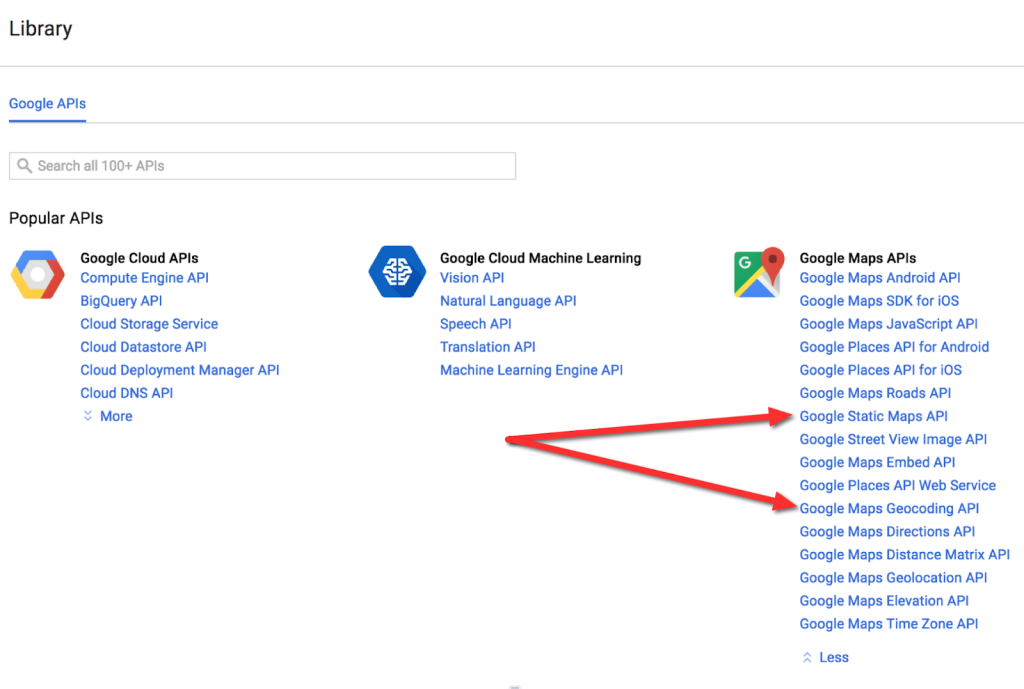
Step 2: Secure Your API Key
- 1. Navigate to Credentials → Create Credentials → API Key
- 2. Restrict immediately** for security and cost control:
- – Application: HTTP referrers
- – Website restrictions: `*.yourdomain.com/*` and `localhost/*` for testing
- – API restrictions: Select Maps JavaScript API, Drawing Library, and Geocoding API
Step 3: Build the Markable Map Interface
Create `markable-map.html` with this complete code:
html
<!DOCTYPE html>
<html lang="en">
<head>
<meta charset="UTF-8">
<meta name="viewport" content="width=device-width, initial-scale=1.0">
<title>Interactive Map - Mark Multiple Locations</title>
<style>
:root {
--primary-blue: #1a73e8;
--secondary-blue: #4285f4;
--success-green: #34a853;
--warning-orange: #fbbc04;
--danger-red: #ea4335;
--light-gray: #f8f9fa;
--medium-gray: #dadce0;
--dark-gray: #5f6368;
}
* {
box-sizing: border-box;
margin: 0;
padding: 0;
}
body {
font-family: 'Segoe UI', system-ui, -apple-system, sans-serif;
background: linear-gradient(135deg, #667eea 0%, #764ba2 100%);
min-height: 100vh;
padding: 20px;
color: #333;
}
.dashboard {
max-width: 1400px;
margin: 0 auto;
background: white;
border-radius: 16px;
overflow: hidden;
box-shadow: 0 20px 60px rgba(0, 0, 0, 0.15);
display: grid;
grid-template-columns: 300px 1fr;
min-height: 90vh;
}
/* Sidebar Styles */
.sidebar {
background: #f8f9ff;
padding: 30px 25px;
border-right: 1px solid #e8eaf6;
display: flex;
flex-direction: column;
}
.logo {
display: flex;
align-items: center;
gap: 12px;
margin-bottom: 30px;
color: var(--primary-blue);
font-weight: 700;
font-size: 22px;
}
.logo-icon {
width: 40px;
height: 40px;
background: var(--primary-blue);
border-radius: 10px;
display: flex;
align-items: center;
justify-content: center;
color: white;
font-size: 20px;
}
.tools-panel {
background: white;
border-radius: 12px;
padding: 25px;
margin-bottom: 25px;
border: 2px solid #e8eaf6;
box-shadow: 0 4px 12px rgba(0,0,0,0.05);
}
.tool-btn {
width: 100%;
padding: 14px;
margin-bottom: 12px;
border: 2px solid var(--medium-gray);
background: white;
border-radius: 8px;
display: flex;
align-items: center;
gap: 12px;
font-weight: 600;
color: var(--dark-gray);
cursor: pointer;
transition: all 0.2s;
}
.tool-btn:hover {
border-color: var(--primary-blue);
background: #f0f7ff;
transform: translateY(-2px);
}
.tool-btn.active {
border-color: var(--primary-blue);
background: #e8f0fe;
color: var(--primary-blue);
}
.tool-icon {
width: 24px;
height: 24px;
display: flex;
align-items: center;
justify-content: center;
font-size: 18px;
}
.color-palette {
display: grid;
grid-template-columns: repeat(4, 1fr);
gap: 8px;
margin: 15px 0;
}
.color-option {
width: 30px;
height: 30px;
border-radius: 6px;
cursor: pointer;
border: 3px solid transparent;
transition: transform 0.2s;
}
.color-option:hover {
transform: scale(1.1);
}
.color-option.selected {
border-color: #333;
}
.locations-list {
flex: 1;
overflow-y: auto;
background: white;
border-radius: 12px;
padding: 20px;
border: 2px solid #e8eaf6;
}
.location-item {
background: #f8f9ff;
padding: 16px;
margin-bottom: 12px;
border-radius: 8px;
border-left: 4px solid var(--primary-blue);
transition: all 0.2s;
cursor: pointer;
}
.location-item:hover {
background: #e8f0fe;
transform: translateX(4px);
}
.location-title {
font-weight: 600;
margin-bottom: 6px;
color: #1a237e;
}
.location-coords {
font-family: 'Courier New', monospace;
font-size: 12px;
color: var(--dark-gray);
background: white;
padding: 4px 8px;
border-radius: 4px;
display: inline-block;
margin-top: 8px;
}
/* Map Container Styles */
.map-container {
position: relative;
display: flex;
flex-direction: column;
}
.map-header {
padding: 25px 30px;
background: linear-gradient(90deg, #1a237e 0%, #283593 100%);
color: white;
}
.map-header h1 {
font-size: 28px;
margin-bottom: 8px;
}
.map-header p {
opacity: 0.9;
font-size: 15px;
}
#map {
flex: 1;
min-height: 500px;
}
.map-controls {
position: absolute;
top: 120px;
right: 30px;
background: white;
border-radius: 12px;
padding: 15px;
box-shadow: 0 8px 24px rgba(0,0,0,0.15);
z-index: 1000;
width: 220px;
}
.control-group {
margin-bottom: 15px;
}
.control-group label {
display: block;
margin-bottom: 6px;
font-weight: 500;
color: var(--dark-gray);
font-size: 14px;
}
select, input[type="text"] {
width: 100%;
padding: 10px;
border: 1px solid var(--medium-gray);
border-radius: 6px;
font-size: 14px;
}
/* Stats Bar */
.stats-bar {
background: white;
padding: 20px 30px;
border-top: 1px solid var(--medium-gray);
display: flex;
justify-content: space-between;
align-items: center;
}
.stat-item {
display: flex;
align-items: center;
gap: 10px;
}
.stat-value {
font-size: 24px;
font-weight: 700;
color: var(--primary-blue);
}
.stat-label {
color: var(--dark-gray);
font-size: 14px;
}
.action-buttons {
display: flex;
gap: 12px;
}
.btn {
padding: 12px 24px;
border: none;
border-radius: 8px;
font-weight: 600;
cursor: pointer;
display: flex;
align-items: center;
gap: 8px;
transition: all 0.2s;
}
.btn-primary {
background: var(--primary-blue);
color: white;
}
.btn-primary:hover {
background: #0d62d9;
transform: translateY(-2px);
box-shadow: 0 6px 12px rgba(26, 115, 232, 0.3);
}
.btn-secondary {
background: var(--light-gray);
color: var(--dark-gray);
}
.btn-secondary:hover {
background: #e8eaed;
}
/* Marker Info Window */
.custom-infowindow {
padding: 15px;
min-width: 280px;
}
.custom-infowindow h3 {
margin: 0 0 10px 0;
color: #1a237e;
}
.custom-infowindow input,
.custom-infowindow textarea {
width: 100%;
padding: 10px;
margin-bottom: 10px;
border: 1px solid var(--medium-gray);
border-radius: 6px;
font-size: 14px;
}
.marker-preview {
width: 24px;
height: 24px;
border-radius: 50%;
display: inline-block;
margin-right: 8px;
border: 2px solid white;
box-shadow: 0 2px 4px rgba(0,0,0,0.2);
}
@media (max-width: 1024px) {
.dashboard {
grid-template-columns: 1fr;
min-height: auto;
}
.sidebar {
border-right: none;
border-bottom: 1px solid #e8eaf6;
}
.map-controls {
position: relative;
top: auto;
right: auto;
margin: 20px;
width: auto;
}
}
</style>
<link rel="stylesheet" href="https://cdnjs.cloudflare.com/ajax/libs/font-awesome/6.0.0/css/all.min.css">
</head>
<body>
<div class="dashboard">
<!-- Sidebar with Tools -->
<div class="sidebar">
<div class="logo">
<div class="logo-icon">
<i class="fas fa-map-marked-alt"></i>
</div>
<span>MapMarker Pro</span>
</div>
<div class="tools-panel">
<h3 style="margin-bottom: 20px; color: #1a237e;">
<i class="fas fa-tools"></i> Marking Tools
</h3>
<button class="tool-btn active" id="markerTool">
<div class="tool-icon">
<i class="fas fa-map-pin"></i>
</div>
<span>Add Marker</span>
</button>
<button class="tool-btn" id="polygonTool">
<div class="tool-icon">
<i class="fas fa-draw-polygon"></i>
</div>
<span>Draw Area</span>
</button>
<button class="tool-btn" id="lineTool">
<div class="tool-icon">
<i class="fas fa-route"></i>
</div>
<span>Draw Route</span>
</button>
<button class="tool-btn" id="clearTool">
<div class="tool-icon">
<i class="fas fa-trash-alt"></i>
</div>
<span>Clear All</span>
</button>
<div style="margin: 20px 0;">
<h4 style="margin-bottom: 10px; color: #1a237e;">Marker Colors</h4>
<div class="color-palette">
<div class="color-option selected" style="background: #1a73e8;" data-color="#1a73e8"></div>
<div class="color-option" style="background: #34a853;" data-color="#34a853"></div>
<div class="color-option" style="background: #ea4335;" data-color="#ea4335"></div>
<div class="color-option" style="background: #fbbc04;" data-color="#fbbc04"></div>
<div class="color-option" style="background: #8e44ad;" data-color="#8e44ad"></div>
<div class="color-option" style="background: #2c3e50;" data-color="#2c3e50"></div>
<div class="color-option" style="background: #e74c3c;" data-color="#e74c3c"></div>
<div class="color-option" style="background: #27ae60;" data-color="#27ae60"></div>
</div>
</div>
<div class="control-group">
<label for="markerStyle">
<i class="fas fa-palette"></i> Marker Style
</label>
<select id="markerStyle">
<option value="pin">Standard Pin</option>
<option value="circle">Circle</option>
<option value="square">Square</option>
<option value="star">Star</option>
</select>
</div>
</div>
<div class="locations-list">
<h3 style="margin-bottom: 20px; color: #1a237e;">
<i class="fas fa-layer-group"></i> Marked Locations
<span id="markerCount" style="background: #e8eaf6; padding: 2px 10px; border-radius: 20px; font-size: 14px; float: right;">0</span>
</h3>
<div id="locationsContainer">
<div style="text-align: center; padding: 40px 20px; color: #9fa8da;">
<i class="fas fa-map-pin" style="font-size: 48px; margin-bottom: 20px; opacity: 0.5;"></i>
<p>No locations marked yet</p>
<p style="font-size: 14px; margin-top: 10px;">Click on the map to add your first marker</p>
</div>
</div>
</div>
</div>
<!-- Main Map Area -->
<div class="map-container">
<div class="map-header">
<h1><i class="fas fa-map"></i> Interactive Marking Map</h1>
<p>Click anywhere on the map to mark locations. Customize each marker with details.</p>
</div>
<div id="map"></div>
<div class="map-controls">
<div class="control-group">
<label for="mapType">
<i class="fas fa-globe"></i> Map Style
</label>
<select id="mapType">
<option value="roadmap">Road Map</option>
<option value="satellite">Satellite</option>
<option value="hybrid">Hybrid</option>
<option value="terrain">Terrain</option>
</select>
</div>
<div class="control-group">
<label for="searchLocation">
<i class="fas fa-search"></i> Search Location
</label>
<input type="text" id="searchLocation" placeholder="Enter address or place...">
</div>
<div class="control-group">
<label>
<i class="fas fa-sliders-h"></i> Settings
</label>
<div style="display: flex; flex-direction: column; gap: 8px;">
<label style="display: flex; align-items: center; gap: 8px; font-size: 13px;">
<input type="checkbox" id="autoSave" checked> Auto-save marks
</label>
<label style="display: flex; align-items: center; gap: 8px; font-size: 13px;">
<input type="checkbox" id="snapToRoads"> Snap to roads
</label>
<label style="display: flex; align-items: center; gap: 8px; font-size: 13px;">
<input type="checkbox" id="showLabels" checked> Show labels
</label>
</div>
</div>
</div>
<div class="stats-bar">
<div class="stat-item">
<div class="stat-value" id="totalMarkers">0</div>
<div class="stat-label">Markers</div>
</div>
<div class="stat-item">
<div class="stat-value" id="mapArea">--</div>
<div class="stat-label">Area Covered</div>
</div>
<div class="action-buttons">
<button class="btn btn-secondary" id="exportBtn">
<i class="fas fa-download"></i> Export
</button>
<button class="btn btn-primary" id="saveMapBtn">
<i class="fas fa-save"></i> Save Map
</button>
</div>
</div>
</div>
</div>
<!-- Load Google Maps API with Drawing Library -->
<script src="https://maps.googleapis.com/maps/api/js?key=YOUR_API_KEY_HERE&libraries=drawing,places,geometry"></script>
<script>
// Replace with your actual API key
const API_KEY = 'YOUR_API_KEY_HERE';
// Global variables
let map;
let drawingManager;
let markers = [];
let currentColor = '#1a73e8';
let currentTool = 'marker';
let geocoder;
let searchBox;
let bounds;
// Initialize the map
function initMap() {
// Default center (Central US)
const defaultCenter = { lat: 39.8283, lng: -98.5795 };
// Create map
map = new google.maps.Map(document.getElementById('map'), {
center: defaultCenter,
zoom: 4,
mapTypeControl: false,
streetViewControl: true,
fullscreenControl: true,
mapTypeId: 'roadmap',
styles: [
{
featureType: "poi",
elementType: "labels",
stylers: [{ visibility: "off" }]
}
]
});
// Initialize services
geocoder = new google.maps.Geocoder();
bounds = new google.maps.LatLngBounds();
// Setup drawing manager
setupDrawingTools();
// Setup search box
setupSearchBox();
// Setup event listeners
setupEventListeners();
// Load saved markers from localStorage
loadSavedMarkers();
// Update stats
updateStats();
}
// Setup drawing tools
function setupDrawingTools() {
drawingManager = new google.maps.drawing.DrawingManager({
drawingMode: null,
drawingControl: false,
markerOptions: {
draggable: true,
icon: createCustomMarkerIcon(currentColor, 'pin')
},
polygonOptions: {
fillColor: currentColor,
fillOpacity: 0.3,
strokeWeight: 2,
strokeColor: currentColor
},
polylineOptions: {
strokeColor: currentColor,
strokeOpacity: 1.0,
strokeWeight: 3
}
});
drawingManager.setMap(map);
// Listen for marker completion
google.maps.event.addListener(drawingManager, 'markercomplete', function(marker) {
addMarkerToCollection(marker);
openMarkerInfoWindow(marker);
});
// Listen for polygon completion
google.maps.event.addListener(drawingManager, 'polygoncomplete', function(polygon) {
addPolygonToCollection(polygon);
bounds.union(polygon.getBounds());
updateStats();
});
// Listen for polyline completion
google.maps.event.addListener(drawingManager, 'polylinecomplete', function(polyline) {
addPolylineToCollection(polyline);
updateStats();
});
}
// Create custom marker icon
function createCustomMarkerIcon(color, style = 'pin') {
const base = 'https://maps.google.com/mapfiles/ms/icons/';
const colors = {
'#1a73e8': 'blue',
'#34a853': 'green',
'#ea4335': 'red',
'#fbbc04': 'yellow',
'#8e44ad': 'purple',
'#2c3e50': 'black',
'#e74c3c': 'orange',
'#27ae60': 'lightgreen'
};
const colorName = colors[color] || 'blue';
if (style === 'pin') {
return {
url: `${base}${colorName}-dot.png`,
scaledSize: new google.maps.Size(32, 32)
};
} else {
// For other styles, use custom SVG
const svg = createSVGIcon(color, style);
return {
url: 'data:image/svg+xml;charset=UTF-8,' + encodeURIComponent(svg),
scaledSize: new google.maps.Size(32, 32),
anchor: new google.maps.Point(16, 16)
};
}
}
// Create SVG icon for custom markers
function createSVGIcon(color, style) {
const svgMap = {
circle: `<svg width="32" height="32" viewBox="0 0 32 32" xmlns="http://www.w3.org/2000/svg">
<circle cx="16" cy="16" r="12" fill="${color}" stroke="white" stroke-width="3"/>
</svg>`,
square: `<svg width="32" height="32" viewBox="0 0 32 32" xmlns="http://www.w3.org/2000/svg">
<rect x="6" y="6" width="20" height="20" fill="${color}" stroke="white" stroke-width="3" rx="3"/>
</svg>`,
star: `<svg width="32" height="32" viewBox="0 0 32 32" xmlns="http://www.w3.org/2000/svg">
<path d="M16 2 L20 12 L30 12 L22 19 L25 30 L16 23 L7 30 L10 19 L2 12 L12 12 Z"
fill="${color}" stroke="white" stroke-width="1"/>
</svg>`
};
return svgMap[style] || svgMap.circle;
}
// Add marker to collection
function addMarkerToCollection(marker) {
const markerData = {
id: Date.now() + Math.random(),
marker: marker,
color: currentColor,
style: document.getElementById('markerStyle').value,
position: marker.getPosition(),
createdAt: new Date().toISOString()
};
markers.push(markerData);
// Add drag event
marker.addListener('dragend', function() {
updateMarkerInList(markerData.id);
});
// Add click event to open info window
marker.addListener('click', function() {
openMarkerInfoWindow(marker);
});
// Extend bounds
bounds.extend(marker.getPosition());
// Update UI
updateMarkerList();
updateStats();
// Auto-save if enabled
if (document.getElementById('autoSave').checked) {
saveMarkersToStorage();
}
}
// Open info window for marker
function openMarkerInfoWindow(marker) {
const markerData = markers.find(m => m.marker === marker);
if (!markerData) return;
const content = `
<div class="custom-infowindow">
<h3>Edit Marker</h3>
<input type="text" id="markerTitle" placeholder="Marker title" value="Marker ${markers.indexOf(markerData) + 1}">
<textarea id="markerDescription" placeholder="Description (optional)" rows="3"></textarea>
<div style="display: flex; gap: 10px; margin-top: 15px;">
<button onclick="saveMarkerDetails('${markerData.id}')"
style="flex: 1; padding: 10px; background: #1a73e8; color: white; border: none; border-radius: 6px; cursor: pointer;">
Save
</button>
<button onclick="deleteMarker('${markerData.id}')"
style="flex: 1; padding: 10px; background: #ea4335; color: white; border: none; border-radius: 6px; cursor: pointer;">
Delete
</button>
</div>
</div>
`;
const infoWindow = new google.maps.InfoWindow({
content: content,
maxWidth: 300
});
infoWindow.open(map, marker);
markerData.infoWindow = infoWindow;
}
// Save marker details
function saveMarkerDetails(markerId) {
const markerData = markers.find(m => m.id === markerId);
if (!markerData) return;
const title = document.getElementById('markerTitle').value;
const description = document.getElementById('markerDescription').value;
markerData.title = title;
markerData.description = description;
if (markerData.infoWindow) {
markerData.infoWindow.close();
}
updateMarkerList();
saveMarkersToStorage();
}
// Delete marker
function deleteMarker(markerId) {
const markerData = markers.find(m => m.id === markerId);
if (!markerData) return;
// Remove from map
markerData.marker.setMap(null);
// Remove from array
markers = markers.filter(m => m.id !== markerId);
// Close info window
if (markerData.infoWindow) {
markerData.infoWindow.close();
}
updateMarkerList();
updateStats();
saveMarkersToStorage();
}
// Update marker in list
function updateMarkerInList(markerId) {
const markerData = markers.find(m => m.id === markerId);
if (markerData) {
markerData.position = markerData.marker.getPosition();
updateMarkerList();
saveMarkersToStorage();
}
}
// Update marker list in sidebar
function updateMarkerList() {
const container = document.getElementById('locationsContainer');
const countElement = document.getElementById('markerCount');
const totalMarkersElement = document.getElementById('totalMarkers');
countElement.textContent = markers.length;
totalMarkersElement.textContent = markers.length;
if (markers.length === 0) {
container.innerHTML = `
<div style="text-align: center; padding: 40px 20px; color: #9fa8da;">
<i class="fas fa-map-pin" style="font-size: 48px; margin-bottom: 20px; opacity: 0.5;"></i>
<p>No locations marked yet</p>
<p style="font-size: 14px; margin-top: 10px;">Click on the map to add your first marker</p>
</div>
`;
return;
}
let html = '';
markers.forEach((markerData, index) => {
const lat = markerData.position.lat().toFixed(6);
const lng = markerData.position.lng().toFixed(6);
const title = markerData.title || `Marker ${index + 1}`;
html += `
<div class="location-item" onclick="panToMarker('${markerData.id}')">
<div class="location-title">
<span class="marker-preview" style="background: ${markerData.color};"></span>
${title}
</div>
${markerData.description ?
`<div style="color: #666; font-size: 14px; margin-top: 5px;">${markerData.description}</div>` : ''}
<div class="location-coords">${lat}, ${lng}</div>
<div style="display: flex; justify-content: flex-end; margin-top: 10px; gap: 8px;">
<button onclick="event.stopPropagation(); editMarker('${markerData.id}')"
style="padding: 4px 8px; background: #e8eaf6; border: none; border-radius: 4px; font-size: 12px; cursor: pointer;">
<i class="fas fa-edit"></i>
</button>
<button onclick="event.stopPropagation(); deleteMarker('${markerData.id}')"
style="padding: 4px 8px; background: #ffebee; border: none; border-radius: 4px; font-size: 12px; cursor: pointer; color: #ea4335;">
<i class="fas fa-trash"></i>
</button>
</div>
</div>
`;
});
container.innerHTML = html;
}
// Pan to specific marker
function panToMarker(markerId) {
const markerData = markers.find(m => m.id === markerId);
if (markerData) {
map.panTo(markerData.position);
map.setZoom(15);
markerData.marker.setAnimation(google.maps.Animation.BOUNCE);
setTimeout(() => {
markerData.marker.setAnimation(null);
}, 1500);
}
}
// Edit marker
function editMarker(markerId) {
const markerData = markers.find(m => m.id === markerId);
if (markerData) {
openMarkerInfoWindow(markerData.marker);
}
}
// Setup search box
function setupSearchBox() {
const input = document.getElementById('searchLocation');
searchBox = new google.maps.places.SearchBox(input);
map.controls[google.maps.ControlPosition.TOP_LEFT].push(input);
// Bias search results to current map viewport
map.addListener('bounds_changed', function() {
searchBox.setBounds(map.getBounds());
});
// Listen for place selection
searchBox.addListener('places_changed', function() {
const places = searchBox.getPlaces();
if (places.length === 0) return;
const place = places[0];
// Pan to the place
map.panTo(place.geometry.location);
map.setZoom(15);
// Add a marker at the place
const marker = new google.maps.Marker({
map: map,
position: place.geometry.location,
icon: createCustomMarkerIcon(currentColor, document.getElementById('markerStyle').value)
});
addMarkerToCollection(marker);
});
}
// Setup event listeners
function setupEventListeners() {
// Tool buttons
document.getElementById('markerTool').addEventListener('click', function() {
setActiveTool('marker');
drawingManager.setDrawingMode(google.maps.drawing.OverlayType.MARKER);
});
document.getElementById('polygonTool').addEventListener('click', function() {
setActiveTool('polygon');
drawingManager.setDrawingMode(google.maps.drawing.OverlayType.POLYGON);
});
document.getElementById('lineTool').addEventListener('click', function() {
setActiveTool('line');
drawingManager.setDrawingMode(google.maps.drawing.OverlayType.POLYLINE);
});
document.getElementById('clearTool').addEventListener('click', function() {
if (confirm('Are you sure you want to clear all markers and drawings?')) {
clearAllMarkers();
}
});
// Color palette
document.querySelectorAll('.color-option').forEach(option => {
option.addEventListener('click', function() {
document.querySelectorAll('.color-option').forEach(opt => {
opt.classList.remove('selected');
});
this.classList.add('selected');
currentColor = this.getAttribute('data-color');
// Update drawing manager options
drawingManager.setOptions({
markerOptions: {
icon: createCustomMarkerIcon(currentColor, document.getElementById('markerStyle').value)
},
polygonOptions: {
fillColor: currentColor,
strokeColor: currentColor
},
polylineOptions: {
strokeColor: currentColor
}
});
});
});
// Marker style change
document.getElementById('markerStyle').addEventListener('change', function() {
drawingManager.setOptions({
markerOptions: {
icon: createCustomMarkerIcon(currentColor, this.value)
}
});
});
// Map type change
document.getElementById('mapType').addEventListener('change', function() {
map.setMapTypeId(this.value);
});
// Export button
document.getElementById('exportBtn').addEventListener('click', exportMarkers);
// Save map button
document.getElementById('saveMapBtn').addEventListener('click', saveMap);
// Map click for manual marker addition
map.addListener('click', function(event) {
if (currentTool === 'marker') {
const marker = new google.maps.Marker({
position: event.latLng,
map: map,
icon: createCustomMarkerIcon(currentColor, document.getElementById('markerStyle').value),
draggable: true
});
addMarkerToCollection(marker);
openMarkerInfoWindow(marker);
}
});
}
// Set active tool
function setActiveTool(tool) {
currentTool = tool;
// Update button states
document.querySelectorAll('.tool-btn').forEach(btn => {
btn.classList.remove('active');
});
document.getElementById(tool + 'Tool').classList.add('active');
}
// Add polygon to collection
function addPolygonToCollection(polygon) {
polygon.setOptions({
fillColor: currentColor,
fillOpacity: 0.3,
strokeColor: currentColor,
strokeWeight: 2
});
// Add right-click to delete
polygon.addListener('rightclick', function(event) {
if (confirm('Delete this polygon?')) {
polygon.setMap(null);
updateStats();
}
});
}
// Add polyline to collection
function addPolylineToCollection(polyline) {
polyline.setOptions({
strokeColor: currentColor,
strokeWeight: 3
});
// Add right-click to delete
polyline.addListener('rightclick', function(event) {
if (confirm('Delete this line?')) {
polyline.setMap(null);
updateStats();
}
});
}
// Clear all markers
function clearAllMarkers() {
markers.forEach(markerData => {
markerData.marker.setMap(null);
if (markerData.infoWindow) {
markerData.infoWindow.close();
}
});
markers = [];
bounds = new google.maps.LatLngBounds();
updateMarkerList();
updateStats();
localStorage.removeItem('savedMarkers');
}
// Update statistics
function updateStats() {
if (bounds.isEmpty()) {
document.getElementById('mapArea').textContent = '--';
return;
}
const ne = bounds.getNorthEast();
const sw = bounds.getSouthWest();
const latDiff = Math.abs(ne.lat() - sw.lat());
const lngDiff = Math.abs(ne.lng() - sw.lng());
let areaDescription;
if (latDiff < 0.1 && lngDiff < 0.1) {
areaDescription = "Local";
} else if (latDiff < 1 && lngDiff < 1) {
areaDescription = "City";
} else if (latDiff < 5 && lngDiff < 5) {
areaDescription = "Regional";
} else {
areaDescription = "Large Area";
}
document.getElementById('mapArea').textContent = areaDescription;
}
// Export markers
function exportMarkers() {
if (markers.length === 0) {
alert('No markers to export!');
return;
}
const exportData = markers.map(marker => ({
title: marker.title || 'Untitled Marker',
description: marker.description || '',
latitude: marker.position.lat(),
longitude: marker.position.lng(),
color: marker.color,
style: marker.style,
created: marker.createdAt
}));
const dataStr = JSON.stringify(exportData, null, 2);
const dataUri = 'data:application/json;charset=utf-8,' + encodeURIComponent(dataStr);
const exportFileDefaultName = `map-markers-${new Date().toISOString().slice(0,10)}.json`;
const linkElement = document.createElement('a');
linkElement.setAttribute('href', dataUri);
linkElement.setAttribute('download', exportFileDefaultName);
linkElement.click();
}
// Save map state
function saveMap() {
const mapState = {
center: map.getCenter(),
zoom: map.getZoom(),
markers: markers.map(marker => ({
position: { lat: marker.position.lat(), lng: marker.position.lng() },
color: marker.color,
style: marker.style,
title: marker.title,
description: marker.description
})),
savedAt: new Date().toISOString()
};
localStorage.setItem('mapState', JSON.stringify(mapState));
alert('Map saved successfully!');
}
// Load saved markers from localStorage
function loadSavedMarkers() {
const saved = localStorage.getItem('mapState');
if (saved) {
try {
const mapState = JSON.parse(saved);
// Restore map position
map.setCenter(mapState.center);
map.setZoom(mapState.zoom);
// Restore markers
mapState.markers.forEach(markerData => {
const position = new google.maps.LatLng(markerData.position.lat, markerData.position.lng);
const marker = new google.maps.Marker({
position: position,
map: map,
icon: createCustomMarkerIcon(markerData.color || currentColor, markerData.style || 'pin'),
draggable: true
});
const restoredMarker = {
id: Date.now() + Math.random(),
marker: marker,
color: markerData.color || currentColor,
style: markerData.style || 'pin',
position: position,
title: markerData.title,
description: markerData.description,
createdAt: new Date().toISOString()
};
markers.push(restoredMarker);
bounds.extend(position);
// Add drag event
marker.addListener('dragend', function() {
updateMarkerInList(restoredMarker.id);
});
// Add click event
marker.addListener('click', function() {
openMarkerInfoWindow(marker);
});
});
updateMarkerList();
updateStats();
} catch (e) {
console.error('Error loading saved map:', e);
}
}
}
// Save markers to localStorage
function saveMarkersToStorage() {
const simplifiedMarkers = markers.map(marker => ({
position: { lat: marker.position.lat(), lng: marker.position.lng() },
color: marker.color,
style: marker.style,
title: marker.title,
description: marker.description
}));
localStorage.setItem('savedMarkers', JSON.stringify(simplifiedMarkers));
}
// Initialize the map
window.onload = initMap;
</script>
</body>
</html>
Code language: HTML, XML (xml)Step 4: Implementation and Testing
- 1. Replace API Key: Insert your actual Google Maps API key
- 2. Test Functionality:
- – Click map to add markers
- – Use drawing tools for polygons and lines
- – Customize colors and styles
- – Export marked locations
- 3. Deploy: Add to your website via iframe or direct integration
- 4. Customize: Adjust colors, add custom marker icons, or extend functionality
The Challenges of Building This Yourself
While this solution works, it has significant complexities:
- Drawing Library Complexity: Managing multiple drawing modes and user interactions
- State Management: Handling marker data, colors, styles, and persistence
- Performance Issues: Slows down with 50+ markers or complex drawings
- Export Limitations: Limited export formats without additional coding
- No Cloud Storage: All data stored locally in browser
- Mobile Responsiveness: Touch gestures require additional optimization
- No Collaboration: Cannot share or collaborate on marked maps with others
- Maintenance Burden: Google Maps API changes can break functionality
The Professional Alternative:MapsFun.com
Why spend weeks building a marking interface when you can have a superior solution instantly?
MapsFun.com provides a complete platform for creating maps where you can mark multiple locations without any coding:
- ✅ Intuitive Marking Tools: Click-to-mark interface with smart tools
- ✅ Unlimited Markers: No performance issues with hundreds of locations
- ✅ Cloud Storage: All your marked maps saved automatically
- ✅ Collaboration Features: Share maps with team members for joint marking
- ✅ Advanced Export: PDF, image, KML, CSV, and embed codes
- ✅ Pre-built Templates: Real estate, travel planning, event mapping
- ✅ Mobile Optimized: Works perfectly on all touch devices
- ✅ No API Management: We handle all technical backend
With MapsFun.com, you can:
- 1. Create a new map in seconds
- 2. Mark locations by clicking, searching, or importing
- 3. Add rich details, photos, and custom fields to each marker
- 4. Organize markers into layers and categories
- 5. Share with colleagues or embed on your website
- 6. Access from any device, anywhere
Building a custom marking map requires extensive development time and ongoing technical maintenance. The solution above, while functional, lacks the polish, reliability, and features needed for professional use.
Get professional results without the technical hassle. Create beautiful, interactive maps where you can mark multiple locations instantly at MapsFun.com – the complete mapping platform designed for ease of use and professional results.