Map That Can Pin Multiple Locations (Best Tools)
How to Create a Map That Can Pin Multiple Locations on Your Website
Displaying a map with multiple pins is a fantastic way to show your store network, event locations, or travel itinerary. While powerful, the fully custom method using Google’s APIs can be complex. This guide will show you both the manual coding method and a much simpler alternative.
Method 1: The Custom Code Approach with Google Maps APIs
This method offers maximum control but requires technical setup.
Step 1: Prerequisites – Get Your API Key
You cannot use Google Maps on your site without an API key. Here’s how to get one:
- 1. Go to the [Google Cloud Console](https://console.cloud.google.com/).
- 2. Create a new project and enable billing (note: you get a $200 monthly credit, which typically covers moderate usage).
- 3. Navigate to “APIs & Services > Library” and enable both the Maps JavaScript API and the Geocoding API.
- 4. Go to “Credentials,” create an API key, and restrict it to the Maps JavaScript API for security.
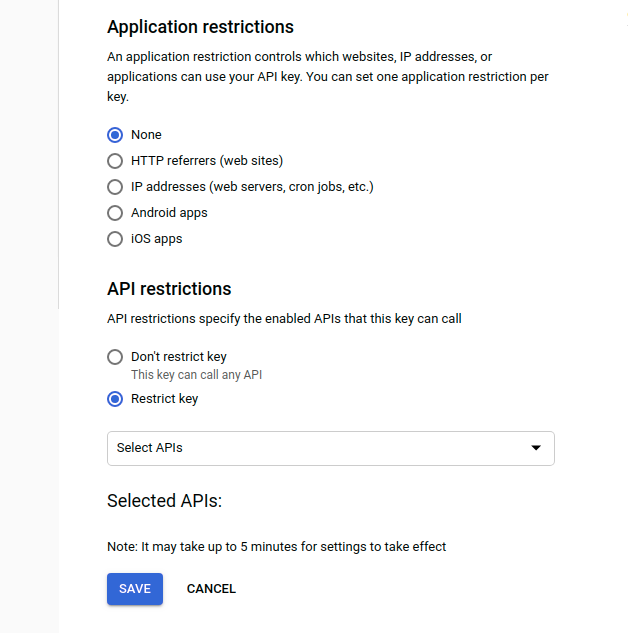
Step 2: Build the Map with Multiple Pins
The code below creates a map and adds multiple markers. You’ll need to create an HTML file and paste this code.
html
<!DOCTYPE html>
<html>
<head>
    <title>Multi-Pin Location Map</title>
    <!-- Include the Google Maps API with your key -->
    <script async defer src="https://maps.googleapis.com/maps/api/js?key=YOUR_API_KEY_HERE&callback=initMap"></script>
    <style>
        #map {
            height: 500px; /* Map height */
            width: 100%;   /* Map width */
            border-radius: 8px; /* Optional: rounded corners */
        }
    </style>
</head>
<body>
    <h2>Our Service Areas</h2>
    <div id="map"></div>

    <script>
        // The function that initializes the map
        function initMap() {
            // Set the initial center point of the map
            const mapCenter = { lat: 51.5074, lng: -0.1278 }; // London

            // Create the map object
            const map = new google.maps.Map(document.getElementById("map"), {
                zoom: 10,
                center: mapCenter,
            });

            // An array of locations: [Title, Latitude, Longitude]
            const locations = [
                ['Central London Office', 51.5074, -0.1278],
                ['North London Depot', 51.6000, -0.1500],
                ['South London Warehouse', 51.4500, -0.1000],
                ['East London Facility', 51.5200, -0.0500]
            ];

            // Create a single InfoWindow to be reused
            const infowindow = new google.maps.InfoWindow();

            // Loop through the locations and add a marker for each one
            locations.forEach(([title, lat, lng]) => {
                const marker = new google.maps.Marker({
                    position: { lat, lng },
                    map: map, // Attach marker to the map
                    title: title, // Tooltip on hover
                    // icon: 'custom-icon.png' // Uncomment to use a custom pin icon
                });

                // Add a click listener to show the location name
                marker.addListener('click', () => {
                    infowindow.setContent(`<strong>${title}</strong>`);
                    infowindow.open(map, marker);
                });
            });
        }
    </script>
</body>
</html>
Code language: HTML, XML (xml)
Replace `YOUR_API_KEY_HERE` in the script tag with the actual API key you generated in Step 1.
Step 3: Embed the Map on Your Site
Upload this HTML file to your web server. If you use a content management system like WordPress, look for an “HTML” or “Code” block in your page editor to paste this code.
The Reality of This Method: It’s a Technical Headache
While the code above works, it comes with significant overhead:
- API Management: You are responsible for securing your API key and managing usage quotas to prevent unexpected costs.
- Manual Data Entry: You must find and manually input the latitude and longitude for every single location.
- Limited Flexibility: To change pins, you have to edit the code and re-upload the file. Non-technical users cannot manage the map.
- Advanced Features Require More Code: Adding features like grouped pins (clustering) or custom popup designs requires extensive additional JavaScript knowledge.
Create Your Multi-Pin Map in Minutes, Not Hours
If the technical process above seems daunting, there’s a professional and far easier solution.
MapsFun.com is built specifically for creating beautiful, interactive maps with multiple pins without any coding.
- Visual Editor: Simply search for addresses and click to drop pins. No latitude/longitude required.
- No API Keys: We handle all the complex backend infrastructure.
- Rich Customization: Easily customize pin colors, map styles, and popup content with a user-friendly interface.
- Instant Embedding: Get a simple embed code to paste into any website, making the map live in seconds.
Why spend hours configuring code and APIs when you can achieve a better result in just a few clicks? Visit MapsFun.com to create your multi-location map today.