Solution for displaying real estate on a realtor’s map
How to Create a Professional Realtor Map for Your Real Estate Website
As a realtor, your website needs to stand out, and nothing engages potential clients more than an interactive map showcasing your listings. A dedicated “realtor map” can be your most powerful lead generation tool. While it’s possible to build one from scratch, the technical process is complex. This guide walks you through a functional method using Google Maps APIs, followed by a much simpler solution.
The manual approach requires a Google Cloud account, API key management, and coding knowledge.
Method 1: Building a Custom Realtor Map with Google Maps API
This method provides maximum customization but involves multiple technical steps.
Step 1: Google Cloud Setup & API Configuration
- 1. Create a Google Cloud Project: Go to the [Google Cloud Console](https://console.cloud.google.com/), create a new project, and enable billing (the $200 monthly credit typically covers usage for a realtor’s website).
- 2. Enable Required APIs: Navigate to “APIs & Services > Library” and enable:
- Maps JavaScript API (displays the map)
- Geocoding API (converts addresses to coordinates)
- Places API (for area search functionality)
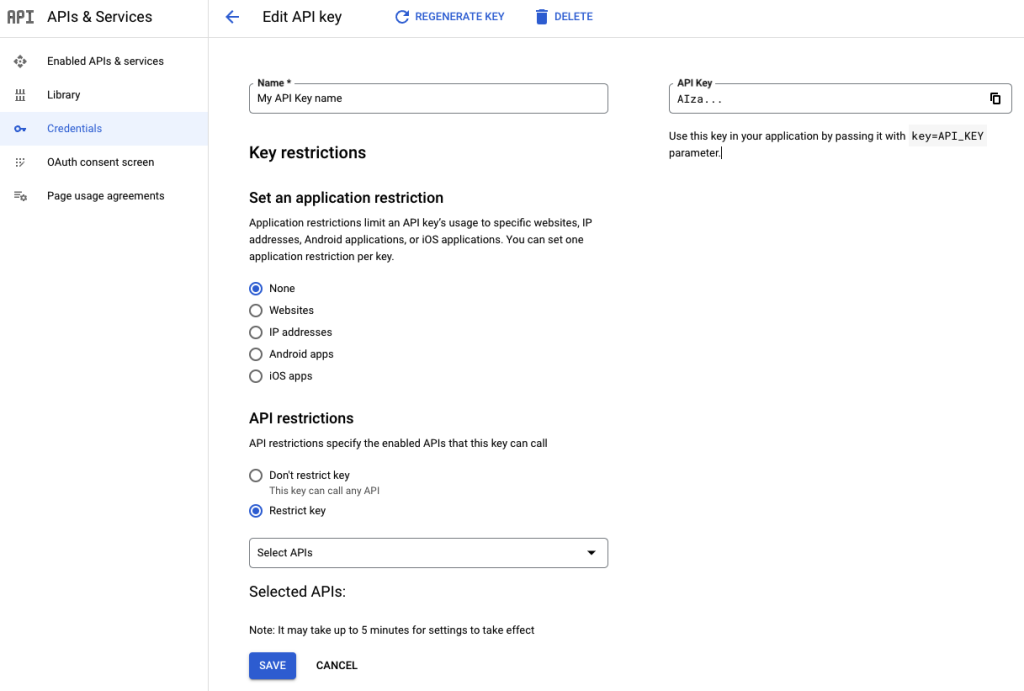
- 3. Generate Secure API Key: Create an API key in “Credentials” and restrict it to the three APIs above. Add your website domain under HTTP referrers (e.g., `https://yourrealestatesite.com/*`) for security.
Proper API key restriction is crucial for security and cost control.
Step 2: Develop the Interactive Realtor Map
The following code creates a professional realtor map with branded markers, property filtering, and lead capture functionality.
Create a file named `realtor-map.html`:
html
<!DOCTYPE html>
<html lang="en">
<head>
<meta charset="UTF-8">
<meta name="viewport" content="width=device-width, initial-scale=1.0">
<title>John Smith Realtor | Property Map</title>
<!-- Load Google Maps API -->
<script async defer src="https://maps.googleapis.com/maps/api/js?key=YOUR_API_KEY_HERE&callback=initMap&libraries=places"></script>
<style>
:root {
--primary-color: #1e40af;
--secondary-color: #3b82f6;
--accent-color: #ef4444;
}
* {
margin: 0;
padding: 0;
box-sizing: border-box;
font-family: 'Inter', sans-serif;
}
.realtor-header {
background: linear-gradient(135deg, var(--primary-color), var(--secondary-color));
color: white;
padding: 1rem 2rem;
display: flex;
justify-content: space-between;
align-items: center;
}
.realtor-info h1 {
font-size: 1.5rem;
margin-bottom: 0.25rem;
}
.realtor-info p {
opacity: 0.9;
}
.contact-btn {
background: var(--accent-color);
color: white;
padding: 0.75rem 1.5rem;
border: none;
border-radius: 6px;
font-weight: 600;
cursor: pointer;
}
.map-container {
display: flex;
height: calc(100vh - 80px);
}
.map-sidebar {
width: 400px;
background: #f8fafc;
border-right: 1px solid #e2e8f0;
display: flex;
flex-direction: column;
}
.search-filters {
padding: 1.5rem;
background: white;
border-bottom: 1px solid #e2e8f0;
}
.filter-grid {
display: grid;
grid-template-columns: 1fr 1fr;
gap: 1rem;
margin-bottom: 1rem;
}
.filter-group label {
display: block;
font-size: 0.875rem;
font-weight: 600;
margin-bottom: 0.5rem;
color: #374151;
}
.filter-select, .filter-input {
width: 100%;
padding: 0.5rem;
border: 1px solid #d1d5db;
border-radius: 6px;
font-size: 0.875rem;
}
.search-btn {
width: 100%;
background: var(--primary-color);
color: white;
padding: 0.75rem;
border: none;
border-radius: 6px;
font-weight: 600;
cursor: pointer;
}
.properties-container {
flex: 1;
overflow-y: auto;
padding: 1rem;
}
.property-card {
background: white;
border-radius: 8px;
padding: 1rem;
margin-bottom: 1rem;
box-shadow: 0 1px 3px rgba(0,0,0,0.1);
cursor: pointer;
transition: all 0.2s;
border: 2px solid transparent;
}
.property-card:hover {
transform: translateY(-2px);
box-shadow: 0 4px 6px rgba(0,0,0,0.1);
border-color: var(--secondary-color);
}
.property-card.active {
border-color: var(--accent-color);
}
.property-badge {
background: var(--accent-color);
color: white;
padding: 0.25rem 0.5rem;
border-radius: 4px;
font-size: 0.75rem;
font-weight: 600;
margin-bottom: 0.5rem;
display: inline-block;
}
.property-price {
font-size: 1.25rem;
font-weight: 700;
color: var(--primary-color);
margin-bottom: 0.5rem;
}
.property-address {
color: #6b7280;
font-size: 0.875rem;
margin-bottom: 0.75rem;
}
.property-features {
display: flex;
gap: 1rem;
font-size: 0.875rem;
color: #4b5563;
}
#map {
flex: 1;
height: 100%;
}
.lead-form {
background: white;
border-radius: 8px;
padding: 1.5rem;
margin: 1rem;
box-shadow: 0 4px 6px rgba(0,0,0,0.1);
}
.lead-form h3 {
margin-bottom: 1rem;
color: var(--primary-color);
}
.form-group {
margin-bottom: 1rem;
}
.form-input {
width: 100%;
padding: 0.5rem;
border: 1px solid #d1d5db;
border-radius: 4px;
font-size: 0.875rem;
}
.submit-btn {
width: 100%;
background: var(--primary-color);
color: white;
padding: 0.75rem;
border: none;
border-radius: 6px;
font-weight: 600;
cursor: pointer;
}
</style>
</head>
<body>
<header class="realtor-header">
<div class="realtor-info">
<h1>John Smith Realtor</h1>
<p>Your Trusted Real Estate Professional</p>
</div>
<button class="contact-btn">Contact Me</button>
</header>
<div class="map-container">
<div class="map-sidebar">
<div class="search-filters">
<div class="filter-grid">
<div class="filter-group">
<label for="price-range">Price Range</label>
<select id="price-range" class="filter-select">
<option value="any">Any Price</option>
<option value="500000">Up to $500,000</option>
<option value="750000">Up to $750,000</option>
<option value="1000000">Up to $1,000,000</option>
<option value="2000000">$1,000,000+</option>
</select>
</div>
<div class="filter-group">
<label for="bedrooms">Bedrooms</label>
<select id="bedrooms" class="filter-select">
<option value="any">Any</option>
<option value="1">1+</option>
<option value="2">2+</option>
<option value="3">3+</option>
<option value="4">4+</option>
</select>
</div>
<div class="filter-group">
<label for="property-type">Property Type</label>
<select id="property-type" class="filter-select">
<option value="any">Any Type</option>
<option value="single_family">Single Family</option>
<option value="condo">Condo</option>
<option value="townhouse">Townhouse</option>
</select>
</div>
<div class="filter-group">
<label for="status">Status</label>
<select id="status" class="filter-select">
<option value="any">Any Status</option>
<option value="active">Active</option>
<option value="pending">Pending</option>
<option value="sold">Sold</option>
</select>
</div>
</div>
<button class="search-btn" onclick="applyFilters()">Search Properties</button>
</div>
<div class="properties-container" id="properties-container">
<!-- Property listings will be generated here -->
</div>
<div class="lead-form">
<h3>Interested in a Property?</h3>
<div class="form-group">
<input type="text" class="form-input" placeholder="Your Name">
</div>
<div class="form-group">
<input type="email" class="form-input" placeholder="Your Email">
</div>
<div class="form-group">
<input type="tel" class="form-input" placeholder="Your Phone">
</div>
<button class="submit-btn">Request Information</button>
</div>
</div>
<div id="map"></div>
</div>
<script>
let map;
let markers = [];
let activeInfoWindow = null;
const allListings = [
{
id: 1,
title: "Luxury Downtown Condo",
price: 750000,
beds: 2,
baths: 2,
sqft: 1450,
address: "123 Main Street, Downtown, CA",
position: { lat: 34.0522, lng: -118.2437 },
type: "condo",
status: "active",
featured: true,
description: "Stunning downtown condo with panoramic city views and luxury finishes.",
yearBuilt: 2020,
mls: "MLS# 123456"
},
{
id: 2,
title: "Family Home in Suburbs",
price: 950000,
beds: 4,
baths: 3,
sqft: 2400,
address: "456 Oak Avenue, Suburbia, CA",
position: { lat: 34.0634, lng: -118.2780 },
type: "single_family",
status: "active",
featured: false,
description: "Perfect family home in quiet neighborhood with excellent schools.",
yearBuilt: 1995,
mls: "MLS# 123457"
},
{
id: 3,
title: "Modern Townhouse",
price: 650000,
beds: 3,
baths: 2.5,
sqft: 1800,
address: "789 Pine Road, Midtown, CA",
position: { lat: 34.0419, lng: -118.2570 },
type: "townhouse",
status: "pending",
featured: true,
description: "Recently renovated townhouse with modern amenities and private patio.",
yearBuilt: 2010,
mls: "MLS# 123458"
}
];
function initMap() {
// Initialize the map
map = new google.maps.Map(document.getElementById('map'), {
center: { lat: 34.0522, lng: -118.2437 },
zoom: 11,
styles: [
{
featureType: "poi",
elementType: "labels",
stylers: [{ visibility: "off" }]
}
]
});
// Initialize listings
updateListingsDisplay(allListings);
// Add search box for locations
const input = document.createElement('input');
input.placeholder = 'Search neighborhoods...';
input.style.cssText = `
margin-top: 10px;
margin-left: 10px;
padding: 8px 12px;
width: 300px;
border: 1px solid #ddd;
border-radius: 4px;
font-size: 14px;
`;
map.controls[google.maps.ControlPosition.TOP_LEFT].push(input);
const searchBox = new google.maps.places.SearchBox(input);
map.addListener('bounds_changed', function() {
searchBox.setBounds(map.getBounds());
});
searchBox.addListener('places_changed', function() {
const places = searchBox.getPlaces();
if (places.length === 0) return;
const bounds = new google.maps.LatLngBounds();
places.forEach(place => {
if (!place.geometry) return;
bounds.extend(place.geometry.location);
});
map.fitBounds(bounds);
});
}
function updateListingsDisplay(listings) {
// Clear existing markers
markers.forEach(marker => marker.setMap(null));
markers = [];
// Update listings container
const container = document.getElementById('properties-container');
container.innerHTML = '';
listings.forEach(listing => {
// Create custom marker
const marker = new google.maps.Marker({
position: listing.position,
map: map,
title: listing.title,
icon: {
url: getMarkerIcon(listing),
scaledSize: new google.maps.Size(32, 32)
}
});
// Create info window
const infoWindow = new google.maps.InfoWindow({
content: `
<div style="padding: 16px; max-width: 300px;">
<div style="font-size: 0.875rem; color: #6b7280; margin-bottom: 4px;">${listing.mls}</div>
<h3 style="margin: 0 0 8px 0; color: #1f2937;">${listing.title}</h3>
<div style="font-size: 1.25rem; font-weight: bold; color: #1e40af; margin-bottom: 8px;">$${listing.price.toLocaleString()}</div>
<div style="color: #6b7280; margin-bottom: 12px;">${listing.address}</div>
<div style="display: flex; gap: 12px; margin-bottom: 12px; font-size: 0.875rem;">
<span>${listing.beds} bd</span>
<span>${listing.baths} ba</span>
<span>${listing.sqft} sqft</span>
</div>
<p style="color: #4b5563; margin: 0 0 12px 0; font-size: 0.875rem;">${listing.description}</p>
<button style="background: #ef4444; color: white; border: none; padding: 8px 16px; border-radius: 4px; cursor: pointer; font-weight: 600;">
Schedule Tour
</button>
</div>
`
});
marker.addListener('click', () => {
if (activeInfoWindow) {
activeInfoWindow.close();
}
infoWindow.open(map, marker);
activeInfoWindow = infoWindow;
// Highlight corresponding property card
document.querySelectorAll('.property-card').forEach(card => {
card.classList.remove('active');
});
document.querySelector(`.property-card[data-listing-id="${listing.id}"]`).classList.add('active');
});
markers.push(marker);
// Create property card
const card = document.createElement('div');
card.className = 'property-card';
card.setAttribute('data-listing-id', listing.id);
card.innerHTML = `
${listing.featured ? '<div class="property-badge">FEATURED</div>' : ''}
<div class="property-price">$${listing.price.toLocaleString()}</div>
<div class="property-address">${listing.address}</div>
<div class="property-features">
<span>${listing.beds} bd</span>
<span>${listing.baths} ba</span>
<span>${listing.sqft} sqft</span>
</div>
`;
card.addEventListener('click', () => {
map.setCenter(listing.position);
map.setZoom(15);
if (activeInfoWindow) {
activeInfoWindow.close();
}
infoWindow.open(map, marker);
activeInfoWindow = infoWindow;
// Highlight this card
document.querySelectorAll('.property-card').forEach(c => {
c.classList.remove('active');
});
card.classList.add('active');
});
container.appendChild(card);
});
}
function getMarkerIcon(listing) {
const baseUrl = 'https://maps.google.com/mapfiles/ms/icons/';
const statusColors = {
'active': 'green',
'pending': 'orange',
'sold': 'red'
};
return `${baseUrl}${statusColors[listing.status]}-dot.png`;
}
function applyFilters() {
const priceFilter = document.getElementById('price-range').value;
const bedsFilter = document.getElementById('bedrooms').value;
const typeFilter = document.getElementById('property-type').value;
const statusFilter = document.getElementById('status').value;
const filtered = allListings.filter(listing => {
return (priceFilter === 'any' || listing.price <= priceFilter) &&
(bedsFilter === 'any' || listing.beds >= bedsFilter) &&
(typeFilter === 'any' || listing.type === typeFilter) &&
(statusFilter === 'any' || listing.status === statusFilter);
});
updateListingsDisplay(filtered);
}
// Initialize display
document.addEventListener('DOMContentLoaded', function() {
updateListingsDisplay(allListings);
});
</script>
</body>
</html>
Code language: HTML, XML (xml)Replace `YOUR_API_KEY_HERE` with your actual, restricted Google Maps API key.
Step 3: Deploy to Your Real Estate Website
For static websites, upload the HTML file directly. For WordPress, use a custom HTML block. For other platforms, use their embed code functionality.
The Hidden Complexities of a Custom Realtor Map
While the code above creates a functional realtor map, maintaining it presents significant challenges:
- Data Synchronization: Manually updating listing data in code is impractical with changing inventory
- Performance Optimization: Large numbers of listings require marker clustering and advanced loading techniques
- Mobile Experience: Ensuring perfect functionality across all devices requires extensive additional testing
- Lead Management: Integrating the contact form with your CRM requires backend development
- Brand Consistency: Maintaining your brand colors, fonts, and styling across updates demands ongoing attention
- API Management: Monitoring usage costs and handling API changes requires technical expertise
The Professional Realtor Solution: MapsFun.com
Why spend weeks building and maintaining a custom map when you can have a superior solution in minutes?
MapsFun.com is specifically designed for realtors who need powerful, branded maps without the technical complexity:
- Live MLS Integration: Connect directly to your MLS for automatic listing updates
- Brand Customization: Easily apply your brand colors, logo, and styling without coding
- Built-in Lead Capture: Integrated contact forms that connect directly to your CRM
- Automatic Optimization: We handle mobile responsiveness, loading speed, and SEO
- Zero Maintenance: Focus on your clients while we handle all technical updates
Stop building and start selling. Create a professional realtor map that showcases your listings and generates leads. Launch your map in minutes at MapsFun.com.