How to Build a Map with Multiple Locations (Complete Guide)
How to Build a Map with Multiple Locations for Your Website
Displaying multiple locations on an interactive map can transform how visitors engage with your business. Whether you’re showcasing store locations, service areas, or event venues, a well-designed map improves user experience and drives conversions.
While it’s possible to build this functionality yourself using Google Maps APIs, the process requires technical expertise. Here’s your complete guide to both approaches.
The Technical Approach: Building with Google Maps API
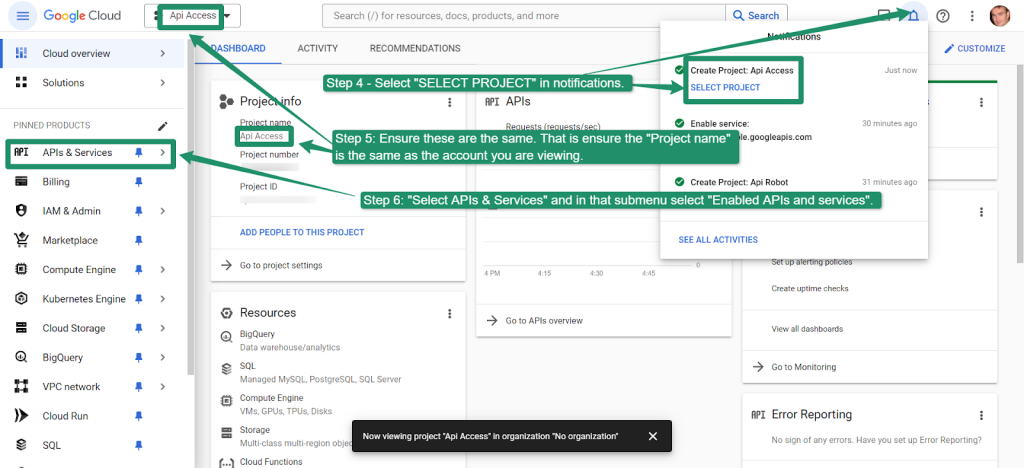
Step 1: Google Cloud Project Setup
Before writing any code, you need to configure Google’s services:
- 1. Create a Google Cloud Project
- – Go to [Google Cloud Console](https://console.cloud.google.com/)
- – Create a new project
- – Enable billing (credit card required, but $200 monthly credit usually suffices for basic usage)
- 2. Enable Required APIs
- In “APIs & Services > Library”, enable:
- – Maps JavaScript API
- – Geocoding API
- – Places API (for address search functionality)
- 3. Create and Secure API Key
- – Navigate to “Credentials”
- – Create new API key
- – Restrict by HTTP referrers (your domain) and API restrictions
Step 2: Implement the Map with Code
Create an HTML file with this complete implementation:
html
<!DOCTYPE html>
<html lang="en">
<head>
    <meta charset="UTF-8">
    <meta name="viewport" content="width=device-width, initial-scale=1.0">
    <title>Store Locator Map</title>
    <style>
        .map-container {
            width: 100%;
            max-width: 1000px;
            margin: 0 auto;
            font-family: Arial, sans-serif;
        }
        #map {
            height: 600px;
            width: 100%;
            border: 1px solid #ddd;
            border-radius: 8px;
        }
        .location-list {
            margin: 20px 0;
            padding: 15px;
            background: #f9f9f9;
            border-radius: 8px;
        }
        .controls {
            margin: 15px 0;
            text-align: center;
        }
        .search-box {
            padding: 10px;
            width: 300px;
            border: 1px solid #ddd;
            border-radius: 4px;
            margin-right: 10px;
        }
    </style>
</head>
<body>
    <div class="map-container">
        <h1>Find Our Locations</h1>

        <div class="controls">
            <input type="text" id="search-input" class="search-box" placeholder="Search locations...">
            <button onclick="searchLocations()">Search</button>
        </div>

        <div id="map"></div>

        <div class="location-list" id="location-list">
            <h3>All Locations</h3>
            <div id="locations-container"></div>
        </div>
    </div>

    <!-- Load Google Maps API -->
    <script src="https://maps.googleapis.com/maps/api/js?key=YOUR_API_KEY_HERE&libraries=places&callback=initMap" async defer></script>

    <script>
        let map;
        let markers = [];
        let infoWindow;

        function initMap() {
            // Initialize map
            map = new google.maps.Map(document.getElementById('map'), {
                center: { lat: 37.0902, lng: -95.7129 }, // Center of US
                zoom: 4,
                styles: [
                    {
                        "featureType": "poi.business",
                        "stylers": [{ "visibility": "on" }]
                    }
                ]
            });

            infoWindow = new google.maps.InfoWindow();

            // Define locations with full details
            const locations = [
                {
                    id: 1,
                    name: "New York Flagship Store",
                    position: { lat: 40.7128, lng: -74.0060 },
                    address: "123 Broadway, New York, NY 10001",
                    phone: "(555) 123-4567",
                    hours: "Mon-Sat: 9AM-9PM, Sun: 10AM-6PM"
                },
                {
                    id: 2,
                    name: "Chicago Downtown",
                    position: { lat: 41.8781, lng: -87.6298 },
                    address: "456 Michigan Ave, Chicago, IL 60601",
                    phone: "(555) 234-5678",
                    hours: "Mon-Fri: 8AM-8PM, Sat-Sun: 9AM-6PM"
                },
                {
                    id: 3,
                    name: "Los Angeles West",
                    position: { lat: 34.0522, lng: -118.2437 },
                    address: "789 Sunset Blvd, Los Angeles, CA 90046",
                    phone: "(555) 345-6789",
                    hours: "Mon-Sun: 10AM-10PM"
                },
                {
                    id: 4,
                    name: "Miami Beach Location",
                    position: { lat: 25.7617, lng: -80.1918 },
                    address: "321 Ocean Drive, Miami, FL 33139",
                    phone: "(555) 456-7890",
                    hours: "Mon-Sun: 9AM-11PM"
                },
                {
                    id: 5,
                    name: "Seattle Downtown",
                    position: { lat: 47.6062, lng: -122.3321 },
                    address: "654 Pine Street, Seattle, WA 98101",
                    phone: "(555) 567-8901",
                    hours: "Mon-Fri: 7AM-7PM, Sat-Sun: 8AM-6PM"
                }
            ];

            // Create markers and list items
            createMarkers(locations);
            populateLocationList(locations);
        }

        function createMarkers(locations) {
            // Clear existing markers
            markers.forEach(marker => marker.setMap(null));
            markers = [];

            const bounds = new google.maps.LatLngBounds();

            locations.forEach(location => {
                const marker = new google.maps.Marker({
                    position: location.position,
                    map: map,
                    title: location.name,
                    animation: google.maps.Animation.DROP
                });

                // Create info window content
                const contentString = `
                    <div class="info-window">
                        <h3>${location.name}</h3>
                        <p><strong>Address:</strong> ${location.address}</p>
                        <p><strong>Phone:</strong> ${location.phone}</p>
                        <p><strong>Hours:</strong> ${location.hours}</p>
                        <button onclick="getDirections(${location.position.lat}, ${location.position.lng})">Get Directions</button>
                    </div>
                `;

                marker.addListener('click', () => {
                    infoWindow.setContent(contentString);
                    infoWindow.open(map, marker);

                    // Add bounce animation
                    marker.setAnimation(google.maps.Animation.BOUNCE);
                    setTimeout(() => {
                        marker.setAnimation(null);
                    }, 1400);
                });

                markers.push(marker);
                bounds.extend(location.position);
            });

            // Fit map to show all markers
            map.fitBounds(bounds);
        }

        function populateLocationList(locations) {
            const container = document.getElementById('locations-container');
            container.innerHTML = '';

            locations.forEach(location => {
                const locationElement = document.createElement('div');
                locationElement.className = 'location-item';
                locationElement.innerHTML = `
                    <h4>${location.name}</h4>
                    <p>${location.address}</p>
                    <p>${location.phone}</p>
                    <small>${location.hours}</small>
                    <button onclick="focusOnLocation(${location.position.lat}, ${location.position.lng})">View on Map</button>
                `;
                container.appendChild(locationElement);
            });
        }

        function focusOnLocation(lat, lng) {
            map.setCenter({ lat, lng });
            map.setZoom(15);
        }

        function getDirections(lat, lng) {
            window.open(`https://www.google.com/maps/dir/?api=1&destination=${lat},${lng}`, '_blank');
        }

        function searchLocations() {
            const searchTerm = document.getElementById('search-input').value.toLowerCase();
            // This would typically involve more complex search logic
            alert('Search functionality requires additional Places API implementation');
        }
    </script>
</body>
</html>
Code language: HTML, XML (xml)
Remember to replace `YOUR_API_KEY_HERE` with your actual Google Maps API key.
Step 3: Deployment Challenges
When implementing this solution, you’ll encounter:
- – Cross-browser compatibility issues
- – Mobile responsiveness adjustments
- – API quota management
- – SSL certificate requirements
- – Loading performance optimization
The Reality of DIY Map Building
While the code approach offers full customization, it comes with significant challenges:
- – Steep Learning Curve: Requires proficiency in JavaScript, HTML, and CSS
- – Ongoing Maintenance: API changes break functionality without updates
- – Cost Management: Unexpected traffic spikes can generate substantial bills
- – Security Vulnerabilities: Exposed API keys can be exploited
- – Time Investment: 10-20 hours for proper implementation and testing
- – Mobile Optimization: Additional complexity for responsive design
Build Better Maps Faster with MapsFun.com
Why spend days wrestling with code when you can create professional, feature-rich maps in minutes?
MapsFun.com eliminates the technical complexity while delivering superior results:
- 🚀 Launch in Minutes – No coding required, intuitive visual editor
- 💸 Cost Predictable – Transparent pricing, no surprise bills
- 📱 Automatically Responsive – Perfect on all devices
- 🎨 Professional Templates – Designed for maximum conversion
- 🔧 Easy Updates – Modify locations instantly without technical skills
- 🛡️ Secure & Reliable – Enterprise-grade infrastructure
Stop struggling with complex APIs and fragile code. Create your perfect multi-location map today at MapsFun.com – the smart alternative to DIY map development.