How to Plot Multiple Places on Google Maps (2025 Beginner-Friendly Guide)
Master Google Maps: Plot Multiple Places Like a Pro in 2025
Tired of basic maps that don’t tell your story? Discover how to transform boring location pins into captivating visual journeys that wow your audience and drive real business results!
The Magic of Multi-Location Mapping: Why This Changes Everything
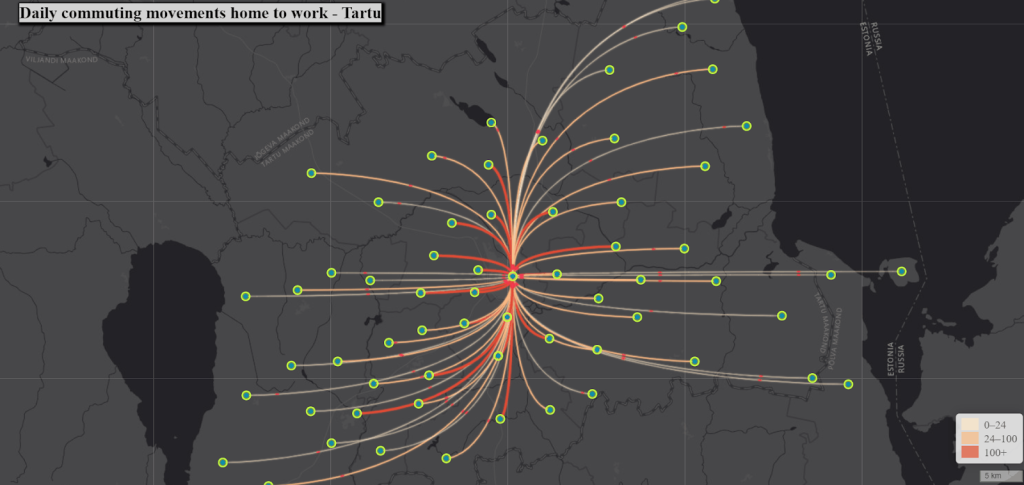
Imagine this: Instead of sending confusing address lists or boring spreadsheets, you share a stunning, interactive map that:
- – 🎯 Guides customers directly to your door
- – 📈 Boosts engagement with eye-catching visuals
- – 💼 Showcases your presence across cities or countries
- – 🎨 Tells your brand story through custom design
- – 📱 Works perfectly on every device
Ready to become a mapping wizard? Let’s dive in! ✨
🎯 Method 1: Google My Maps – Your 5-Minute Magic Wand
🎨 Create Jaw-Dropping Maps Without Coding!
Transform from zero to hero in under 5 minutes
Step 1: Unleash Your Inner Cartographer
html
<!-- The secret sauce for instant website integration -->
<iframe src="https://www.google.com/maps/d/embed?mid=YOUR_MAGIC_MAP_ID"
        width="100%" height="500"
        style="border-radius: 15px; box-shadow: 0 10px 30px rgba(0,0,0,0.2);">
</iframe>
Code language: HTML, XML (xml)
Step 2: Supercharge Your Locations with This CSV Power Move:
csv
Name,Address,Category,Magic Sauce
Epic Coffee Shop,123 Brew St,Cafe," Best Latte in Town"
Mountain Viewpoint,456 Sky Rd,Scenic," Breathtaking 360° Views"
Secret Book Nook,789 Quiet Lane,Cultural," Hidden Literary Gem"
Urban Art Gallery,321 Creative Ave,Arts," Street Art Masterpieces"
Code language: JavaScript (javascript)
💡 Pro Tip: Use emojis in descriptions to make your pins pop with personality!
Step 3: Color Code Like a Design Guru
- – 🔵 Blue pins for calm spaces (cafes, libraries)
- – 🟢 Green pins for nature spots (parks, trails)
- – 🔴 Red pins for excitement (restaurants, events)
- – 🟡 Yellow pins for shopping & services
💻 Method 2: Google Maps Platform – Become a Coding Rockstar!
🚀 Build Maps That Make People Say “WOW!”
Here’s your secret weapon – copy, paste, and dominate:
html
<!DOCTYPE html>
<html>
<head>
    <title>🔥 Ultimate Location Mapper</title>
    <style>
        body {
            background: linear-gradient(135deg, #667eea 0%, #764ba2 100%);
            font-family: 'Poppins', sans-serif;
        }
        #map {
            height: 600px;
            border-radius: 20px;
            box-shadow: 0 20px 40px rgba(0,0,0,0.3);
            border: 3px solid white;
        }
        .pulse-marker {
            animation: pulse 2s infinite;
        }
        @keyframes pulse {
            0% { transform: scale(1); }
            50% { transform: scale(1.1); }
            100% { transform: scale(1); }
        }
    </style>
</head>
<body>
    <div id="map"></div>

    <script>
        // 🎯 Your Epic Locations Data
        const epicLocations = [
            {
                name: "🌊 Ocean View Cafe",
                position: { lat: 34.0195, lng: -118.4912 },
                vibe: "Beachfront paradise with artisanal coffee",
                instaSpot: "Sunset photos guaranteed!",
                hours: "6AM-8PM Daily"
            },
            {
                name: "🏛️ Urban Museum",
                position: { lat: 34.0180, lng: -118.4880 },
                vibe: "Contemporary art meets ancient history",
                instaSpot: "Sculpture garden selfie zone",
                hours: "10AM-6PM Tue-Sun"
            },
            {
                name: "🎵 Live Music Venue",
                position: { lat: 34.0170, lng: -118.4920 },
                vibe: "Underground bands & craft cocktails",
                instaSpot: "Neon wall backdrop",
                hours: "5PM-2AM Nightly"
            }
        ];

        function initMap() {
            const map = new google.maps.Map(document.getElementById('map'), {
                zoom: 14,
                center: { lat: 34.0180, lng: -118.4900 },
                styles: [
                    {
                        "featureType": "all",
                        "elementType": "labels.text.fill",
                        "stylers": [{"color": "#ffffff"}]
                    },
                    {
                        "featureType": "water",
                        "elementType": "geometry",
                        "stylers": [{"color": "#2D9CDB"}]
                    }
                ]
            });

            // 🎪 Create Show-Stopping Markers
            epicLocations.forEach((location, index) => {
                const marker = new google.maps.Marker({
                    position: location.position,
                    map: map,
                    title: location.name,
                    icon: {
                        url: `https://maps.google.com/mapfiles/ms/icons/${getColor(index)}-dot.png`,
                        scaledSize: new google.maps.Size(50, 50)
                    },
                    animation: google.maps.Animation.BOUNCE
                });

                // 🎭 Epic Info Windows
                const content = `
                    <div style="padding: 20px; max-width: 300px;">
                        <h3 style="color: #2D9CDB; margin: 0 0 10px 0;">${location.name}</h3>
                        <p style="margin: 5px 0;">🎨 <strong>Vibe:</strong> ${location.vibe}</p>
                        <p style="margin: 5px 0;">📸 <strong>Instagram Spot:</strong> ${location.instaSpot}</p>
                        <p style="margin: 5px 0;">🕒 <strong>Hours:</strong> ${location.hours}</p>
                        <button onclick="navigateHere(${location.position.lat}, ${location.position.lng})"
                                style="background: #E74C3C; color: white; border: none; padding: 10px 20px;
                                       border-radius: 25px; cursor: pointer; margin-top: 10px;">
                            🚀 Take Me There!
                        </button>
                    </div>
                `;

                marker.addListener('click', () => {
                    new google.maps.InfoWindow({ content }).open(map, marker);
                });
            });
        }

        function getColor(index) {
            const colors = ['red', 'blue', 'green', 'yellow', 'purple', 'orange'];
            return colors[index % colors.length];
        }
    </script>
    <script src="https://maps.googleapis.com/maps/api/js?key=YOUR_API_KEY&callback=initMap" async defer></script>
</body>
</html>
Code language: HTML, XML (xml)
🎪 Advanced Magic Tricks for Mapping Masters
✨ Make Your Maps UNFORGETTABLE
1. The “Pulse” Effect – Grab Attention Instantly
javascript
// Make markers pulse like a heartbeat
function createPulsingMarker(position) {
    const marker = new google.maps.Marker({
        position: position,
        icon: {
            path: google.maps.SymbolPath.CIRCLE,
            scale: 10,
            fillColor: '#FF0000',
            fillOpacity: 0.8,
            strokeWeight: 2
        }
    });

    // Add pulsing animation
    setInterval(() => {
        marker.setAnimation(google.maps.Animation.BOUNCE);
        setTimeout(() => marker.setAnimation(null), 1500);
    }, 3000);
}
Code language: JavaScript (javascript)
2. The “Storytelling” Map – Take Visitors on a Journey
javascript
// Create a narrative path through your locations
const adventurePath = [
    "Start your day with amazing coffee",
    "Explore contemporary art masterpieces",
    "Enjoy lunch with ocean views",
    "Discover hidden local gems",
    "End with live music and cocktails"
];

function createAdventureTour() {
    // Connect locations with a colorful path
    const adventureLine = new google.maps.Polyline({
        path: epicLocations.map(loc => loc.position),
        geodesic: true,
        strokeColor: '#FF6B6B',
        strokeOpacity: 1.0,
        strokeWeight: 4
    });
    adventureLine.setMap(map);
}Code language: JavaScript (javascript)
🚀 The Game-Changer: Why Thousands Are Switching to MapsFun.com
Feeling overwhelmed by code? You’re not alone! Here’s what mapping heroes are saying:
“I spent 3 weeks building a custom map, only to have it break every time Google updated their API. With MapsFun.com , I created a BETTER map in 15 minutes without writing a single line of code!” – Sarah Chen, Travel Blogger with 500K Followers
🎯 MapsFun.com : Your Shortcut to Mapping Stardom
- ✨ Instant Magic Features:
- – 🎨 Drag & Drop Editor – No coding degree required!
- – 📱 Auto-Magic Mobile Optimization – Perfect on every device
- – 🚀 One-Click Publishing – Go live in 60 seconds
- – 🌈 Professionally Designed Templates – Look like a design agency
- – 📊 Live Analytics – Watch your engagement skyrocket
- – 🔄 Real-Time Updates – Change pins instantly
The Shocking Truth:
| Traditional Development | MapsFun.com |
|---|---|
| 40+ hours development | 5 minutes setup |
| $2,000+ developer costs | $29/month all-inclusive |
| Ongoing maintenance headaches | Everything handled for you |
| Technical skills required | Anyone can do it! |
🏆 Your Quick-Start Challenge: Become a Mapping Legend TODAY!
🎯 Your 3-Step Journey to Mapping Greatness:
Step 1: Choose Your Path
- – 🚶 The Express Lane: Try [MapsFun.com ] FREE – Create your first stunning map in 5 minutes
- – 💻 The Adventure Route: Use our code examples above to build something unique
Step 2: Create Your “Wow” Moment
- – Upload your locations (even from Excel!)
- – Choose a template that matches your vibe
- – Add your special touches and brand colors
Step 3: Share and Dominate
- – Embed on your website
- – Share on social media
- – Watch the engagement pour in! 📈
Your Mapping Success Checklist
- ✅ This Week:
- – Plot your first 5 locations
- – Choose your color scheme
- – Add compelling descriptions
- – Test on mobile devices
- ✅ This Month:
- – Reach 25+ locations mapped
- – Implement visitor analytics
- – Create seasonal map variations
- – Share across all your platforms
- ✅ This Quarter:
- – Hit 100+ locations
- – Optimize based on engagement data
- – Integrate with your booking system
- – Become the go-to resource in your niche
Ready to Transform Your Locations into an Unforgettable Experience?
Don’t let complexity stop you from creating something amazing. Whether you choose the code-free magic of MapsFun.com or the custom power of Google Maps Platform, your journey to mapping mastery starts NOW!
The world is waiting to see your story unfold on the map. What incredible journey will you create today?
P.S. Still hesitating? Remember: Every great adventure begins with a single pin on a map. Drop yours today and watch your world transform! 🌍✨
[Click Here to Start Your Mapping Adventure with MapsFun.com ] 🚀
The best time to plant a tree was 20 years ago. The second best time is now. The best time to create an amazing map was yesterday. The second best time is today!”