Top WordPress Plugins for Multiple Location Maps
How to Create a Multiple Location Map for WordPress: A Developer’s Guide
Displaying multiple locations on your WordPress site—whether for store locators, event venues, or service areas—significantly enhances user experience. While you can build a custom solution, it requires substantial development work. This guide will show you how to create a custom multiple location map plugin from scratch.
This method requires PHP/JavaScript knowledge and a Google Cloud account with billing enabled.
Method 1: Build a Custom Multiple Location Map Plugin
This approach gives you complete control but involves creating a custom WordPress plugin.
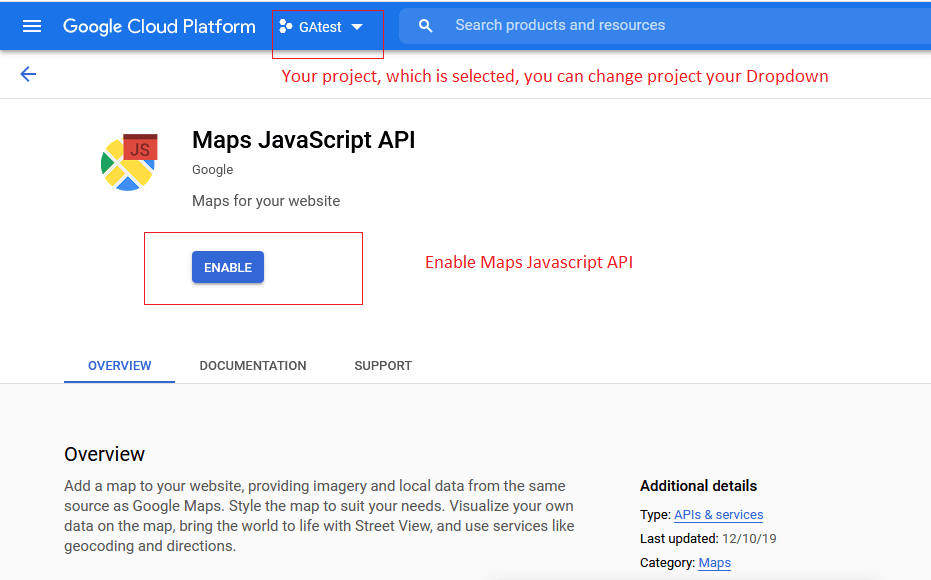
Step 1: Set Up Google Maps Platform
- 1. Create a Google Cloud Project at the [Google Cloud Console]
- 2. Enable Billing (you’ll get $200 monthly credit)
- 3. Enable Maps JavaScript API and Geocoding API
- 4. Create and restrict an API Key to your domain and the enabled APIs
Restrict your API key to prevent unauthorized usage.
Step 2: Create the Custom WordPress Plugin
Create a new folder in your `/wp-content/plugins/` directory called `multi-location-map` and add these files:
A. Create the main plugin file: `multi-location-map.php`
php
<?php
/**
 * Plugin Name: Multiple Location Map
 * Description: Display multiple locations on an interactive Google Map
 * Version: 1.0
 */

// Prevent direct access
if (!defined('ABSPATH')) {
    exit;
}

class MultipleLocationMap {

    public function __construct() {
        add_action('init', array($this, 'init'));
        add_action('wp_enqueue_scripts', array($this, 'enqueue_scripts'));
        add_shortcode('multi_location_map', array($this, 'render_map_shortcode'));
    }

    public function init() {
        // Register custom post type for locations
        register_post_type('location',
            array(
                'labels' => array(
                    'name' => __('Locations'),
                    'singular_name' => __('Location')
                ),
                'public' => true,
                'has_archive' => true,
                'supports' => array('title', 'editor', 'custom-fields')
            )
        );
    }

    public function enqueue_scripts() {
        global $post;
        if (is_a($post, 'WP_Post') && has_shortcode($post->post_content, 'multi_location_map')) {
            wp_enqueue_script('google-maps', 'https://maps.googleapis.com/maps/api/js?key=YOUR_API_KEY_HERE&callback=Function.prototype', array(), null, true);
            wp_enqueue_script('multi-location-map', plugin_dir_url(__FILE__) . 'map.js', array('jquery'), '1.0', true);

            // Pass locations to JavaScript
            $locations = $this->get_locations();
            wp_localize_script('multi-location-map', 'mapData', array(
                'locations' => $locations,
                'center' => !empty($locations) ? $locations[0] : array('lat' => 40.7128, 'lng' => -74.0060)
            ));
        }
    }

    private function get_locations() {
        $locations = array();
        $posts = get_posts(array(
            'post_type' => 'location',
            'numberposts' => -1
        ));

        foreach ($posts as $post) {
            $lat = get_post_meta($post->ID, 'latitude', true);
            $lng = get_post_meta($post->ID, 'longitude', true);
            $address = get_post_meta($post->ID, 'address', true);

            if ($lat && $lng) {
                $locations[] = array(
                    'title' => $post->post_title,
                    'lat' => floatval($lat),
                    'lng' => floatval($lng),
                    'address' => $address,
                    'content' => wp_trim_words($post->post_content, 20)
                );
            }
        }

        return $locations;
    }

    public function render_map_shortcode($atts) {
        $atts = shortcode_atts(array(
            'height' => '500px',
            'width' => '100%'
        ), $atts);

        return '<div id="multi-location-map" style="height: ' . esc_attr($atts['height']) . '; width: ' . esc_attr($atts['width']) . '; border-radius: 8px; box-shadow: 0 2px 10px rgba(0,0,0,0.1);"></div>';
    }
}

new MultipleLocationMap();

// Add meta boxes for location data
function add_location_meta_boxes() {
    add_meta_box('location_coordinates', 'Location Coordinates', 'location_coordinates_callback', 'location', 'normal', 'high');
}
add_action('add_meta_boxes', 'add_location_meta_boxes');

function location_coordinates_callback($post) {
    $lat = get_post_meta($post->ID, 'latitude', true);
    $lng = get_post_meta($post->ID, 'longitude', true);
    $address = get_post_meta($post->ID, 'address', true);
    ?>
    <p>
        <label>Address:</label>
        <input type="text" name="location_address" value="<?php echo esc_attr($address); ?>" style="width: 100%; margin-bottom: 10px;" placeholder="Enter full address for geocoding">
    </p>
    <p>
        <label>Latitude:</label>
        <input type="text" name="latitude" value="<?php echo esc_attr($lat); ?>" style="width: 48%; margin-right: 2%;">
        <label>Longitude:</label>
        <input type="text" name="longitude" value="<?php echo esc_attr($lng); ?>" style="width: 48%;">
    </p>
    <p><small>Use <a href="https://www.latlong.net/" target="_blank">latlong.net</a> to find coordinates</small></p>
    <?php
}

function save_location_metadata($post_id) {
    if (defined('DOING_AUTOSAVE') && DOING_AUTOSAVE) return;

    if (isset($_POST['latitude'])) {
        update_post_meta($post_id, 'latitude', sanitize_text_field($_POST['latitude']));
    }
    if (isset($_POST['longitude'])) {
        update_post_meta($post_id, 'longitude', sanitize_text_field($_POST['longitude']));
    }
    if (isset($_POST['location_address'])) {
        update_post_meta($post_id, 'address', sanitize_text_field($_POST['location_address']));
    }
}
add_action('save_post', 'save_location_metadata');
?>
Code language: HTML, XML (xml)
B. Create the JavaScript file: `map.js
javascript
jQuery(document).ready(function($) {
    function initMultiLocationMap() {
        const mapElement = document.getElementById('multi-location-map');
        if (!mapElement) return;

        const map = new google.maps.Map(mapElement, {
            zoom: 10,
            center: new google.maps.LatLng(mapData.center.lat, mapData.center.lng),
            mapTypeControl: false,
            styles: [
                {featureType: "poi", stylers: [{visibility: "off"}]},
                {featureType: "transit", stylers: [{visibility: "off"}]}
            ]
        });

        const bounds = new google.maps.LatLngBounds();
        const infoWindow = new google.maps.InfoWindow();

        // Add markers for each location
        mapData.locations.forEach(function(location) {
            const marker = new google.maps.Marker({
                position: {lat: location.lat, lng: location.lng},
                map: map,
                title: location.title
            });

            bounds.extend(marker.getPosition());

            // Add click listener for info window
            marker.addListener('click', function() {
                infoWindow.setContent(`
                    <div style="padding: 12px; max-width: 250px;">
                        <h3 style="margin: 0 0 8px 0; color: #2c3e50;">${location.title}</h3>
                        <p style="margin: 0 0 8px 0; color: #666;">${location.address}</p>
                        <p style="margin: 0; font-size: 14px;">${location.content}</p>
                    </div>
                `);
                infoWindow.open(map, marker);
            });
        });

        // Adjust map bounds to show all markers
        if (mapData.locations.length > 1) {
            map.fitBounds(bounds);
        }
    }

    // Initialize map when Google Maps API is loaded
    if (typeof google !== 'undefined') {
        initMultiLocationMap();
    } else {
        window.initMultiLocationMap = initMultiLocationMap;
    }
});
Code language: JavaScript (javascript)
Step 3: Install and Configure the Plugin
- 1. Replace `YOUR_API_KEY_HERE` with your actual Google Maps API key
- 2. Zip the plugin folder and upload via WordPress Admin > Plugins > Add New
- 3. Activate the plugin
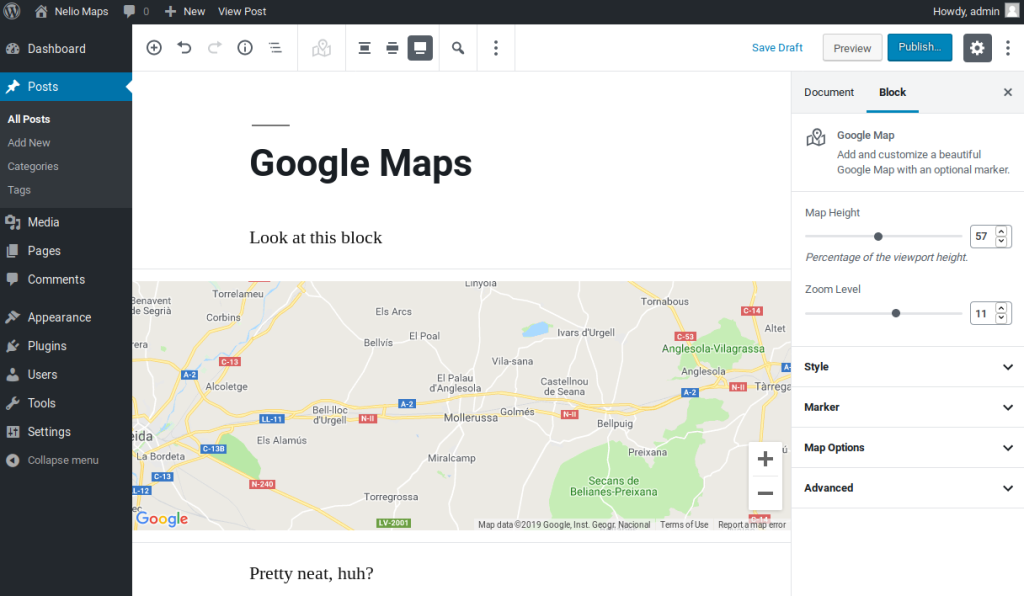
- 4. Add locations via the new “Locations” menu in WordPress admin
- 5. Use the shortcode `[multi_location_map]` on any post or page
Add and manage locations through the custom post type interface.
The Challenges of This Custom Plugin Method
While this solution offers complete control, it comes with significant drawbacks:
- Development Complexity: Requires extensive PHP and JavaScript knowledge
- Maintenance Burden: You’re responsible for security updates and compatibility
- No Geocoding: Users must manually find and enter latitude/longitude coordinates
- Limited Features: Missing advanced functionality like search filters, categories, or custom marker clustering
- API Management: Requires ongoing monitoring of Google Cloud usage and costs
- Time-Consuming: Development and testing can take days or weeks
Get a Professional Multi-Location Map in Minutes with MapsFun.com
Why spend weeks developing and maintaining a custom solution when you can have a superior, feature-rich map instantly?
MapsFun.com offers the ultimate WordPress multi-location mapping solution:
- 1. Zero Coding Required: Create stunning maps with our visual editor—no development needed
- 2. Automatic Geocoding: Simply enter addresses—we handle the coordinates automatically
- 3. Advanced Features: Marker clustering, category filters, live search, and custom styling
- 4. Easy WordPress Integration: Simple plugin installation or embed code
- 5. Fully Managed: No API keys, no security concerns, automatic updates
Stop wasting time on complex development and maintenance. Create a professional, feature-rich multi-location map in just a few clicks at MapsFun.com.