Best WordPress Map Plugins for Multiple Locations
How to Create a WordPress Map Plugin for Multiple Locations: A Developer’s Guide
Displaying multiple locations on your WordPress site is essential for businesses with multiple stores, service areas, or event venues. While you can build a custom plugin, it requires significant development expertise. This guide will show you how to create a functional multiple location map plugin from scratch.
This method requires advanced PHP/JavaScript knowledge and a Google Cloud account with billing enabled.
Method 1: Build a Custom Multiple Locations Map Plugin
This approach creates a professional-grade solution but involves complex development work.
Step 1: Google Maps Platform Setup
- 1. Create a Google Cloud Project at [console.cloud.google.com]
- 2. Enable Billing (utilizing the $200 monthly credit)
- 3. Enable Maps JavaScript API and Geocoding API
- 4. Create and restrict an API Key to your domain
Enable the necessary APIs for your custom plugin.
Step 2: Create the Custom WordPress Plugin
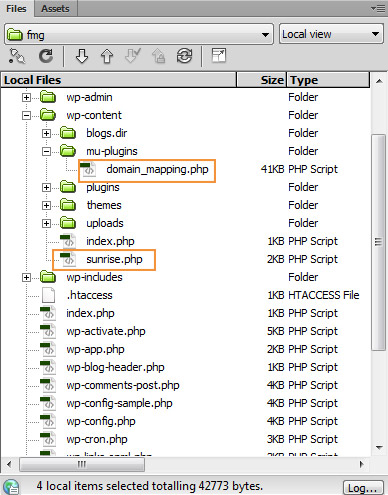
Create a new directory `/wp-content/plugins/multi-location-maps/` with these files:
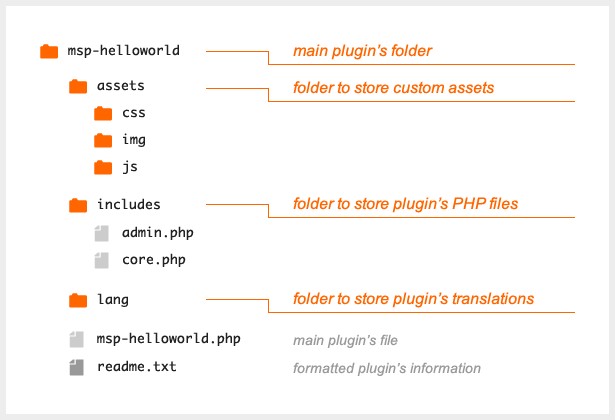
A. Main plugin file: `multi-location-maps.php`
php
<?php
/**
 * Plugin Name: Multi Location Maps
 * Description: Advanced multiple location mapping with custom post types and shortcodes
 * Version: 2.0
 * Author: Your Name
 */

defined('ABSPATH') or die('No direct access allowed!');

class WP_Multi_Location_Maps {

    private $api_key;

    public function __construct() {
        $this->api_key = get_option('wmlm_api_key', '');

        add_action('init', array($this, 'register_location_post_type'));
        add_action('add_meta_boxes', array($this, 'add_location_meta_boxes'));
        add_action('save_post', array($this, 'save_location_metadata'));
        add_action('admin_menu', array($this, 'add_admin_menu'));
        add_action('admin_init', array($this, 'register_settings'));
        add_shortcode('wmlm_map', array($this, 'render_map_shortcode'));
        add_action('wp_enqueue_scripts', array($this, 'enqueue_scripts'));
        register_activation_hook(__FILE__, array($this, 'activate_plugin'));
    }

    public function activate_plugin() {
        flush_rewrite_rules();
    }

    public function register_location_post_type() {
        $args = array(
            'public' => true,
            'label'  => 'Locations',
            'supports' => array('title', 'editor', 'thumbnail'),
            'menu_icon' => 'dashicons-location',
            'show_in_rest' => true,
            'has_archive' => true
        );
        register_post_type('location', $args);
    }

    public function add_location_meta_boxes() {
        add_meta_box('location_coordinates', 'Location Details', array($this, 'render_coordinates_meta_box'), 'location', 'normal', 'high');
    }

    public function render_coordinates_meta_box($post) {
        wp_nonce_field('wmlm_save_location', 'wmlm_nonce');

        $address = get_post_meta($post->ID, '_wmlm_address', true);
        $lat = get_post_meta($post->ID, '_wmlm_lat', true);
        $lng = get_post_meta($post->ID, '_wmlm_lng', true);
        $phone = get_post_meta($post->ID, '_wmlm_phone', true);
        ?>
        <div style="display: grid; grid-template-columns: 1fr 1fr; gap: 15px;">
            <div>
                <label><strong>Full Address:</strong></label>
                <input type="text" name="wmlm_address" value="<?php echo esc_attr($address); ?>" style="width: 100%;" placeholder="Enter full address for geocoding">
            </div>
            <div>
                <label><strong>Phone Number:</strong></label>
                <input type="text" name="wmlm_phone" value="<?php echo esc_attr($phone); ?>" style="width: 100%;">
            </div>
            <div>
                <label><strong>Latitude:</strong></label>
                <input type="text" name="wmlm_lat" value="<?php echo esc_attr($lat); ?>" style="width: 100%;">
            </div>
            <div>
                <label><strong>Longitude:</strong></label>
                <input type="text" name="wmlm_lng" value="<?php echo esc_attr($lng); ?>" style="width: 100%;">
            </div>
        </div>
        <p><small><em>Leave latitude/longitude empty and save to attempt automatic geocoding from address.</em></small></p>
        <?php
    }

    public function save_location_metadata($post_id) {
        if (!isset($_POST['wmlm_nonce']) || !wp_verify_nonce($_POST['wmlm_nonce'], 'wmlm_save_location')) {
            return;
        }

        if (defined('DOING_AUTOSAVE') && DOING_AUTOSAVE) return;

        $fields = array('address', 'lat', 'lng', 'phone');
        foreach ($fields as $field) {
            if (isset($_POST['wmlm_' . $field])) {
                update_post_meta($post_id, '_wmlm_' . $field, sanitize_text_field($_POST['wmlm_' . $field]));
            }
        }

        // Auto-geocode if coordinates are empty but address exists
        $address = get_post_meta($post_id, '_wmlm_address', true);
        $lat = get_post_meta($post_id, '_wmlm_lat', true);
        $lng = get_post_meta($post_id, '_wmlm_lng', true);

        if ($address && (!$lat || !$lng) && $this->api_key) {
            $this->geocode_address($post_id, $address);
        }
    }

    private function geocode_address($post_id, $address) {
        $url = 'https://maps.googleapis.com/maps/api/geocode/json?address=' . urlencode($address) . '&key=' . $this->api_key;

        $response = wp_remote_get($url);
        if (is_wp_error($response)) return false;

        $data = json_decode(wp_remote_retrieve_body($response), true);

        if ($data['status'] === 'OK' && !empty($data['results'][0]['geometry']['location'])) {
            $location = $data['results'][0]['geometry']['location'];
            update_post_meta($post_id, '_wmlm_lat', $location['lat']);
            update_post_meta($post_id, '_wmlm_lng', $location['lng']);
            return true;
        }

        return false;
    }

    public function add_admin_menu() {
        add_options_page('Multi Location Maps Settings', 'Map Settings', 'manage_options', 'wmlm-settings', array($this, 'render_settings_page'));
    }

    public function register_settings() {
        register_setting('wmlm_settings', 'wmlm_api_key');
        register_setting('wmlm_settings', 'wmlm_default_zoom');
        register_setting('wmlm_settings', 'wmlm_map_style');
    }

    public function render_settings_page() {
        ?>
        <div class="wrap">
            <h1>Multi Location Maps Settings</h1>
            <form method="post" action="options.php">
                <?php settings_fields('wmlm_settings'); ?>
                <table class="form-table">
                    <tr>
                        <th scope="row">Google Maps API Key</th>
                        <td><input type="text" name="wmlm_api_key" value="<?php echo esc_attr(get_option('wmlm_api_key')); ?>" class="regular-text"></td>
                    </tr>
                    <tr>
                        <th scope="row">Default Zoom Level</th>
                        <td><input type="number" name="wmlm_default_zoom" value="<?php echo esc_attr(get_option('wmlm_default_zoom', '10')); ?>" min="1" max="20"></td>
                    </tr>
                </table>
                <?php submit_button(); ?>
            </form>
        </div>
        <?php
    }

    public function enqueue_scripts() {
        global $post;
        if (is_a($post, 'WP_Post') && has_shortcode($post->post_content, 'wmlm_map')) {
            wp_enqueue_script('google-maps', 'https://maps.googleapis.com/maps/api/js?key=' . $this->api_key . '&loading=async', array(), null, true);
            wp_enqueue_script('wmlm-frontend', plugin_dir_url(__FILE__) . 'assets/frontend.js', array('jquery'), '1.0', true);

            // Pass data to JavaScript
            $locations = $this->get_all_locations();
            wp_localize_script('wmlm-frontend', 'wmlmData', array(
                'locations' => $locations,
                'defaultZoom' => get_option('wmlm_default_zoom', 10),
                'mapStyle' => get_option('wmlm_map_style', '[]')
            ));

            wp_enqueue_style('wmlm-styles', plugin_dir_url(__FILE__) . 'assets/styles.css', array(), '1.0');
        }
    }

    private function get_all_locations() {
        $locations = array();
        $posts = get_posts(array(
            'post_type' => 'location',
            'numberposts' => -1,
            'post_status' => 'publish'
        ));

        foreach ($posts as $post) {
            $locations[] = array(
                'id' => $post->ID,
                'title' => $post->post_title,
                'description' => wp_trim_words($post->post_content, 25),
                'address' => get_post_meta($post->ID, '_wmlm_address', true),
                'phone' => get_post_meta($post->ID, '_wmlm_phone', true),
                'lat' => floatval(get_post_meta($post->ID, '_wmlm_lat', true)),
                'lng' => floatval(get_post_meta($post->ID, '_wmlm_lng', true)),
                'thumbnail' => get_the_post_thumbnail_url($post->ID, 'thumbnail')
            );
        }

        return $locations;
    }

    public function render_map_shortcode($atts) {
        $atts = shortcode_atts(array(
            'height' => '500px',
            'width' => '100%',
            'zoom' => 'auto',
            'cluster' => 'true'
        ), $atts);

        ob_start();
        ?>
        <div class="wmlm-map-container">
            <div class="wmlm-map"
                 data-height="<?php echo esc_attr($atts['height']); ?>"
                 data-width="<?php echo esc_attr($atts['width']); ?>"
                 data-zoom="<?php echo esc_attr($atts['zoom']); ?>"
                 data-cluster="<?php echo esc_attr($atts['cluster']); ?>"
                 style="height: <?php echo esc_attr($atts['height']); ?>; width: <?php echo esc_attr($atts['width']); ?>;">
            </div>
            <div class="wmlm-locations-list"></div>
        </div>
        <?php
        return ob_get_clean();
    }
}

new WP_Multi_Location_Maps();
?>
Code language: HTML, XML (xml)
B. Create frontend JavaScript: `/assets/frontend.js
javascript
(function($) {
    'use strict';

    class MultiLocationMap {
        constructor(container) {
            this.container = container;
            this.map = null;
            this.markers = [];
            this.infoWindow = null;
            this.settings = {
                height: container.data('height') || '500px',
                width: container.data('width') || '100%',
                zoom: container.data('zoom') || 'auto',
                cluster: container.data('cluster') === 'true'
            };

            this.init();
        }

        init() {
            if (typeof google === 'undefined') {
                console.error('Google Maps API not loaded');
                return;
            }

            this.createMap();
            this.addMarkers();
            this.addListings();
        }

        createMap() {
            const center = this.calculateCenter();

            this.map = new google.maps.Map(this.container[0], {
                zoom: this.settings.zoom === 'auto' ? 10 : parseInt(this.settings.zoom),
                center: center,
                styles: JSON.parse(wmlmData.mapStyle || '[]'),
                mapTypeControl: false,
                streetViewControl: true,
                fullscreenControl: true
            });

            this.infoWindow = new google.maps.InfoWindow();
        }

        calculateCenter() {
            if (wmlmData.locations.length === 0) {
                return { lat: 40.7128, lng: -74.0060 }; // Default to NYC
            }

            const bounds = new google.maps.LatLngBounds();
            wmlmData.locations.forEach(location => {
                bounds.extend(new google.maps.LatLng(location.lat, location.lng));
            });

            return bounds.getCenter();
        }

        addMarkers() {
            const bounds = new google.maps.LatLngBounds();

            wmlmData.locations.forEach(location => {
                const marker = new google.maps.Marker({
                    position: { lat: location.lat, lng: location.lng },
                    map: this.map,
                    title: location.title,
                    icon: this.getCustomIcon()
                });

                this.markers.push(marker);
                bounds.extend(marker.getPosition());

                // Add click listener
                marker.addListener('click', () => {
                    this.showInfoWindow(marker, location);
                });
            });

            // Fit map to show all markers
            if (wmlmData.locations.length > 1 && this.settings.zoom === 'auto') {
                this.map.fitBounds(bounds);
            }
        }

        getCustomIcon() {
            // Return custom marker icon or null for default
            return null;
        }

        showInfoWindow(marker, location) {
            const content = `
                <div class="wmlm-info-window">
                    ${location.thumbnail ? `<img src="${location.thumbnail}" alt="${location.title}" style="max-width: 100px; float: left; margin-right: 10px;">` : ''}
                    <h3 style="margin: 0 0 8px 0;">${location.title}</h3>
                    <p style="margin: 0 0 5px 0; color: #666;">${location.address}</p>
                    ${location.phone ? `<p style="margin: 0 0 5px 0;">📞 ${location.phone}</p>` : ''}
                    <p style="margin: 0; font-size: 14px;">${location.description}</p>
                    <div style="clear: both;"></div>
                </div>
            `;

            this.infoWindow.setContent(content);
            this.infoWindow.open(this.map, marker);
        }

        addListings() {
            const $list = $('.wmlm-locations-list');
            if ($list.length === 0) return;

            let html = '<div class="wmlm-locations">';
            wmlmData.locations.forEach(location => {
                html += `
                    <div class="wmlm-location-item" data-lat="${location.lat}" data-lng="${location.lng}">
                        <h4>${location.title}</h4>
                        <p class="address">${location.address}</p>
                        ${location.phone ? `<p class="phone">${location.phone}</p>` : ''}
                    </div>
                `;
            });
            html += '</div>';

            $list.html(html);

            // Add click handlers for listings
            $('.wmlm-location-item').on('click', (e) => {
                const $item = $(e.currentTarget);
                const lat = parseFloat($item.data('lat'));
                const lng = parseFloat($item.data('lng'));

                this.map.panTo({ lat, lng });
                this.map.setZoom(15);
            });
        }
    }

    // Initialize maps when document is ready
    $(document).ready(function() {
        $('.wmlm-map').each(function() {
            new MultiLocationMap($(this));
        });
    });

})(jQuery);
Code language: JavaScript (javascript)
C. Create CSS file: `/assets/styles.css
css
.wmlm-map-container {
    margin: 20px 0;
    border-radius: 8px;
    overflow: hidden;
    box-shadow: 0 4px 12px rgba(0,0,0,0.1);
}

.wmlm-map {
    border-radius: 8px;
}

.wmlm-locations {
    padding: 20px;
    background: #f9f9f9;
}

.wmlm-location-item {
    padding: 15px;
    margin-bottom: 10px;
    background: white;
    border-radius: 6px;
    cursor: pointer;
    transition: all 0.3s ease;
    border-left: 4px solid #4CAF50;
}

.wmlm-location-item:hover {
    transform: translateX(5px);
    box-shadow: 0 2px 8px rgba(0,0,0,0.1);
}

.wmlm-location-item h4 {
    margin: 0 0 8px 0;
    color: #2c3e50;
}

.wmlm-location-item .address {
    margin: 0 0 5px 0;
    color: #666;
    font-size: 14px;
}

.wmlm-location-item .phone {
    margin: 0;
    color: #4CAF50;
    font-weight: bold;
}

.wmlm-info-window {
    max-width: 300px;
    font-family: Arial, sans-serif;
}

.wmlm-info-window img {
    border-radius: 4px;
}
Code language: CSS (css)
Step 3: Install and Use the Plugin
1. Zip the plugin folder and upload via WordPress Admin
2. Activate the plugin and configure your API key in Settings > Map Settings
3. Add locations through the new Locations menu
4. Use shortcode `[wmlm_map]` on any page or post
Manage locations through a custom post type with detailed metadata
The Challenges of This Custom Plugin Development
While this solution offers complete control, it comes with significant challenges:
- Complex Development: Requires advanced PHP, JavaScript, and WordPress API knowledge
- Maintenance Burden: You’re responsible for security updates, WordPress compatibility, and bug fixes
- Limited Geocoding: Basic geocoding implementation without error handling or batch processing
- No Advanced Features: Missing marker clustering, category filters, live search, or import/export functionality
- API Management Complexity: Requires ongoing monitoring of Google Cloud usage, quotas, and costs
- Time Investment: Development, testing, and debugging can take weeks of dedicated work
- No Support: You’re on your own for troubleshooting and feature requests
Get a Professional Multi-Location Map in Minutes with MapsFun.com
Why spend weeks developing and maintaining a complex plugin when you can have a superior solution instantly?
MapsFun.com offers the ultimate WordPress multiple location mapping solution:
- 1. Zero Coding Required: Create stunning, feature-rich maps with our visual editor—no development needed
- 2. Automatic Geocoding: Simply enter addresses—we handle all coordinate processing automatically
- 3. Advanced Features: Marker clustering, category filters, live search, custom styling, and import/export
- 4. Easy WordPress Integration: Simple plugin installation with seamless WordPress integration
- 5. Fully Managed: No API key management, no security concerns, automatic updates and support
- 6. Professional Support: Get help when you need it from our dedicated support team
Stop wasting time on complex development and maintenance. Create a professional, feature-rich multi-location map in just a few clicks at MapsFun.com.