Homes for Sale Map (2025 Guide to Finding Properties)
How to Create an Interactive Homes for Sale Map for Your Real Estate Website
An interactive map showcasing your property listings is no longer a luxury—it’s a necessity for engaging modern home buyers. While you can build one from scratch using Google Maps, the process is technically complex. This guide provides a working method using the Google Maps Platform, followed by a dramatically simpler solution.
The manual method requires a Google Cloud account, API key management, and coding knowledge.
Method 1: The Technical Approach with Google Maps API
This method offers full control over the map’s appearance and functionality but involves multiple technical steps.
Step 1: Google Cloud Setup & API Configuration
- 1. Create a Google Cloud Project: Go to the [Google Cloud Console](https://console.cloud.google.com/), create a new project, and enable billing (the $200 monthly credit typically covers usage for a small to medium website).
- 2. Enable Necessary APIs: Navigate to “APIs & Services > Library” and enable the **Maps JavaScript API** and the **Geocoding API** (to convert property addresses into coordinates).
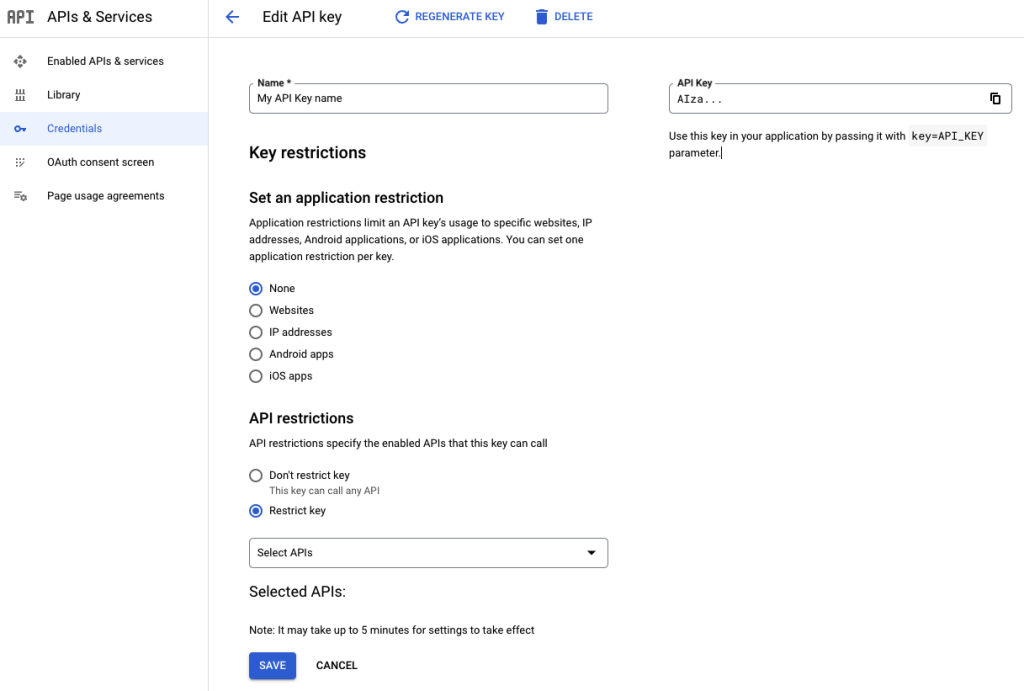
- 3. Generate and Secure an API Key: In the “Credentials” section, create an API key. **Crucially, restrict this key** to the two APIs mentioned above and to your website’s domain (e.g., `https://yourrealestatesite.com/*`) to prevent unauthorized use.
Step 2: Build the Property Map with Custom Markers
Create an HTML file and use the following code. This code creates a map with custom home-shaped markers and info windows that display key property details.
Create a file named `property-listings-map.html`:
html
<!DOCTYPE html>
<html>
<head>
    <title>Premium Property Listings</title>
    <!-- Load the Google Maps API with your key -->
    <script async defer src="https://maps.googleapis.com/maps/api/js?key=YOUR_API_KEY_HERE&callback=initMap"></script>
    <style>
        #property-map {
            height: 600px;
            width: 100%;
            border-radius: 8px;
            border: 1px solid #ddd;
        }
        .map-container {
            max-width: 1200px;
            margin: 20px auto;
            padding: 0 20px;
        }
    </style>
</head>
<body>
    <div class="map-container">
        <h2>Explore Our Featured Homes</h2>
        <div id="property-map"></div>
    </div>

    <script>
        function initMap() {
            // Center the map on your target area
            const mapCenter = { lat: 34.0522, lng: -118.2437 }; // Los Angeles

            const map = new google.maps.Map(document.getElementById("property-map"), {
                zoom: 10,
                center: mapCenter,
                mapId: 'DEMO_MAP_ID' // Optional for custom styled maps
            });

            // Array of property listings
            const properties = [
                {
                    title: "Modern Villa in Beverly Hills",
                    price: "$2,450,000",
                    address: "123 Sunset Blvd, Los Angeles, CA",
                    beds: 5,
                    baths: 4,
                    sqft: "4,200",
                    position: { lat: 34.0901, lng: -118.4065 },
                    image: "https://example.com/images/property1.jpg" // Replace with actual image URL
                },
                {
                    title: "Beachfront Malibu Home",
                    price: "$3,850,000",
                    address: "456 Pacific Coast Hwy, Malibu, CA",
                    beds: 4,
                    baths: 3.5,
                    sqft: "3,500",
                    position: { lat: 34.0259, lng: -118.7798 },
                    image: "https://example.com/images/property2.jpg"
                },
                {
                    title: "Downtown LA Luxury Loft",
                    price: "$1,250,000",
                    address: "789 Arts District Ave, Los Angeles, CA",
                    beds: 2,
                    baths: 2,
                    sqft: "1,800",
                    position: { lat: 34.0440, lng: -118.2370 },
                    image: "https://example.com/images/property3.jpg"
                }
            ];

            const infowindow = new google.maps.InfoWindow();
            const bounds = new google.maps.LatLngBounds();

            properties.forEach(property => {
                // Create a custom marker (using a standard one, but you can use a custom icon)
                const marker = new google.maps.Marker({
                    position: property.position,
                    map: map,
                    title: property.title,
                    // icon: { // Uncomment to use a custom home icon
                    //     url: 'https://maps.google.com/mapfiles/kml/pal2/icon10.png',
                    //     scaledSize: new google.maps.Size(32, 32)
                    // }
                });

                // Extend bounds to include this marker
                bounds.extend(marker.getPosition());

                // Create click event with detailed property info window
                marker.addListener('click', () => {
                    infowindow.setContent(`
                        <div style="padding: 12px; max-width: 300px; font-family: Arial, sans-serif;">
                            <img src="${property.image}" alt="${property.title}" style="width: 100%; height: 150px; object-fit: cover; border-radius: 4px; margin-bottom: 10px;">
                            <h3 style="margin: 0 0 8px 0; color: #1a73e8; font-size: 1.2em;">${property.title}</h3>
                            <p style="font-size: 1.4em; font-weight: bold; color: #202124; margin: 0 0 10px 0;">${property.price}</p>
                            <p style="margin: 4px 0; color: #5f6368;"><strong>Address:</strong> ${property.address}</p>
                            <p style="margin: 4px 0; color: #5f6368;"><strong>Beds/Baths:</strong> ${property.beds} / ${property.baths}</p>
                            <p style="margin: 4px 0 12px 0; color: #5f6368;"><strong>Sq Ft:</strong> ${property.sqft}</p>
                            <a href="#" style="display: inline-block; background: #1a73e8; color: white; padding: 8px 16px; text-decoration: none; border-radius: 4px; font-weight: bold;">Schedule Tour</a>
                        </div>
                    `);
                    infowindow.open(map, marker);
                });
            });

            // Adjust map to show all properties
            map.fitBounds(bounds);
        }
    </script>
</body>
</html>
Code language: HTML, XML (xml)
Replace `YOUR_API_KEY_HERE` with your actual restricted Google Maps API key.
Step 3: Embed the Map on Your Real Estate Website
For a static website, upload the HTML file. For platforms like WordPress, use a custom HTML block. For Wix or Squarespace, use an “Embed Code” element.
The Hidden Challenges of the DIY Approach
While the code above works, real-world implementation reveals significant hurdles:
- Data Management: Manually updating the `properties` array in code for new listings or price changes is inefficient and error-prone.
- Geocoding Complexity: Automatically converting a large number of addresses to coordinates requires a separate server-side process.
- Mobile Responsiveness: Ensuring the map and info windows look perfect on all devices requires additional CSS and testing.
- Performance Issues: With dozens of listings, the map can load slowly without advanced techniques like marker clustering.
- API Cost Uncertainty: High website traffic could lead to unexpected costs if API quotas are exceeded.
The Professional Real Estate Solution: MapsFun.com
Why spend countless hours building and maintaining a custom map when you can have a superior solution in minutes?
MapsFun.com is specifically designed for real estate professionals who need to showcase homes for sale without the technical headache:
- Visual Listing Management: Add properties by address with a simple form—no coding or coordinates needed.
- Rich Property Cards: Easily add photos, descriptions, prices, and contact buttons through an intuitive editor.
- Automatic Geocoding: We instantly convert addresses to map markers the moment you add them.
- Built-in Best Practices: Maps are automatically responsive, fast-loading, and SEO-friendly.
- Zero Maintenance: Update your listings anytime without touching a line of code.
Stop wrestling with complex APIs and fragile code. Create a stunning, professional homes for sale map that converts visitors into leads. Get started in minutes at MapsFun.com.