How to Put Multiple Locations on a Map (Step-by-Step Tutorial)
How to Put Multiple Locations on a Map: The Technical Guide
Need to visualize multiple addresses on a single map? Whether you’re showing store locations, event venues, delivery areas, or property listings, displaying multiple points on a map requires specific techniques. Here’s the working method using Google Maps Platform.
Method 1: Using Google Maps JavaScript API with Custom Markers
This approach gives you complete control but requires programming knowledge and API setup.
Step 1: Set Up Google Cloud Project
- 1. Visit [Google Cloud Console](https://console.cloud.google.com/)
- 2. Create a new project (e.g., “Multi-Location Visualizer”)
- 3. Enable billing ($200 monthly free credit for most use cases)
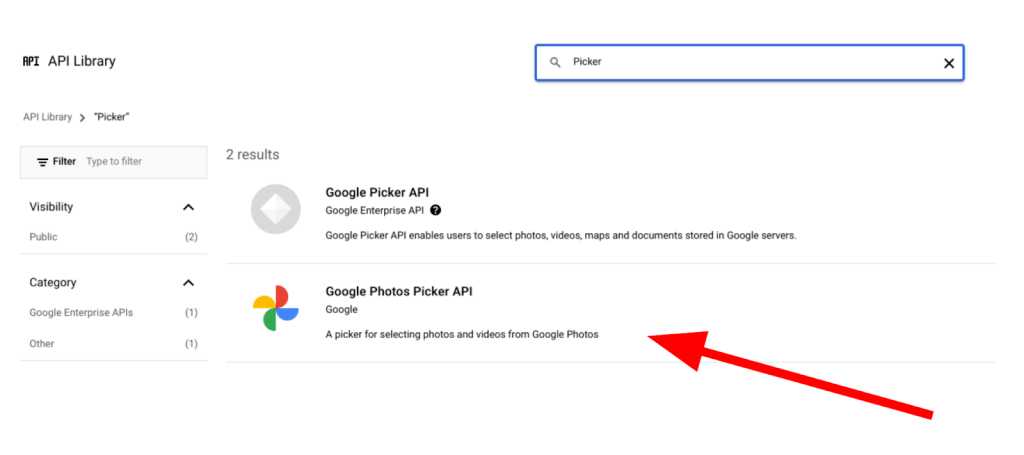
- 4. Enable these essential APIs:
- – Maps JavaScript API (for the interactive map)
- – Geocoding API (to convert addresses to coordinates)
- – Places API (for search functionality)
Step 2: Generate and Secure Your API Key
- 1. Go to Credentials → Create Credentials → API Key
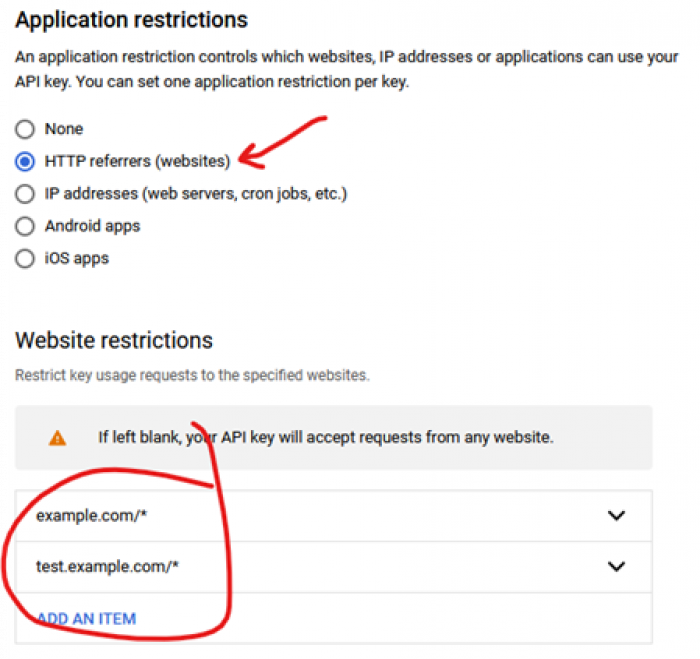
- 2. Immediately restrict to prevent security issues:
- – Application: HTTP referrers
- – Website restrictions: `*.yourdomain.com/*`
- – API restrictions: Select only the three APIs you enabled
Step 3: Create the Map with Multiple Locations
Create `multiple-locations-map.html` with this complete code:
html
<!DOCTYPE html>
<html lang="en">
<head>
<meta charset="UTF-8">
<meta name="viewport" content="width=device-width, initial-scale=1.0">
<title>Multiple Locations Map Visualization</title>
<style>
:root {
--primary-color: #4285f4;
--secondary-color: #34a853;
--accent-color: #ea4335;
--light-bg: #f8f9fa;
}
body {
font-family: 'Inter', -apple-system, BlinkMacSystemFont, sans-serif;
margin: 0;
padding: 0;
background: #f0f2f5;
color: #202124;
}
.app-container {
display: flex;
min-height: 100vh;
}
.map-sidebar {
width: 380px;
background: white;
border-right: 1px solid #dadce0;
display: flex;
flex-direction: column;
box-shadow: 2px 0 10px rgba(0,0,0,0.05);
z-index: 1;
}
.map-header {
padding: 24px;
background: linear-gradient(135deg, var(--primary-color), #5c6bc0);
color: white;
}
.locations-list {
flex: 1;
overflow-y: auto;
padding: 16px;
}
#map {
flex: 1;
height: 100vh;
}
.location-card {
background: white;
border-radius: 10px;
padding: 18px;
margin-bottom: 16px;
border: 1px solid #e8eaed;
cursor: pointer;
transition: all 0.2s ease;
box-shadow: 0 2px 6px rgba(0,0,0,0.05);
}
.location-card:hover {
transform: translateY(-2px);
box-shadow: 0 6px 15px rgba(66, 133, 244, 0.15);
border-color: var(--primary-color);
}
.location-header {
display: flex;
justify-content: space-between;
align-items: flex-start;
margin-bottom: 12px;
}
.location-title {
font-weight: 600;
font-size: 16px;
color: #202124;
margin: 0;
}
.location-type {
display: inline-block;
padding: 4px 10px;
border-radius: 20px;
font-size: 12px;
font-weight: 500;
margin-left: 10px;
}
.store { background: #e8f0fe; color: var(--primary-color); }
.office { background: #e6f4ea; color: var(--secondary-color); }
.warehouse { background: #fce8e6; color: var(--accent-color); }
.location-details {
color: #5f6368;
font-size: 14px;
line-height: 1.5;
}
.location-actions {
display: flex;
gap: 10px;
margin-top: 15px;
}
.action-btn {
flex: 1;
padding: 8px 12px;
border: none;
border-radius: 6px;
font-size: 13px;
font-weight: 500;
cursor: pointer;
transition: all 0.2s;
text-align: center;
}
.directions-btn {
background: var(--primary-color);
color: white;
}
.details-btn {
background: var(--light-bg);
color: #5f6368;
}
.search-box {
padding: 16px;
background: white;
border-bottom: 1px solid #dadce0;
}
#locationSearch {
width: 100%;
padding: 12px 16px;
border: 1px solid #dadce0;
border-radius: 8px;
font-size: 14px;
transition: border-color 0.2s;
}
#locationSearch:focus {
outline: none;
border-color: var(--primary-color);
box-shadow: 0 0 0 2px rgba(66, 133, 244, 0.2);
}
.stats-bar {
display: flex;
justify-content: space-between;
padding: 12px 16px;
background: var(--light-bg);
border-top: 1px solid #e8eaed;
font-size: 13px;
color: #5f6368;
}
.cluster-marker {
width: 40px;
height: 40px;
background: var(--primary-color);
color: white;
border-radius: 50%;
display: flex;
align-items: center;
justify-content: center;
font-weight: bold;
border: 3px solid white;
box-shadow: 0 2px 6px rgba(0,0,0,0.3);
}
@media (max-width: 768px) {
.app-container {
flex-direction: column;
}
.map-sidebar {
width: 100%;
max-height: 40vh;
}
#map {
height: 60vh;
}
}
</style>
<link href="https://fonts.googleapis.com/css2?family=Inter:wght@300;400;500;600;700&display=swap" rel="stylesheet">
</head>
<body>
<div class="app-container">
<!-- Sidebar with locations -->
<div class="map-sidebar">
<div class="map-header">
<h1 style="margin: 0 0 8px 0; font-size: 24px;">📍 Multiple Locations Map</h1>
<p style="margin: 0; opacity: 0.9; font-size: 14px;">Visualizing all your locations in one interactive map</p>
</div>
<div class="search-box">
<input type="text" id="locationSearch" placeholder="Search locations...">
</div>
<div class="locations-list" id="locationsList">
<!-- Locations will be loaded here dynamically -->
</div>
<div class="stats-bar">
<span id="totalLocations">0 locations</span>
<span id="mapBounds">Worldwide</span>
</div>
</div>
<!-- Main map container -->
<div id="map"></div>
</div>
<!-- Load Google Maps API -->
<script src="https://maps.googleapis.com/maps/api/js?key=YOUR_API_KEY_HERE&libraries=places,geometry"></script>
<script>
// Replace with your actual API key
const API_KEY = 'YOUR_API_KEY_HERE';
// Sample location data - in real use, this would come from a database
const locationsData = [
{
id: 1,
name: "New York Headquarters",
address: "123 Park Ave, New York, NY 10017",
lat: 40.7549,
lng: -73.9840,
type: "office",
phone: "(212) 555-1001",
hours: "Mon-Fri: 9AM-6PM",
description: "Main corporate office with customer service"
},
{
id: 2,
name: "Downtown Retail Store",
address: "456 Broadway, New York, NY 10013",
lat: 40.7209,
lng: -74.0095,
type: "store",
phone: "(212) 555-1002",
hours: "Mon-Sun: 10AM-9PM",
description: "Flagship retail store with full inventory"
},
{
id: 3,
name: "Brooklyn Distribution Center",
address: "789 Industrial Way, Brooklyn, NY 11231",
lat: 40.6759,
lng: -74.0112,
type: "warehouse",
phone: "(718) 555-1003",
hours: "Mon-Fri: 7AM-5PM",
description: "Primary warehouse and distribution hub"
},
{
id: 4,
name: "Queens Service Center",
address: "101 Queens Blvd, Queens, NY 11375",
lat: 40.7265,
lng: -73.8523,
type: "office",
phone: "(347) 555-1004",
hours: "Mon-Sat: 8AM-8PM",
description: "Customer service and support center"
},
{
id: 5,
name: "Manhattan Flagship Store",
address: "202 5th Avenue, New York, NY 10010",
lat: 40.7421,
lng: -73.9897,
type: "store",
phone: "(212) 555-1005",
hours: "Mon-Sun: 10AM-10PM",
description: "Largest retail location with premium products"
},
{
id: 6,
name: "Staten Island Warehouse",
address: "303 Richmond Terrace, Staten Island, NY 10301",
lat: 40.6438,
lng: -74.0782,
type: "warehouse",
phone: "(718) 555-1006",
hours: "Mon-Fri: 6AM-4PM",
description: "Secondary storage and fulfillment center"
}
];
let map;
let markers = [];
let infoWindows = [];
let bounds;
let geocoder;
// Initialize the map
function initMap() {
// Create map centered on average location
const centerLat = locationsData.reduce((sum, loc) => sum + loc.lat, 0) / locationsData.length;
const centerLng = locationsData.reduce((sum, loc) => sum + loc.lng, 0) / locationsData.length;
map = new google.maps.Map(document.getElementById('map'), {
center: { lat: centerLat, lng: centerLng },
zoom: 11,
mapTypeControl: true,
streetViewControl: false,
fullscreenControl: true,
styles: [
{
featureType: "poi",
elementType: "labels",
stylers: [{ visibility: "off" }]
},
{
featureType: "transit",
elementType: "labels",
stylers: [{ visibility: "off" }]
}
]
});
geocoder = new google.maps.Geocoder();
bounds = new google.maps.LatLngBounds();
// Create markers for each location
createMarkers();
// Create location cards in sidebar
renderLocationCards();
// Fit map to show all markers
map.fitBounds(bounds);
// Add search functionality
setupSearch();
// Update stats
updateStats();
}
// Create markers on the map
function createMarkers() {
// Clear existing markers
markers.forEach(marker => marker.setMap(null));
markers = [];
infoWindows = [];
// Define marker colors by type
const typeColors = {
'office': '#4285f4',
'store': '#34a853',
'warehouse': '#ea4335'
};
// Create each marker
locationsData.forEach((location, index) => {
const markerColor = typeColors[location.type] || '#666666';
// Create custom marker
const marker = new google.maps.Marker({
position: { lat: location.lat, lng: location.lng },
map: map,
title: location.name,
animation: google.maps.Animation.DROP,
icon: {
path: google.maps.SymbolPath.CIRCLE,
fillColor: markerColor,
fillOpacity: 1,
strokeWeight: 2,
strokeColor: '#ffffff',
scale: 12
}
});
// Extend bounds to include this marker
bounds.extend(marker.getPosition());
// Create info window content
const infoWindow = new google.maps.InfoWindow({
content: createInfoWindowContent(location, markerColor)
});
// Add click listener to marker
marker.addListener('click', () => {
// Close all other info windows
infoWindows.forEach(iw => iw.close());
infoWindow.open(map, marker);
// Center map on this marker
map.panTo(marker.getPosition());
map.setZoom(15);
// Highlight corresponding card
highlightLocationCard(location.id);
});
markers.push(marker);
infoWindows.push(infoWindow);
});
}
// Create info window HTML content
function createInfoWindowContent(location, color) {
return `
<div style="min-width: 280px; padding: 5px;">
<div style="border-left: 4px solid ${color}; padding-left: 12px;">
<h3 style="margin: 0 0 8px 0; color: #202124;">${location.name}</h3>
<div style="color: #5f6368; margin-bottom: 12px;">
<div style="margin-bottom: 4px;">📍 ${location.address}</div>
<div style="margin-bottom: 4px;">📞 ${location.phone}</div>
<div style="margin-bottom: 4px;">⏰ ${location.hours}</div>
</div>
<p style="margin: 0; color: #5f6368; font-size: 14px;">${location.description}</p>
</div>
<div style="margin-top: 15px; display: flex; gap: 8px;">
<a href="https://www.google.com/maps/dir/?api=1&destination=${location.lat},${location.lng}"
target="_blank"
style="flex: 1; padding: 8px 12px; background: ${color}; color: white; text-decoration: none; border-radius: 4px; text-align: center; font-size: 13px; font-weight: 500;">
Get Directions
</a>
<button onclick="zoomToLocation(${location.lat}, ${location.lng})"
style="flex: 1; padding: 8px 12px; background: #f1f3f4; border: none; border-radius: 4px; color: #5f6368; cursor: pointer; font-size: 13px; font-weight: 500;">
Zoom In
</button>
</div>
</div>
`;
}
// Render location cards in sidebar
function renderLocationCards() {
const container = document.getElementById('locationsList');
let html = '';
locationsData.forEach((location) => {
const typeColors = {
'office': 'office',
'store': 'store',
'warehouse': 'warehouse'
};
html += `
<div class="location-card" data-id="${location.id}" onclick="focusOnLocation(${location.id})">
<div class="location-header">
<h3 class="location-title">${location.name}</h3>
<span class="location-type ${typeColors[location.type]}">
${location.type.toUpperCase()}
</span>
</div>
<div class="location-details">
<div style="margin-bottom: 6px;">${location.address}</div>
<div style="margin-bottom: 6px; font-size: 13px;">${location.phone}</div>
<div style="font-size: 13px; color: #5f6368;">${location.hours}</div>
</div>
<div class="location-actions">
<button class="action-btn directions-btn" onclick="event.stopPropagation(); openDirections(${location.lat}, ${location.lng}, '${location.address.replace(/'/g, "\\'")}')">
Directions
</button>
<button class="action-btn details-btn" onclick="event.stopPropagation(); showDetails(${location.id})">
Details
</button>
</div>
</div>
`;
});
container.innerHTML = html;
// Update total locations count
document.getElementById('totalLocations').textContent = `${locationsData.length} locations`;
}
// Focus on specific location
function focusOnLocation(locationId) {
const location = locationsData.find(loc => loc.id === locationId);
if (!location) return;
// Find corresponding marker
const markerIndex = locationsData.findIndex(loc => loc.id === locationId);
if (markerIndex !== -1 && markers[markerIndex]) {
// Open info window
infoWindows.forEach(iw => iw.close());
infoWindows[markerIndex].open(map, markers[markerIndex]);
// Center and zoom map
map.panTo({ lat: location.lat, lng: location.lng });
map.setZoom(15);
// Highlight card
highlightLocationCard(locationId);
}
}
// Highlight location card
function highlightLocationCard(locationId) {
// Remove highlight from all cards
document.querySelectorAll('.location-card').forEach(card => {
card.style.boxShadow = '0 2px 6px rgba(0,0,0,0.05)';
card.style.borderColor = '#e8eaed';
});
// Highlight selected card
const selectedCard = document.querySelector(`.location-card[data-id="${locationId}"]`);
if (selectedCard) {
selectedCard.style.boxShadow = '0 6px 15px rgba(66, 133, 244, 0.25)';
selectedCard.style.borderColor = '#4285f4';
selectedCard.scrollIntoView({ behavior: 'smooth', block: 'center' });
}
}
// Open directions in Google Maps
function openDirections(lat, lng, address) {
const url = `https://www.google.com/maps/dir/?api=1&destination=${lat},${lng}&destination_place_id=${encodeURIComponent(address)}`;
window.open(url, '_blank');
}
// Show location details
function showDetails(locationId) {
const location = locationsData.find(loc => loc.id === locationId);
if (location) {
alert(`Location Details:\n\nName: ${location.name}\nAddress: ${location.address}\nPhone: ${location.phone}\nHours: ${location.hours}\nDescription: ${location.description}`);
}
}
// Zoom to specific location
function zoomToLocation(lat, lng) {
map.panTo({ lat, lng });
map.setZoom(16);
}
// Setup search functionality
function setupSearch() {
const searchInput = document.getElementById('locationSearch');
searchInput.addEventListener('input', function() {
const searchTerm = this.value.toLowerCase().trim();
if (searchTerm.length === 0) {
// Show all locations
locationsData.forEach((_, index) => {
markers[index].setVisible(true);
});
document.querySelectorAll('.location-card').forEach(card => {
card.style.display = 'block';
});
return;
}
// Filter locations
locationsData.forEach((location, index) => {
const matches = location.name.toLowerCase().includes(searchTerm) ||
location.address.toLowerCase().includes(searchTerm) ||
location.type.toLowerCase().includes(searchTerm);
// Show/hide marker
markers[index].setVisible(matches);
// Show/hide card
const card = document.querySelector(`.location-card[data-id="${location.id}"]`);
if (card) {
card.style.display = matches ? 'block' : 'none';
}
});
});
}
// Update map statistics
function updateStats() {
const ne = bounds.getNorthEast();
const sw = bounds.getSouthWest();
const latDiff = Math.abs(ne.lat() - sw.lat());
const lngDiff = Math.abs(ne.lng() - sw.lng());
let areaDescription;
if (latDiff < 1 && lngDiff < 1) {
areaDescription = "City area";
} else if (latDiff < 5 && lngDiff < 5) {
areaDescription = "Metro area";
} else if (latDiff < 20 && lngDiff < 20) {
areaDescription = "Regional view";
} else {
areaDescription = "Wide area";
}
document.getElementById('mapBounds').textContent = areaDescription;
}
// Initialize the map when page loads
window.onload = initMap;
</script>
</body>
</html>
Code language: HTML, XML (xml)Step 4: Deploy and Customize
- 1. Replace API Key: Insert your actual Google Maps API key
- 2. Customize Data: Replace the sample locations with your own data
- 3. Style Adjustments: Modify CSS colors to match your brand
- 4. Add Features: Implement clustering for many markers (>100 locations)
- 5. Embed: Add to your site via iframe or direct integration
The Challenges of This DIY Approach
While technically impressive, this method has significant drawbacks:
1. API Complexity: Managing quotas, billing, and key security
2. Data Management: No built-in database for location storage
3. Scalability Issues: Performance degrades with 100+ markers
4. Maintenance Burden: Constant updates for API changes
5. Mobile Optimization: Requires additional responsive design work
6. No Admin Interface: All changes require code modifications
7. Limited Collaboration: No team editing or permission controls
The Professional Solution: MapsFun.com
Why spend weeks building when you can have a better solution in minutes?
MapsFun.com provides a complete platform for putting multiple locations on maps without any coding:
- ✅ No API Hassle: We handle all Google Maps integration
- ✅ Visual Editor: Drag-and-drop interface for adding locations
- ✅ Bulk Import: Upload CSV/Excel files with hundreds of locations
- ✅ Smart Geocoding: Automatic address-to-coordinate conversion
- ✅ Live Collaboration: Multiple team members can edit simultaneously
- ✅ Advanced Features: Heatmaps, territory drawing, route optimization
- ✅ Multiple Export Formats: PDF, image, KML, and embed codes
- ✅ Responsive Design: Works perfectly on all devices automatically
With MapsFun.com , you can:
- 1. Upload your location list in any format
- 2. Customize markers, colors, and info windows visually
- 3. Add filters and search functionality with clicks
- 4. Publish instantly with automatic responsive design
- 5. Update anytime through a simple dashboard
Building a custom multi-location map solution requires significant development time and ongoing technical maintenance. For businesses, marketers, researchers, or anyone who needs to visualize locations quickly and professionally, the DIY approach is unnecessarily complex.
Get professional results instantly. Create beautiful, interactive maps with multiple locations in minutes at MapsFun.com – the no-code platform that makes complex mapping simple.