How to Advertise on Google Maps
How to Advertise on Google Maps: A Technical Guide to Custom Map Integration
Google Maps advertising isn’t just about appearing in search results – it’s about creating immersive, interactive experiences that drive customer engagement. While Google offers complex API solutions, there’s a simpler way to create compelling map-based advertisements. This guide covers both the technical approach and a more accessible alternative.
The manual API approach requires significant technical expertise and ongoing maintenance.
Method 1: Advanced Google Maps Advertising with Custom APIs
This method provides maximum customization for creating advertising-focused maps but involves complex implementation.
Step 1: Set Up Google Cloud Infrastructure
- 1. Create Google Cloud Project: Visit [Google Cloud Console](https://console.cloud.google.com/) and create a new project with billing enabled
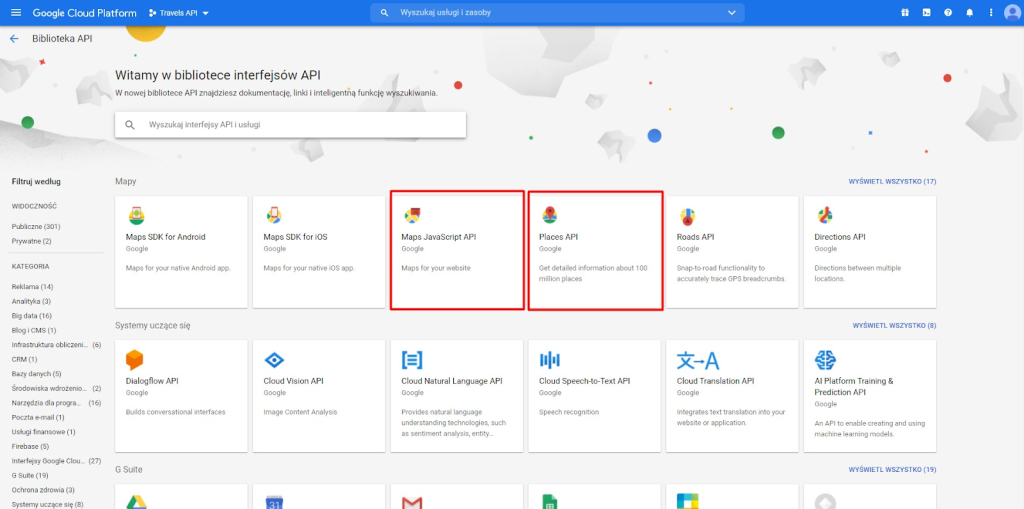
- 2. Enable Required APIs: Navigate to “APIs & Services > Library” and enable:
- Maps JavaScript API (core mapping functionality)
- Geocoding API (address conversion)
- Places API (location data)
- Maps Static API (static map images)
- 3. Configure API Key: Create and restrict API keys with domain restrictions and usage quotas
Multiple APIs are required for advanced advertising features on Google Maps
Step 2: Create Advertising-Focused Interactive Map
Here’s complete code for a promotional map with advertising features, lead capture, and analytics tracking.
Create a file named `advertising-map.html`:
html
<!DOCTYPE html>
<html lang="en">
<head>
<meta charset="UTF-8">
<meta name="viewport" content="width=device-width, initial-scale=1.0">
<title>Special Promotion - Find Our Locations</title>
<script async defer src="https://maps.googleapis.com/maps/api/js?key=YOUR_API_KEY_HERE&callback=initMap&libraries=places,geometry"></script>
<style>
.promotion-banner {
background: linear-gradient(135deg, #ff6b6b 0%, #ee5a24 100%);
color: white;
padding: 2rem;
text-align: center;
position: relative;
overflow: hidden;
}
.promotion-banner::before {
content: '';
position: absolute;
top: -50%;
left: -50%;
width: 200%;
height: 200%;
background: radial-gradient(circle, rgba(255,255,255,0.1) 1px, transparent 1px);
background-size: 20px 20px;
animation: float 20s infinite linear;
}
@keyframes float {
0% { transform: translate(0, 0) rotate(0deg); }
100% { transform: translate(-20px, -20px) rotate(360deg); }
}
.ad-container {
display: grid;
grid-template-columns: 350px 1fr;
gap: 2rem;
max-width: 1400px;
margin: 0 auto;
padding: 2rem;
}
.ad-sidebar {
background: #fff;
border-radius: 12px;
box-shadow: 0 8px 32px rgba(0,0,0,0.1);
padding: 2rem;
position: relative;
overflow: hidden;
}
.ad-sidebar::after {
content: 'SPECIAL OFFER';
position: absolute;
top: 20px;
right: -30px;
background: #ff6b6b;
color: white;
padding: 0.5rem 2rem;
transform: rotate(45deg);
font-weight: bold;
font-size: 0.8rem;
}
.offer-card {
background: linear-gradient(135deg, #667eea 0%, #764ba2 100%);
color: white;
padding: 1.5rem;
border-radius: 10px;
margin-bottom: 1.5rem;
text-align: center;
}
.offer-badge {
background: #ffd32a;
color: #2f3542;
padding: 0.5rem 1rem;
border-radius: 20px;
font-weight: bold;
display: inline-block;
margin-bottom: 1rem;
animation: pulse 2s infinite;
}
@keyframes pulse {
0% { transform: scale(1); }
50% { transform: scale(1.05); }
100% { transform: scale(1); }
}
.cta-button {
width: 100%;
background: #ff6b6b;
color: white;
border: none;
padding: 1rem 2rem;
border-radius: 8px;
font-size: 1.1rem;
font-weight: bold;
cursor: pointer;
transition: all 0.3s ease;
margin: 1rem 0;
}
.cta-button:hover {
background: #ff5252;
transform: translateY(-2px);
box-shadow: 0 6px 20px rgba(255,107,107,0.4);
}
.lead-form {
background: #f8f9fa;
padding: 1.5rem;
border-radius: 8px;
margin-top: 1.5rem;
}
.form-group {
margin-bottom: 1rem;
}
.form-input {
width: 100%;
padding: 0.75rem;
border: 1px solid #ddd;
border-radius: 6px;
font-size: 1rem;
}
#advertising-map {
height: 600px;
border-radius: 12px;
box-shadow: 0 8px 32px rgba(0,0,0,0.1);
}
.location-card {
background: white;
border-radius: 8px;
padding: 1rem;
margin: 1rem 0;
box-shadow: 0 2px 10px rgba(0,0,0,0.1);
border-left: 4px solid #667eea;
cursor: pointer;
transition: all 0.3s ease;
}
.location-card:hover {
transform: translateX(5px);
box-shadow: 0 4px 15px rgba(0,0,0,0.15);
}
.promo-tag {
background: #ff9ff3;
color: #2d3436;
padding: 0.25rem 0.5rem;
border-radius: 4px;
font-size: 0.8rem;
font-weight: bold;
margin-left: 0.5rem;
}
.analytics-badge {
background: #00cec9;
color: white;
padding: 0.5rem;
border-radius: 6px;
font-size: 0.8rem;
text-align: center;
margin-top: 1rem;
}
</style>
</head>
<body>
<div class="promotion-banner">
<h1>🎯 Limited Time Offer!</h1>
<p>Visit any of our locations this week and get 25% off your first purchase</p>
</div>
<div class="ad-container">
<div class="ad-sidebar">
<div class="offer-card">
<div class="offer-badge">HOT DEAL</div>
<h2>25% OFF</h2>
<p>Your First Purchase</p>
<small>Valid until: December 31, 2024</small>
</div>
<h3>Our Promotional Locations</h3>
<div id="locations-list">
<!-- Locations will be dynamically added here -->
</div>
<button class="cta-button" onclick="showLeadForm()">
📍 Get Directions to Nearest Location
</button>
<div class="lead-form" id="leadForm" style="display: none;">
<h4>Get Your Discount Code</h4>
<div class="form-group">
<input type="text" class="form-input" placeholder="Your Name" id="userName">
</div>
<div class="form-group">
<input type="email" class="form-input" placeholder="Your Email" id="userEmail">
</div>
<div class="form-group">
<input type="tel" class="form-input" placeholder="Your Phone" id="userPhone">
</div>
<button class="cta-button" onclick="captureLead()">
Get My 25% Off Code
</button>
</div>
<div class="analytics-badge">
🔥 <span id="views-counter">0</span> people viewed this offer today
</div>
</div>
<div id="advertising-map"></div>
</div>
<script>
let map;
let markers = [];
let promoLocations = [];
let userLocation = null;
// Promotional business locations with special offers
const advertisingLocations = [
{
id: 1,
name: "Downtown Flagship Store",
position: { lat: 40.7128, lng: -74.0060 },
address: "123 Broadway, New York, NY",
offer: "25% OFF First Purchase",
promoCode: "DOWNTOWN25",
hours: "9AM-9PM",
phone: "(555) 123-4567",
features: ["Free Parking", "WiFi", "Gift Wrapping"],
promotion: "flagship"
},
{
id: 2,
name: "Midtown Express",
position: { lat: 40.7549, lng: -73.9840 },
address: "456 5th Avenue, New York, NY",
offer: "Buy 1 Get 1 Free",
promoCode: "MIDTOWNBOGO",
hours: "8AM-8PM",
phone: "(555) 123-4568",
features: ["Quick Service", "Metro Access"],
promotion: "express"
},
{
id: 3,
name: "Uptown Boutique",
position: { lat: 40.7812, lng: -73.9665 },
address: "789 Central Park West, New York, NY",
offer: "Free Gift with Purchase",
promoCode: "UPTOWNGIFT",
hours: "10AM-7PM",
phone: "(555) 123-4569",
features: ["Personal Shopping", "Luxury Items"],
promotion: "boutique"
}
];
function initMap() {
// Initialize the map with advertising-friendly styling
map = new google.maps.Map(document.getElementById('advertising-map'), {
center: { lat: 40.7128, lng: -74.0060 },
zoom: 12,
styles: [
{
"featureType": "all",
"elementType": "geometry",
"stylers": [{ "color": "#f5f5f5" }]
},
{
"featureType": "poi.business",
"stylers": [{ "visibility": "on" }]
},
{
"featureType": "poi.park",
"elementType": "labels.text",
"stylers": [{ "visibility": "off" }]
}
]
});
// Track page views for analytics
trackPageView();
// Add promotional markers
addPromotionalMarkers();
// Try to get user's location for personalized experience
getUserLocation();
// Initialize locations list
updateLocationsList();
}
function addPromotionalMarkers() {
advertisingLocations.forEach(location => {
const marker = new google.maps.Marker({
position: location.position,
map: map,
title: location.name,
icon: getPromotionalIcon(location.promotion),
animation: google.maps.Animation.DROP
});
const infoWindow = new google.maps.InfoWindow({
content: createPromoContent(location)
});
marker.addListener('click', function() {
// Track marker clicks for analytics
trackPromoClick(location.id);
infoWindow.open(map, marker);
// Center map on clicked marker
map.setCenter(location.position);
map.setZoom(15);
});
markers.push(marker);
});
}
function getPromotionalIcon(promotionType) {
const icons = {
'flagship': {
url: 'https://maps.google.com/mapfiles/ms/icons/red-dot.png',
scaledSize: new google.maps.Size(40, 40)
},
'express': {
url: 'https://maps.google.com/mapfiles/ms/icons/blue-dot.png',
scaledSize: new google.maps.Size(35, 35)
},
'boutique': {
url: 'https://maps.google.com/mapfiles/ms/icons/green-dot.png',
scaledSize: new google.maps.Size(35, 35)
}
};
return icons[promotionType] || icons['flagship'];
}
function createPromoContent(location) {
return `
<div style="min-width: 250px; padding: 1rem;">
<h3 style="margin: 0 0 0.5rem 0; color: #2d3436;">${location.name}</h3>
<div style="background: #ffeaa7; padding: 0.5rem; border-radius: 4px; margin-bottom: 0.5rem;">
<strong>${location.offer}</strong>
<br><small>Use code: <code>${location.promoCode}</code></small>
</div>
<p style="margin: 0.5rem 0; color: #636e72;">${location.address}</p>
<p style="margin: 0.5rem 0;">📞 ${location.phone}</p>
<p style="margin: 0.5rem 0;">🕒 ${location.hours}</p>
<div style="margin: 0.5rem 0;">
${location.features.map(feature => `<span style="background: #dfe6e9; padding: 0.25rem 0.5rem; border-radius: 12px; font-size: 0.8rem; margin-right: 0.25rem;">${feature}</span>`).join('')}
</div>
<button onclick="navigateToLocation(${location.id})" style="background: #00b894; color: white; border: none; padding: 0.5rem 1rem; border-radius: 4px; cursor: pointer; width: 100%;">
Get Directions
</button>
</div>
`;
}
function updateLocationsList() {
const container = document.getElementById('locations-list');
container.innerHTML = '';
advertisingLocations.forEach(location => {
const card = document.createElement('div');
card.className = 'location-card';
card.innerHTML = `
<h4>${location.name} <span class="promo-tag">${location.offer}</span></h4>
<p style="margin: 0.5rem 0; color: #636e72;">${location.address}</p>
<p style="margin: 0.5rem 0; font-size: 0.9rem;">🕒 ${location.hours}</p>
<p style="margin: 0.5rem 0; font-size: 0.8rem; color: #00b894;">
Use code: <strong>${location.promoCode}</strong>
</p>
`;
card.addEventListener('click', () => {
map.setCenter(location.position);
map.setZoom(15);
// Find and open the corresponding marker's info window
markers.forEach((marker, index) => {
if (marker.getPosition().equals(new google.maps.LatLng(location.position))) {
google.maps.event.trigger(marker, 'click');
}
});
});
container.appendChild(card);
});
}
function getUserLocation() {
if (navigator.geolocation) {
navigator.geolocation.getCurrentPosition(
position => {
userLocation = {
lat: position.coords.latitude,
lng: position.coords.longitude
};
// Add user location marker
new google.maps.Marker({
position: userLocation,
map: map,
title: 'Your Location',
icon: {
url: 'https://maps.google.com/mapfiles/ms/icons/blue-dot.png',
scaledSize: new google.maps.Size(30, 30)
}
});
},
error => {
console.log('Geolocation failed:', error);
}
);
}
}
function navigateToLocation(locationId) {
const location = advertisingLocations.find(loc => loc.id === locationId);
if (location && userLocation) {
// Calculate and display route
const directionsService = new google.maps.DirectionsService();
const directionsRenderer = new google.maps.DirectionsRenderer();
directionsRenderer.setMap(map);
directionsService.route({
origin: userLocation,
destination: location.position,
travelMode: 'DRIVING'
}, (result, status) => {
if (status === 'OK') {
directionsRenderer.setDirections(result);
}
});
} else {
alert('Please enable location services to get directions');
}
}
function showLeadForm() {
document.getElementById('leadForm').style.display = 'block';
trackCTAConversion('directions_button');
}
function captureLead() {
const name = document.getElementById('userName').value;
const email = document.getElementById('userEmail').value;
const phone = document.getElementById('userPhone').value;
if (name && email) {
// Simulate lead capture - in real implementation, send to your CRM
console.log('Lead captured:', { name, email, phone });
alert('Thank you! Your 25% off code has been sent to your email.');
trackLeadConversion();
} else {
alert('Please fill in at least your name and email.');
}
}
// Analytics functions
function trackPageView() {
// Simulate page view tracking
const views = parseInt(localStorage.getItem('promo_views') || '0') + 1;
localStorage.setItem('promo_views', views.toString());
document.getElementById('views-counter').textContent = views;
}
function trackPromoClick(locationId) {
console.log('Promo location clicked:', locationId);
// Implement your analytics tracking here
}
function trackCTAConversion(source) {
console.log('CTA conversion:', source);
// Implement conversion tracking
}
function trackLeadConversion() {
console.log('Lead conversion completed');
// Implement lead conversion tracking
}
</script>
</body>
</html>
Code language: HTML, XML (xml)Critical Step: Replace `YOUR_API_KEY_HERE` with your actual restricted Google Maps API key.
Step 3: Deploy and Monitor
- 1. Upload to your website using custom HTML embedding
- 2. Set up analytics to track conversions and user engagement
- 3. Monitor API usage in Google Cloud Console
- 4. A/B test different promotions and locations
The Complexities of Manual Maps Advertising
While powerful, the technical approach presents significant challenges:
- API Cost Management: Advertising traffic can quickly exceed free tier limits, leading to unexpected charges
- Analytics Integration: Proper conversion tracking requires additional coding and setup
- Mobile Optimization: Ensuring smooth performance across all devices demands extensive testing
- Security Concerns: API keys require careful management to prevent misuse
- Feature Maintenance: Keeping up with Google Maps API changes requires ongoing development
- Performance Optimization: High-resolution maps and multiple markers can slow page loading
The Simplified Advertising Solution: MapsFun.com
Why navigate the complexity of API management when you can create high-converting map advertisements instantly?
MapsFun.com provides everything you need for effective Google Maps advertising without the technical overhead:
- Pre-built Advertising Templates: Choose from proven, high-converting map designs
- Automatic Analytics: Built-in conversion tracking and performance monitoring
- Mobile-First Design: Perfect performance on all devices without extra work
- Lead Capture Integration: Built-in forms that connect to your CRM or email marketing
- No API Management: We handle all technical infrastructure and updates
- A/B Testing Tools: Easily test different promotions and layouts
Stop struggling with complex code and start converting visitors into customers. Create high-performing map advertisements in minutes, not months. Visit MapsFun.com to launch your campaign today.