How to Add Your Business to Google Maps
How to Put Your Business on Google Map and Embed It on Your Website
Getting your business on Google Maps is essential for local visibility, but taking it a step further by embedding an interactive map on your website can significantly boost customer engagement. While Google provides the tools to do this manually, the process involves several technical steps. This guide will show you both methods.
The manual coding approach requires technical knowledge of APIs and web development.
Part 1: Getting Your Business on Google Maps
Step 1: Claim Your Google Business Profile
- 1. Go to [Google Business Profile](https://www.google.com/business/) and click “Manage now”
- 2. Enter your exact business name and address
- 3. Choose your business category
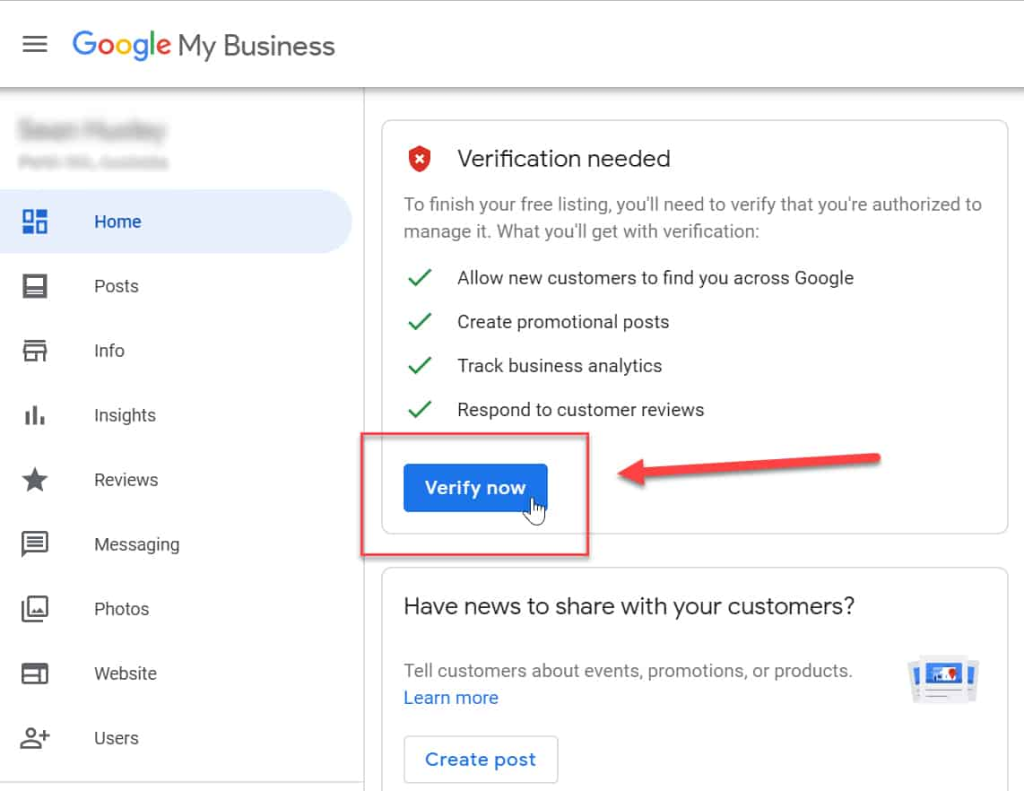
- 4. Verify your business through postcard, phone, or email
- 5. Complete your profile with photos, hours, services, and contact information
Verifying your business is crucial for appearing in Google Maps searches.
Part 2: Embedding Your Business Map on Your Website
Method 1: The Technical API Approach
This method gives you full customization but requires coding and API management.
Step 1: Set Up Google Cloud Project
- 1. Create a Project: Visit [Google Cloud Console](https://console.cloud.google.com/), create a project, and enable billing
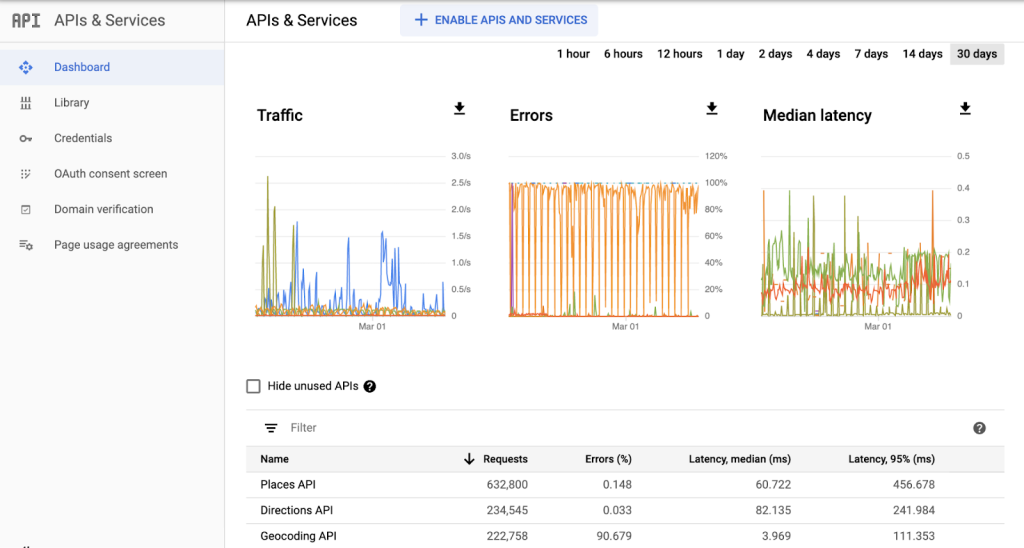
- 2. Enable APIs: Go to “APIs & Services > Library” and enable:
- Maps JavaScript API
- Geocoding API
- Places API
- 3. Create API Key: Generate credentials and restrict the key to your domain and the three APIs
Monitor your API usage in the Google Cloud Console to avoid unexpected charges.
Step 2: Build Your Business Map with Custom Features
Here’s complete code for a professional business map with contact information and customer features.
Create a file named `my-business-map.html`:
html
<!DOCTYPE html>
<html lang="en">
<head>
    <meta charset="UTF-8">
    <meta name="viewport" content="width=device-width, initial-scale=1.0">
    <title>Visit Us | Your Business Name</title>
    <script async defer src="https://maps.googleapis.com/maps/api/js?key=YOUR_API_KEY_HERE&callback=initMap&libraries=places"></script>
    <style>
        .business-hero {
            background: linear-gradient(135deg, #667eea 0%, #764ba2 100%);
            color: white;
            padding: 3rem 2rem;
            text-align: center;
        }

        .map-container {
            display: grid;
            grid-template-columns: 400px 1fr;
            gap: 2rem;
            max-width: 1200px;
            margin: 2rem auto;
            padding: 0 1rem;
        }

        .business-info {
            background: #f8f9fa;
            padding: 2rem;
            border-radius: 10px;
            box-shadow: 0 2px 10px rgba(0,0,0,0.1);
        }

        .contact-card {
            background: white;
            padding: 1.5rem;
            border-radius: 8px;
            margin-bottom: 1.5rem;
            box-shadow: 0 1px 3px rgba(0,0,0,0.1);
        }

        .action-buttons {
            display: grid;
            grid-template-columns: 1fr 1fr;
            gap: 1rem;
            margin: 1.5rem 0;
        }

        .action-btn {
            padding: 0.75rem;
            border: none;
            border-radius: 6px;
            cursor: pointer;
            font-weight: 600;
            transition: all 0.3s ease;
        }

        .directions-btn {
            background: #4285f4;
            color: white;
        }

        .call-btn {
            background: #34a853;
            color: white;
        }

        .action-btn:hover {
            transform: translateY(-2px);
            box-shadow: 0 4px 8px rgba(0,0,0,0.2);
        }

        #map {
            height: 500px;
            border-radius: 10px;
            box-shadow: 0 4px 12px rgba(0,0,0,0.15);
        }

        .hours-section {
            margin: 1.5rem 0;
        }

        .hour-row {
            display: flex;
            justify-content: space-between;
            padding: 0.5rem 0;
            border-bottom: 1px solid #e9ecef;
        }

        .testimonial {
            background: white;
            padding: 1rem;
            border-radius: 8px;
            margin: 1rem 0;
            border-left: 4px solid #4285f4;
        }

        @media (max-width: 968px) {
            .map-container {
                grid-template-columns: 1fr;
            }
        }
    </style>
</head>
<body>
    <section class="business-hero">
        <h1>Find Our Location</h1>
        <p>Visit us today and experience the difference</p>
    </section>

    <div class="map-container">
        <div class="business-info">
            <div class="contact-card">
                <h2>Your Business Name</h2>
                <p>📍 123 Main Street<br>Your City, State 12345</p>
                <p>📞 (555) 123-4567</p>
                <p>✉️ info@yourbusiness.com</p>
            </div>

            <div class="action-buttons">
                <button class="action-btn directions-btn" onclick="openDirections()">
                    Get Directions
                </button>
                <button class="action-btn call-btn" onclick="callBusiness()">
                    Call Now
                </button>
            </div>

            <div class="hours-section">
                <h3>Business Hours</h3>
                <div class="hour-row">
                    <span>Monday - Friday</span>
                    <span>9:00 AM - 6:00 PM</span>
                </div>
                <div class="hour-row">
                    <span>Saturday</span>
                    <span>10:00 AM - 4:00 PM</span>
                </div>
                <div class="hour-row">
                    <span>Sunday</span>
                    <span>Closed</span>
                </div>
            </div>

            <div class="testimonial">
                <p>"Great service and easy to find location! The map made it simple to get here."</p>
                <small>- Satisfied Customer</small>
            </div>
        </div>

        <div id="map"></div>
    </div>

    <script>
        let map;
        let businessMarker;
        let directionsService;
        let directionsRenderer;

        // Your business coordinates (replace with your actual address coordinates)
        const myBusinessLocation = {
            lat: 40.7128,
            lng: -74.0060,
            name: "Your Business Name",
            address: "123 Main Street, Your City, State 12345",
            phone: "(555) 123-4567"
        };

        function initMap() {
            // Initialize the map
            map = new google.maps.Map(document.getElementById('map'), {
                center: myBusinessLocation,
                zoom: 15,
                styles: [
                    {
                        "featureType": "poi",
                        "elementType": "labels",
                        "stylers": [{ "visibility": "simplified" }]
                    },
                    {
                        "featureType": "transit",
                        "elementType": "labels",
                        "stylers": [{ "visibility": "off" }]
                    }
                ]
            });

            // Initialize directions services
            directionsService = new google.maps.DirectionsService();
            directionsRenderer = new google.maps.DirectionsRenderer();
            directionsRenderer.setMap(map);

            // Create custom business marker
            businessMarker = new google.maps.Marker({
                position: myBusinessLocation,
                map: map,
                title: myBusinessLocation.name,
                icon: {
                    path: google.maps.SymbolPath.CIRCLE,
                    scale: 12,
                    fillColor: "#4285f4",
                    fillOpacity: 1,
                    strokeColor: "#ffffff",
                    strokeWeight: 2,
                },
                animation: google.maps.Animation.DROP
            });

            // Create comprehensive info window
            const businessInfoWindow = new google.maps.InfoWindow({
                content: `
                    <div style="min-width: 250px; padding: 1rem;">
                        <h3 style="margin: 0 0 0.5rem 0; color: #1a73e8;">${myBusinessLocation.name}</h3>
                        <p style="margin: 0 0 0.5rem 0; color: #5f6368;">${myBusinessLocation.address}</p>
                        <p style="margin: 0 0 1rem 0;">
                            <a href="tel:${myBusinessLocation.phone}" style="color: #34a853; text-decoration: none;">
                                📞 ${myBusinessLocation.phone}
                            </a>
                        </p>
                        <div style="display: grid; grid-template-columns: 1fr 1fr; gap: 0.5rem;">
                            <button onclick="openGoogleDirections()" style="background: #4285f4; color: white; border: none; padding: 0.5rem; border-radius: 4px; cursor: pointer; font-size: 0.8rem;">
                                Directions
                            </button>
                            <button onclick="callBusiness()" style="background: #34a853; color: white; border: none; padding: 0.5rem; border-radius: 4px; cursor: pointer; font-size: 0.8rem;">
                                Call Now
                            </button>
                        </div>
                    </div>
                `
            });

            // Open info window automatically
            businessInfoWindow.open(map, businessMarker);

            // Add click listener to marker
            businessMarker.addListener('click', () => {
                businessInfoWindow.open(map, businessMarker);
            });

            // Add nearby amenities
            addNearbyAmenities();
        }

        function addNearbyAmenities() {
            // Add parking information
            const parkingMarker = new google.maps.Marker({
                position: { lat: 40.7135, lng: -74.0065 },
                map: map,
                title: 'Public Parking',
                icon: {
                    url: 'https://maps.google.com/mapfiles/ms/icons/green-dot.png',
                    scaledSize: new google.maps.Size(20, 20)
                }
            });

            const parkingInfoWindow = new google.maps.InfoWindow({
                content: '<div style="padding: 0.5rem;">Public Parking Available<br><small>2-hour limit</small></div>'
            });

            parkingMarker.addListener('click', () => {
                parkingInfoWindow.open(map, parkingMarker);
            });
        }

        function openDirections() {
            if (navigator.geolocation) {
                navigator.geolocation.getCurrentPosition(function(position) {
                    const userLocation = {
                        lat: position.coords.latitude,
                        lng: position.coords.longitude
                    };

                    calculateRoute(userLocation, myBusinessLocation);
                }, function() {
                    // If geolocation fails, prompt for address
                    const address = prompt("Please enter your starting address:");
                    if (address) {
                        calculateRoute(address, myBusinessLocation);
                    }
                });
            } else {
                const address = prompt("Please enter your starting address:");
                if (address) {
                    calculateRoute(address, myBusinessLocation);
                }
            }
        }

        function calculateRoute(start, destination) {
            const request = {
                origin: start,
                destination: destination,
                travelMode: 'DRIVING'
            };

            directionsService.route(request, function(result, status) {
                if (status === 'OK') {
                    directionsRenderer.setDirections(result);

                    // Show route information
                    const route = result.routes[0].legs[0];
                    alert(`Route found!\nDistance: ${route.distance.text}\nDuration: ${route.duration.text}`);
                } else {
                    alert('Unable to calculate route. Please try again.');
                }
            });
        }

        function openGoogleDirections() {
            const url = `https://www.google.com/maps/dir/?api=1&destination=${myBusinessLocation.lat},${myBusinessLocation.lng}`;
            window.open(url, '_blank');
        }

        function callBusiness() {
            window.location.href = `tel:${myBusinessLocation.phone}`;
        }

        // Add map controls customization
        function addMapControls() {
            map.setOptions({
                zoomControl: true,
                mapTypeControl: true,
                scaleControl: true,
                streetViewControl: true,
                rotateControl: true,
                fullscreenControl: true
            });
        }
    </script>
</body>
</html>
Code language: HTML, XML (xml)
Critical Step: Replace `YOUR_API_KEY_HERE` with your actual restricted Google Maps API key.
Step 3: Add to Your Website
Upload the HTML file to your web server or use your website platform’s embed functionality.
The Challenges of Manual Implementation
While the technical approach works, business owners face significant hurdles:
- -API Complexity: Managing API keys, quotas, and billing requires technical expertise
- -Geocoding Issues: Converting addresses to coordinates accurately can be problematic
- -Mobile Responsiveness: Ensuring the map works perfectly on all devices needs extra coding
- -Feature Limitations: Advanced features like appointment scheduling require additional development
- -Maintenance Burden: Keeping up with API changes and browser updates is time-consuming
- -Cost Management: Monitoring usage to prevent unexpected charges adds administrative overhead
The Simple Business Solution: MapsFun.com
Why spend hours debugging code when you can have a professional business map in minutes?
MapsFun.com is designed specifically for business owners who need a powerful online presence without technical complexity:
- No Coding Required: Create beautiful, interactive maps through a simple visual editor
- Automatic Setup: Just enter your business address – we handle all the technical details
- Built-in Features: Get directions, contact buttons, and business information automatically
- Mobile Perfect: Your map will work flawlessly on all devices without extra work
- Zero Maintenance: We handle all updates, security, and performance optimization
- Professional Templates: Choose from designed templates that build customer trust
Stop struggling with code and start growing your business. Create a professional Google Maps presence that drives customers to your door. Visit MapsFun.com to get started in minutes.